
Chip-Tools
Porsche software setup: protocols, K-Line baud rates, pins and CAN resistance
Porsche
Interface Classic
Diagnostics
Basic
⏱ 10 min
11 steps
Before working on a Porsche it is worth setting which protocols the software should try, the order of the K-Line baud rates, which OBDII pins to interrogate and the CAN resistance. This is the setup that sorts out most cases where a control unit "does not respond".
Required licences
- —
Hardware / cables

⚠ WarningSome units running at 9600 baud will not wake up again if they are first interrogated at 10472: if a control unit does not respond on K-Line, set the order to "9600 \ 10472". Also, if you launch the software from a shortcut, the "working folder" parameter must point to the folder containing the executable, otherwise K-Line can behave incorrectly.
Procedure
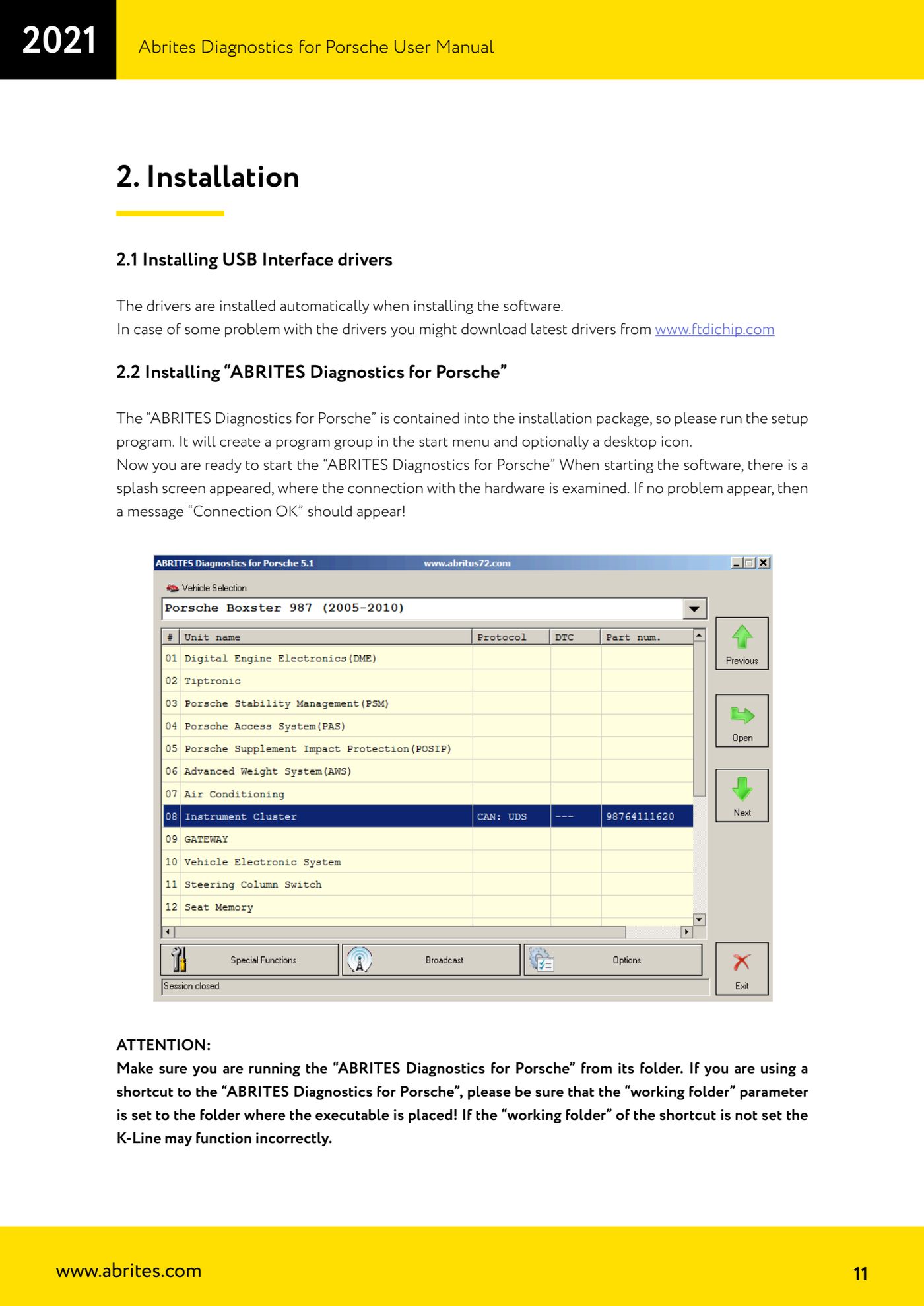
- Launch "ABRITES Diagnostics for Porsche" from its installation folder. On startup the splash screen appears and checks the connection to the hardware: the message "Connection OK" must be shown.
- If you use a desktop shortcut, check in its properties that the "working folder" parameter is set to the folder where the executable is located.
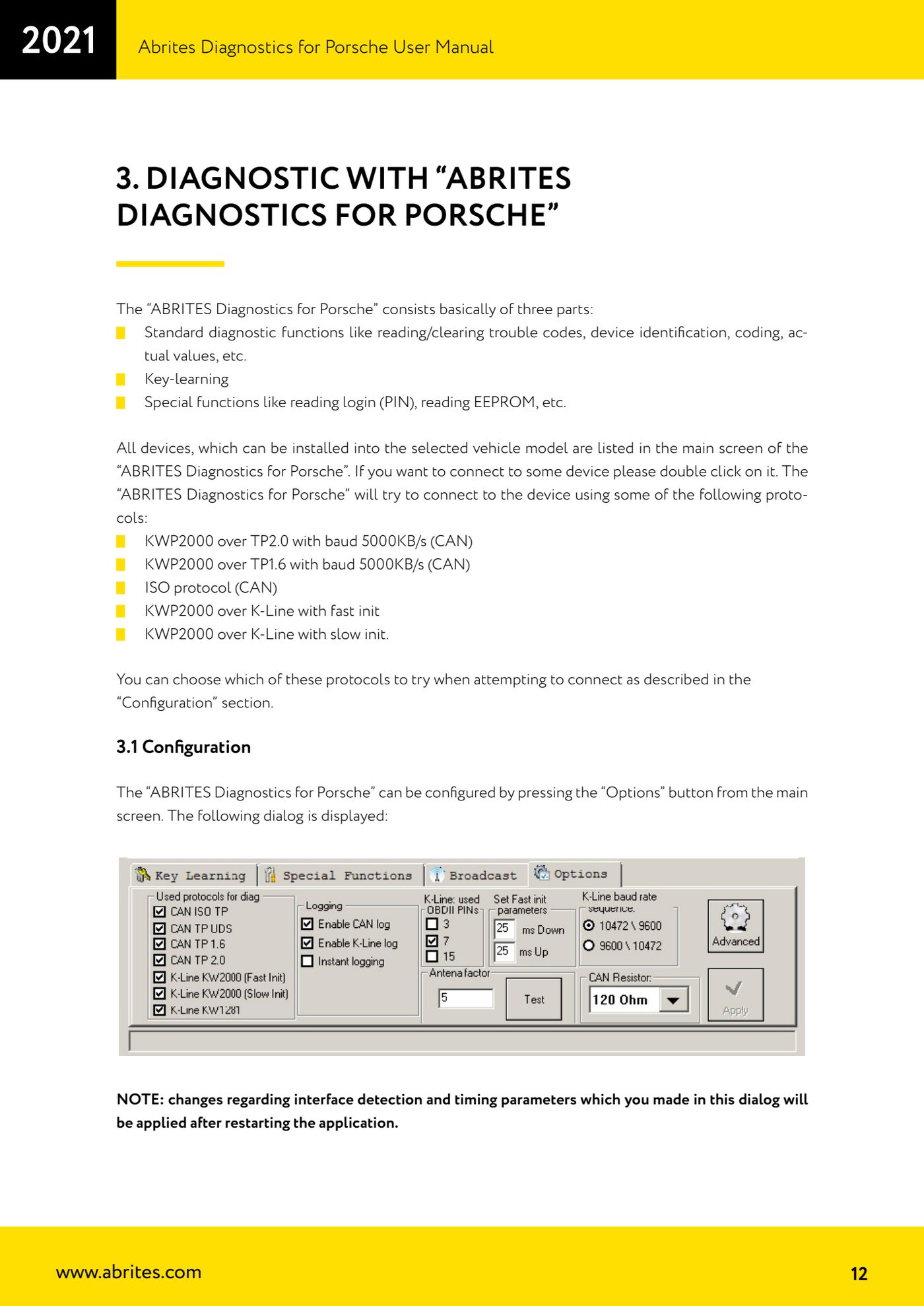
- From the main screen press "Options": the setup window opens.
- In the used protocols section tick the ones the software should try when connecting: "CAN ISO TP" (ISO protocol CAN), "CAN UDS TP" (UDS over CAN), "CAN TP2.0" (KWP2000 over TP2.0 at 500 KB/s), "CAN TP1.6" (KWP2000 over TP1.6 at 500 KB/s), "K-Line KWP2000 (Fast Init)", "K-Line KWP2000 (Slow Init)", "K-Line KW1281".
- Bear in mind that these tick boxes only apply when connecting to an individual unit for standard diagnostic requests: they are not used when running the automatic unit scan.
- Interface detection: the USB interface is normally recognised automatically; only touch this section if detection fails.
- K-Line baud rate: use the "10472 \ 9600" and "9600 \ 10472" radio buttons to choose the order of the two values. With the first, the software tries 10472 first and then drops to 9600; with the second it does the opposite.
- K-Line PINs: by default only PIN7 of the OBDII connector is selected. On some models (the Porsche Cayenne 2004, for example) the K-Line of certain units is on PIN3 or PIN15: only tick these as well when you need to, because the unit scan becomes much slower.
- If K-Line communication is unstable, press "Advanced" and fine-tune the timing parameters: "Wakeup echo delay" (the time after slow init between receiving "55 xx yy" and sending the inverted value of "yy"), "Communication echo delay" (the time between receiving a byte in KWP1281 and sending it back inverted), "Inter byte time" (the time between two bytes in KWP2000), "Time between messages" (the delay between the control unit's answer and the next request).
- CAN resistance: you can choose between None, 75 Ohm, 100 Ohm, 120 Ohm and 10 kOhm; the default is 120 Ohm. On the car the resistance is normally in the gateway, whereas if you are working with a control unit on the bench you have to set it here.
- Close the window and restart the application: changes to interface detection and timing parameters only take effect after the program is restarted.
Reference screenshots
Source: Manuale Porsche (interfaccia classica), prima parte, cap. 2.2 e 3.1 (p.11-14) · ⏱ estimated time 10 min
← All Abrites guides Hardware catalogue
More guides Porsche
- Scanning control units, identification, actual values and reading/clearing DTCs
- Coding control unit options with "Coding - Settings" (Boxster 987 PAS example)
- Automatic coding, manual coding and restoring from file (UDS CAN TP units)
- Actuator tests ("Actuator tests") on Porsche control units
- Writing the VIN into a control unit with "Change ID"
- Control unit replacement: copying the configuration data with "Control Unit Replacement"
- CAN instrument cluster 911 997, Boxster 987 and Cayman: ConfData, mileage reading and cluster reset
- Service interval reset and oil level measurement: 911 997, Boxster 987, Cayman
- Reading and erasing the instrument cluster event memory (Instrument Cluster CAN)
- Service interval reset for Panamera, Cayenne 2011+, Macan, 918 Spyder, 911 991 and Boxster/Cayman 981
- Writing and changing the maintenance intervals: Panamera (2010-2012) and Cayenne (2011+)
- Cayenne K-Line instrument cluster: ConfData, ECU reset, service and mileage reading