
Chip-Tools
Pinout of NATS 2, NATS 4 and NATS-5/5+ Siemens immobiliser units for bench work
Nissan/Infiniti
Interface Classic
Hardware / Connections
Advanced
⏱ 30-60 min
9 steps
Connection diagram for Siemens NATS immobiliser units when they have to be worked on out of the car, on the bench. Needed when the unit cannot be reached over OBDII or when working on a removed module.
Required licences
- —
Hardware / cables
 AVDI
AVDI- AN001 Base Interface OBDII Male Cable
⚠ WarningThe NATS version is determined from the label on the immobiliser unit itself: check the code on the label before connecting, because the connection has to be chosen according to the version.
Procedure
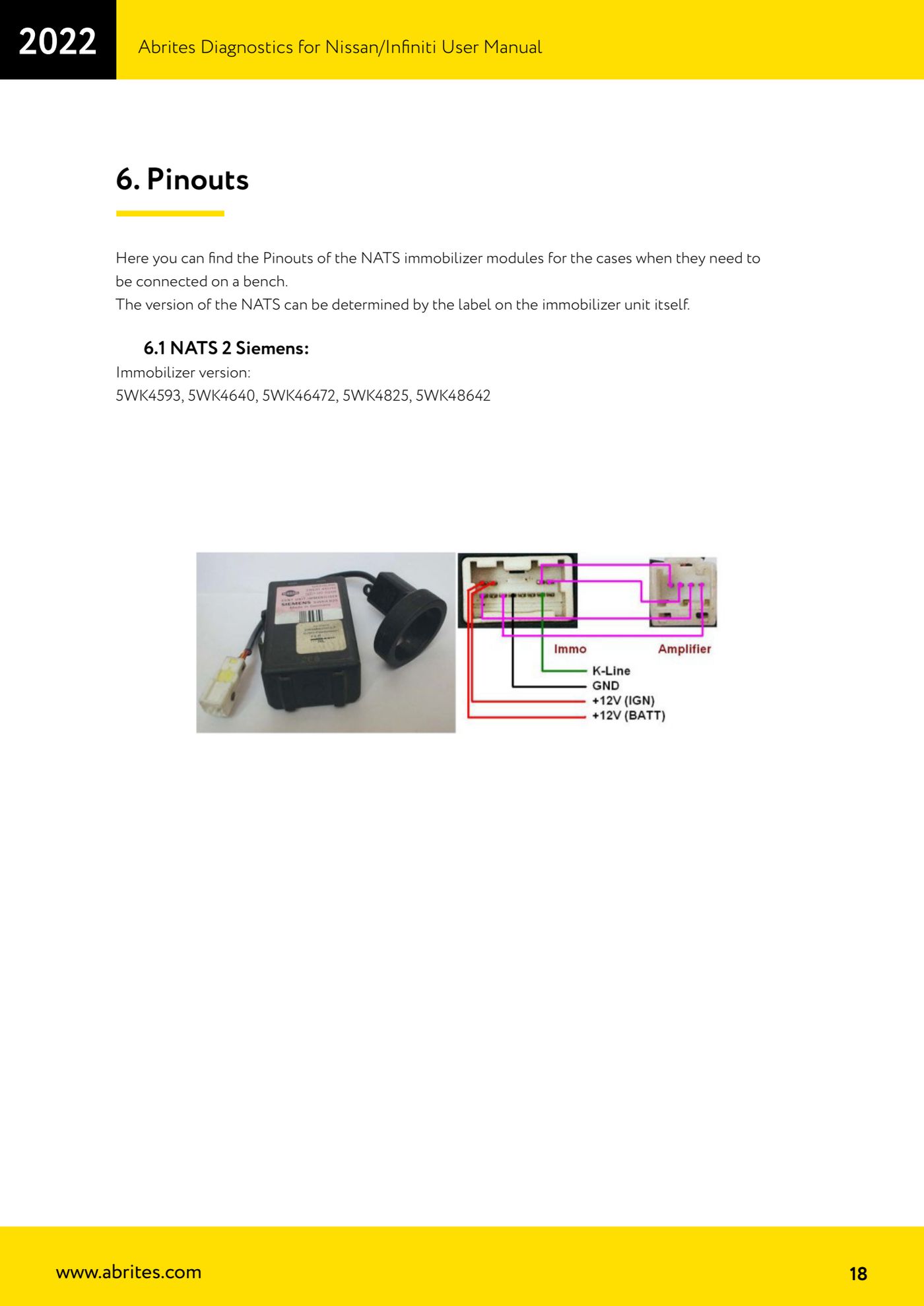
- Identify the NATS version by reading the label on the immobiliser unit.
- NATS 2 Siemens: the immobiliser versions covered are 5WK4593, 5WK4640, 5WK46472, 5WK4825, 5WK48642.
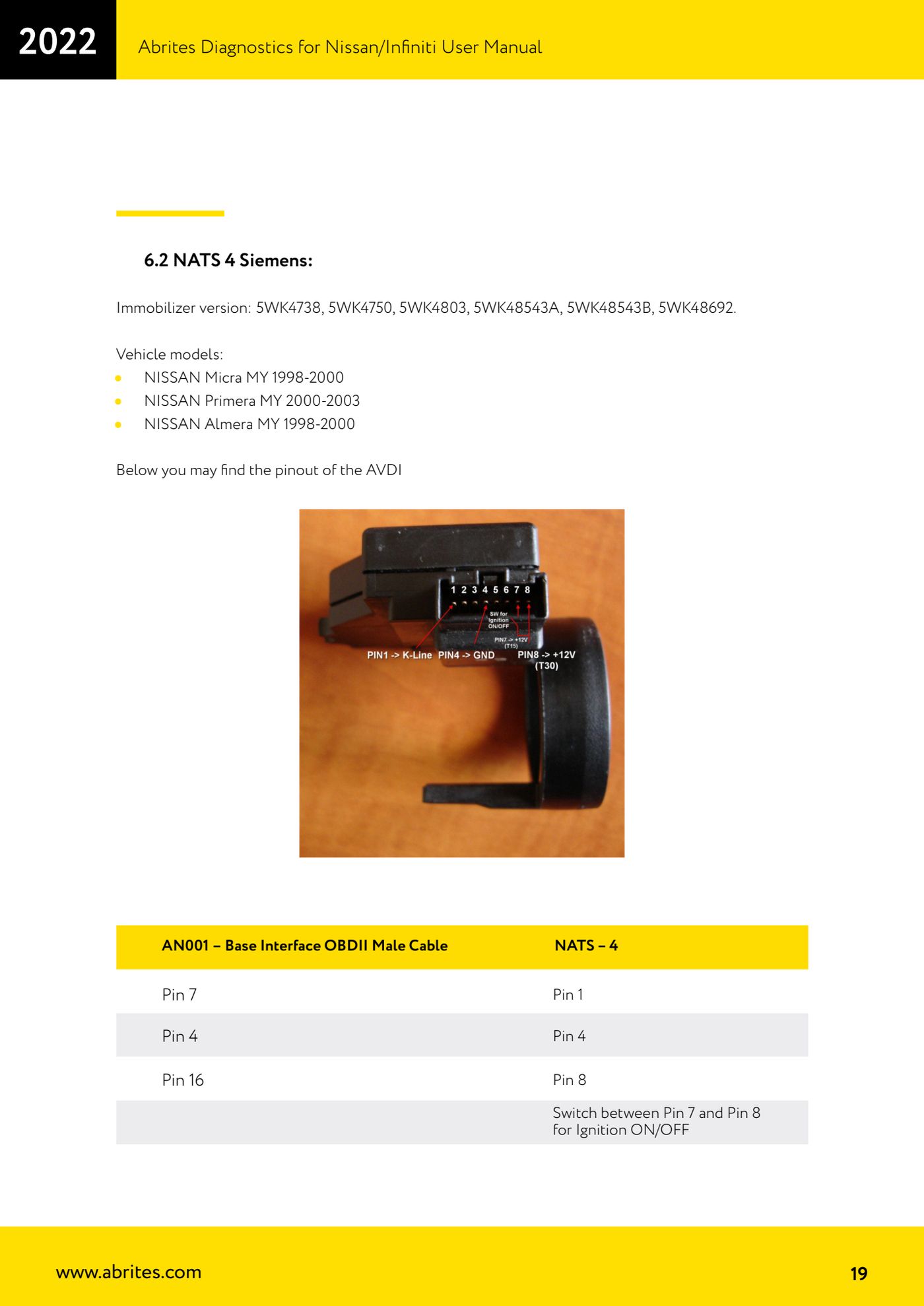
- NATS 4 Siemens: the immobiliser versions covered are 5WK4738, 5WK4750, 5WK4803, 5WK48543A, 5WK48543B, 5WK48692. Typical models: Nissan Micra MY 1998-2000, Nissan Primera MY 2000-2003, Nissan Almera MY 1998-2000.
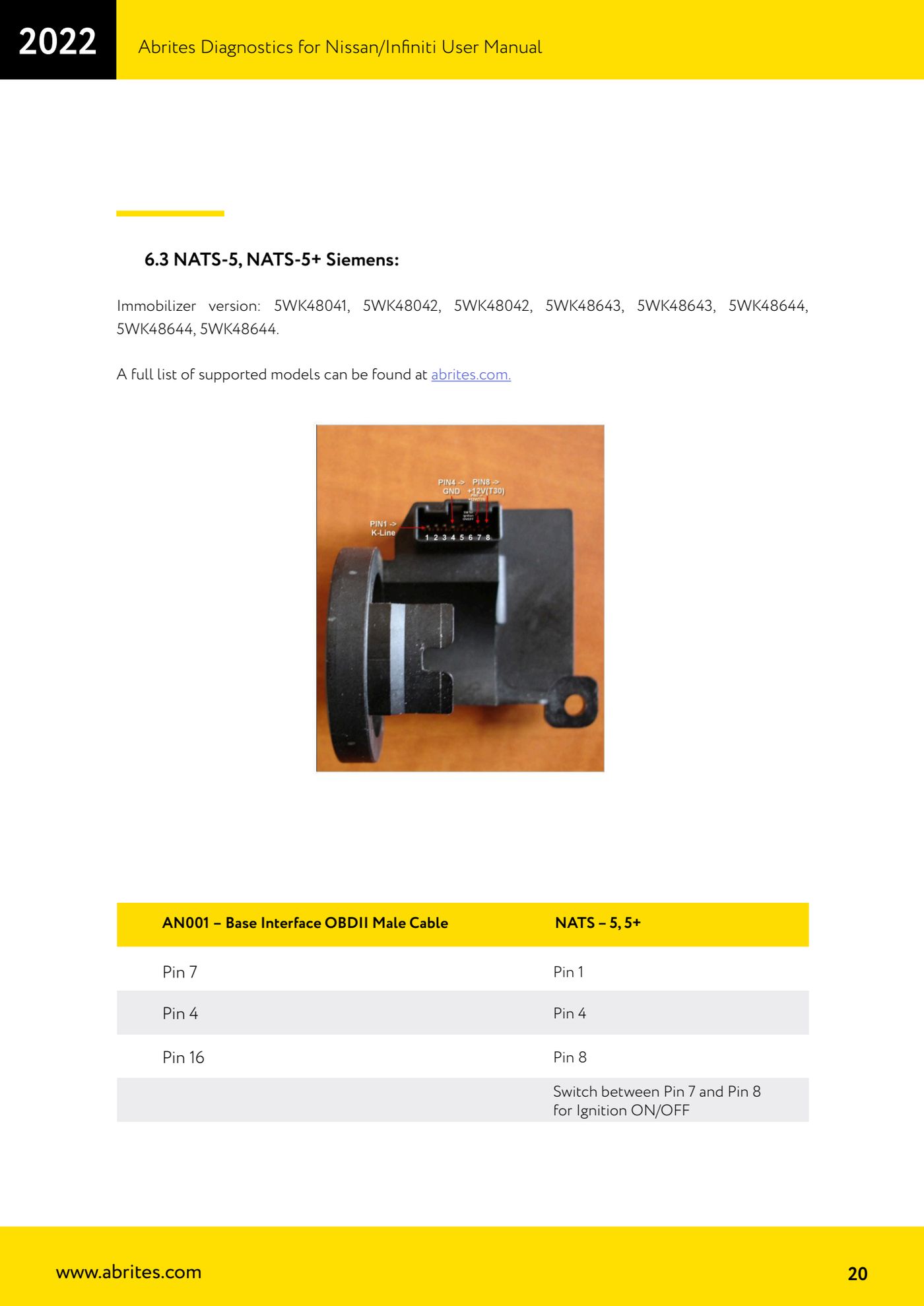
- NATS-5 and NATS-5+ Siemens: the immobiliser versions covered are 5WK48041, 5WK48042, 5WK48643, 5WK48644. The full list of supported models is published on abrites.com.
- Get the AN001 - Base Interface OBDII Male Cable ready: it is the cable specified for bench connection of both NATS-4 and NATS-5/5+.
- On the AVDI/OBDII side connect pins 7, 4, 16 and 1 according to the AN001 cable diagram.
- On the NATS unit side connect pins 4, 7 and 8 as shown in the manual's diagram.
- To switch the ignition on and off on the bench, switch between pin 7 and pin 8 of the unit: this is the Ignition ON/OFF command while you work.
- Once the unit is powered and connected, start the Nissan/Infiniti software and work on the module as you would in the car.
Reference screenshots
Source: Manuale Nissan/Infiniti, cap. 6-6.3 (p.18-20) · ⏱ estimated time 30-60 min
← All Abrites guides Hardware catalogue
More guides Nissan/Infiniti
- Module scan and DTC read/clear on Nissan/Infiniti with the AVDI
- Reading live parameters (list and graph) and actuator testing on Nissan/Infiniti
- Calculating and extracting the Nissan/Infiniti PIN Code (ICU, SEC, BCM, OBDII, glovebox label)
- Nissan key programming with NATS-2, NATS-4, NATS-5 and NATS-5+ immobiliser
- EEPROM NATS2/5 Memory Manager: reading, saving and writing NATS configuration data
- EM002 ESL/steering lock emulator for Renault/Nissan: 6-pin and 8-pin connection diagrams
- Starting Abrites Nissan/Infiniti Online and selecting the vehicle
- Module scan and DTC read/clear on Nissan and Infiniti
- Real-time parameter monitoring (Live Values) on Nissan and Infiniti
- Actuator Testing on Nissan and Infiniti
- Dealer-level advanced functions: the "procedures" menu of Nissan/Infiniti modules
- Nissan/Infiniti key programming via OBDII (Key Learning, including all keys lost)