
Chip-Tools
Reading live parameters (list and graph) and actuator testing on Nissan/Infiniti
Nissan/Infiniti
Interface Classic
Diagnostics
Basic
⏱ 15-30 min
8 steps
With the module open you can follow the measured values in real time and drive the actuators. Use it to analyse how the vehicle behaves while it works and to isolate a fault the DTCs alone do not explain.
Required licences
- —
Hardware / cables
 AVDI
AVDI- cavo OBDII
⚠ WarningChock all the vehicle's wheels before running actuator tests and work in a properly ventilated area, with the exhaust gases ducted towards the workshop exit.
Procedure
- Connect the AVDI to the OBDII socket, start "Abrites Diagnostics for Nissan/Infinity" and select the vehicle.
- From the main screen double-click on the module you need (or select it and press "Open") to enter its functions.
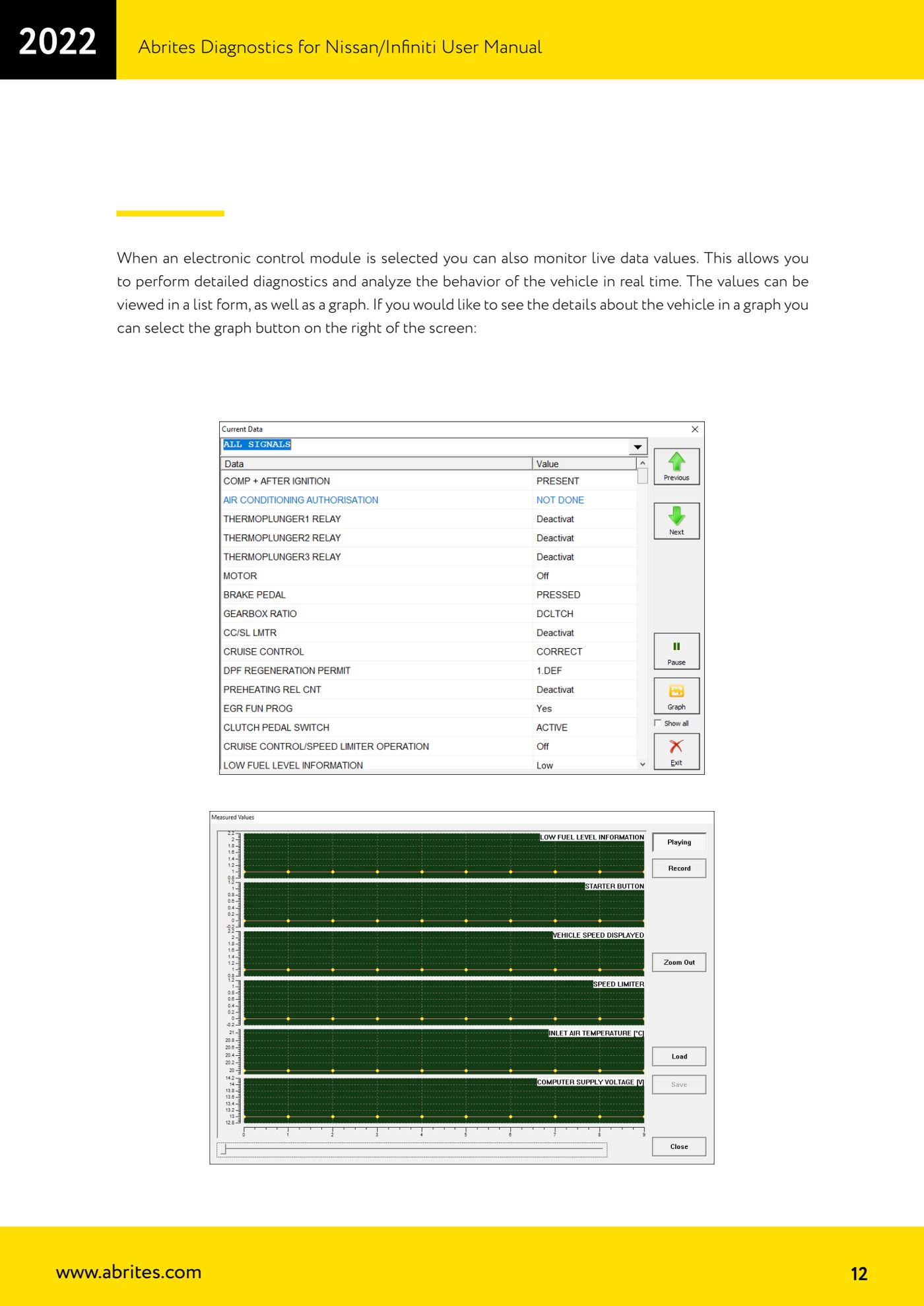
- Open the measured values reading: the live parameters are shown as a list.
- If you prefer to follow the trend over time, press the graph button on the right of the screen: the same values are plotted graphically.
- Watch the parameters while you vary the real conditions (ignition, engine, electrical loads, controls) to compare expected behaviour with actual behaviour.
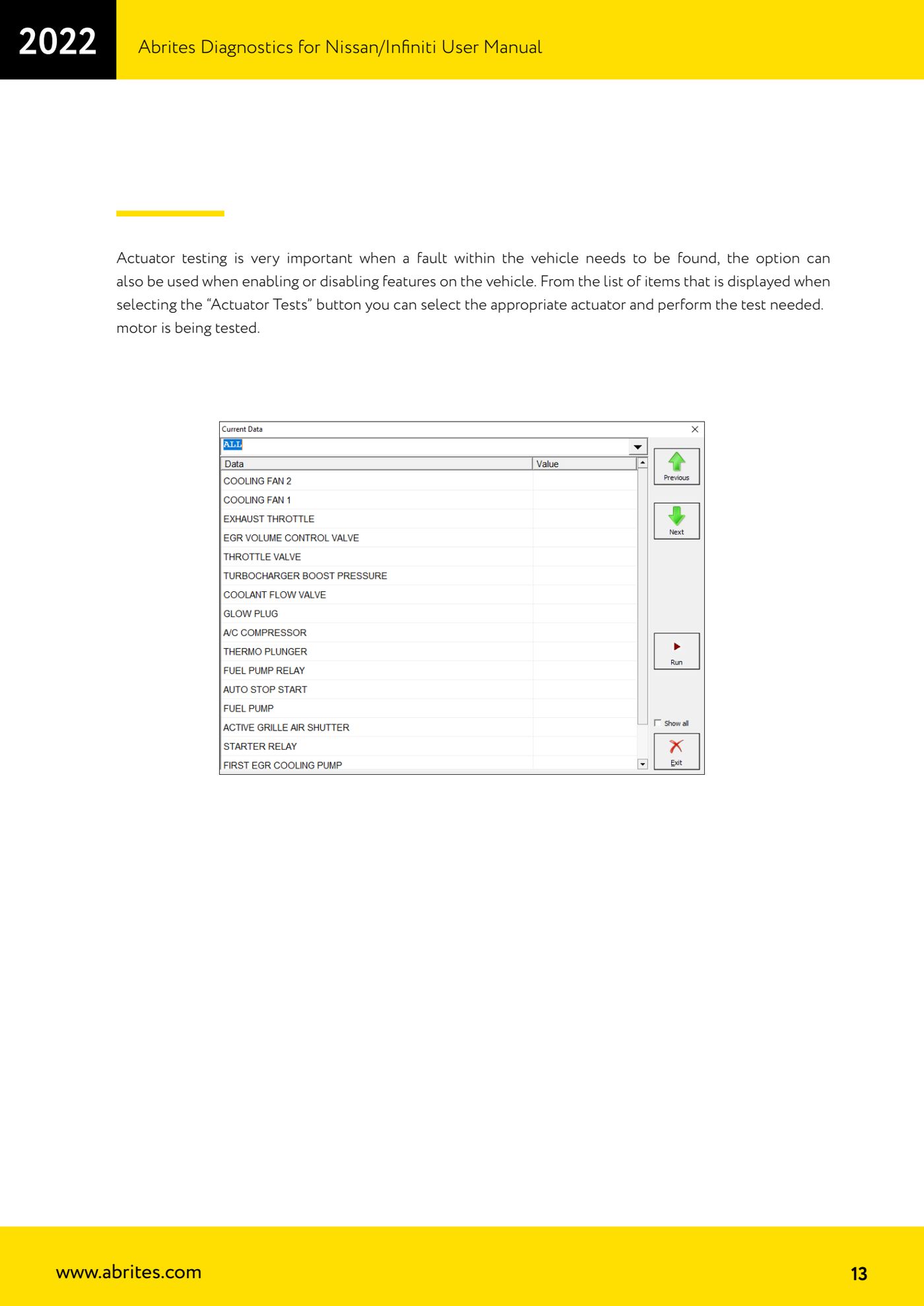
- To drive a component press the "Actuator Tests" button: the list of actuators available for that module appears.
- Select the actuator to be tested from the list and run the test. The same function is also used to enable or disable features on the vehicle.
- Compare the actuator's response with what you read in the live parameters to confirm or rule out the suspect component.
Reference screenshots
Source: Manuale Nissan/Infiniti, cap. 2.1 (p.12-13) · ⏱ estimated time 15-30 min
← All Abrites guides Hardware catalogue
More guides Nissan/Infiniti
- Module scan and DTC read/clear on Nissan/Infiniti with the AVDI
- Calculating and extracting the Nissan/Infiniti PIN Code (ICU, SEC, BCM, OBDII, glovebox label)
- Nissan key programming with NATS-2, NATS-4, NATS-5 and NATS-5+ immobiliser
- EEPROM NATS2/5 Memory Manager: reading, saving and writing NATS configuration data
- Pinout of NATS 2, NATS 4 and NATS-5/5+ Siemens immobiliser units for bench work
- EM002 ESL/steering lock emulator for Renault/Nissan: 6-pin and 8-pin connection diagrams
- Starting Abrites Nissan/Infiniti Online and selecting the vehicle
- Module scan and DTC read/clear on Nissan and Infiniti
- Real-time parameter monitoring (Live Values) on Nissan and Infiniti
- Actuator Testing on Nissan and Infiniti
- Dealer-level advanced functions: the "procedures" menu of Nissan/Infiniti modules
- Nissan/Infiniti key programming via OBDII (Key Learning, including all keys lost)