
Chip-Tools
Building your own ABPROG adapters with the male DB25 connector: ZN046, ZN058, ZN078, ZN086 pinouts
Strumenti
Interface Classic
Hardware / Connections
Advanced
⏱ 30-60 min
6 steps
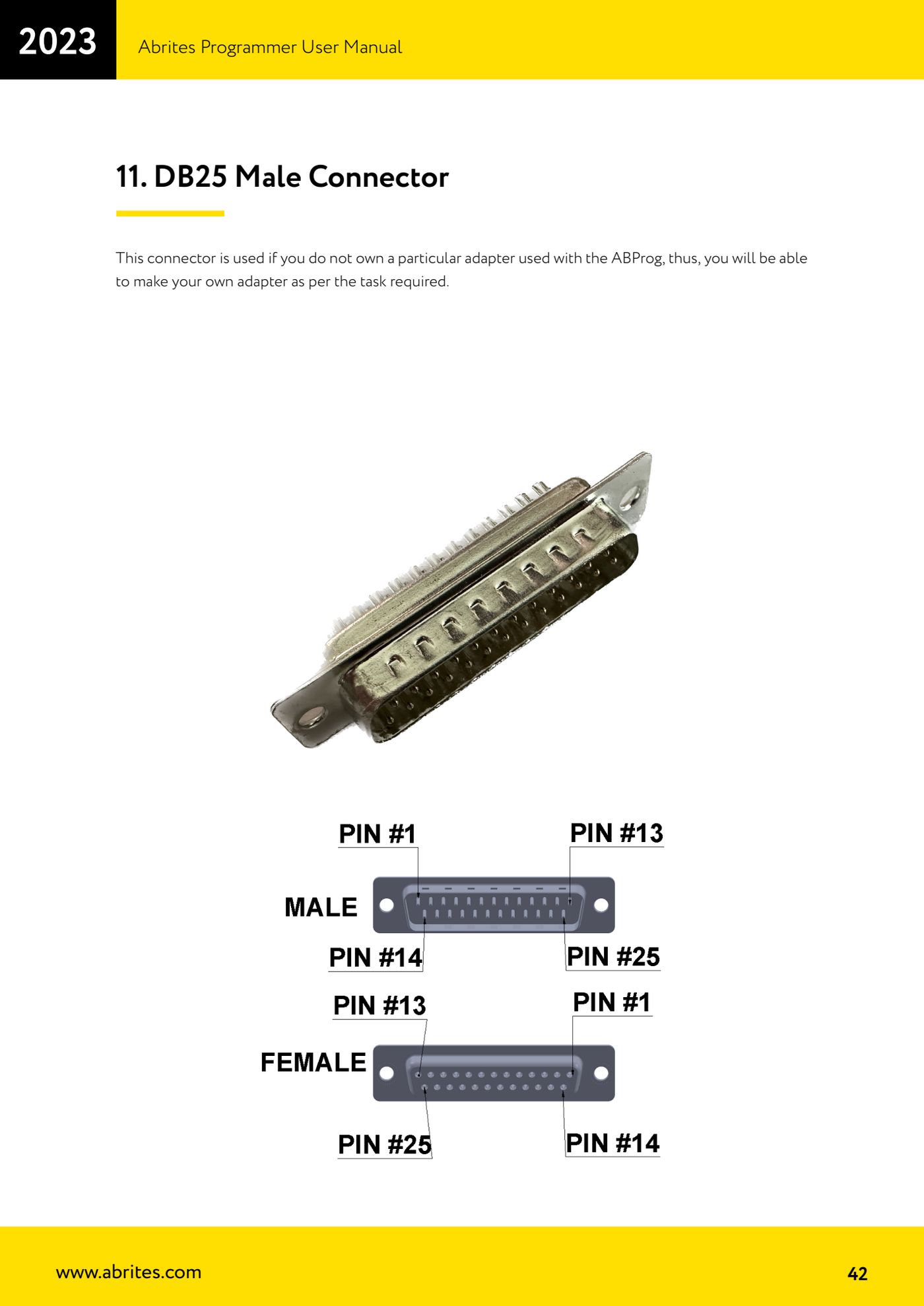
The male DB25 connector supplied with the ZN030 set lets you build the adapter you don't own in-house, wiring the pins to match the corresponding Abrites adapter's pinout. Here are the official pinouts for the ZN046, ZN058, ZN078 and ZN086.
Required licences
- —
Hardware / cables
- DB25 Male connector
 ZN045 programmatore ABPROG
 AVDI
AVDI- resistenza 38K
- resistenza 10K
- diodo 1N4148
- stazione saldante
⚠ WarningFit the passive components listed as well (resistors and diode): without them the lines are unmatched and the connection to the processor may not work or may damage the target. Always check the pin numbering on the DB25 body before soldering.
Procedure
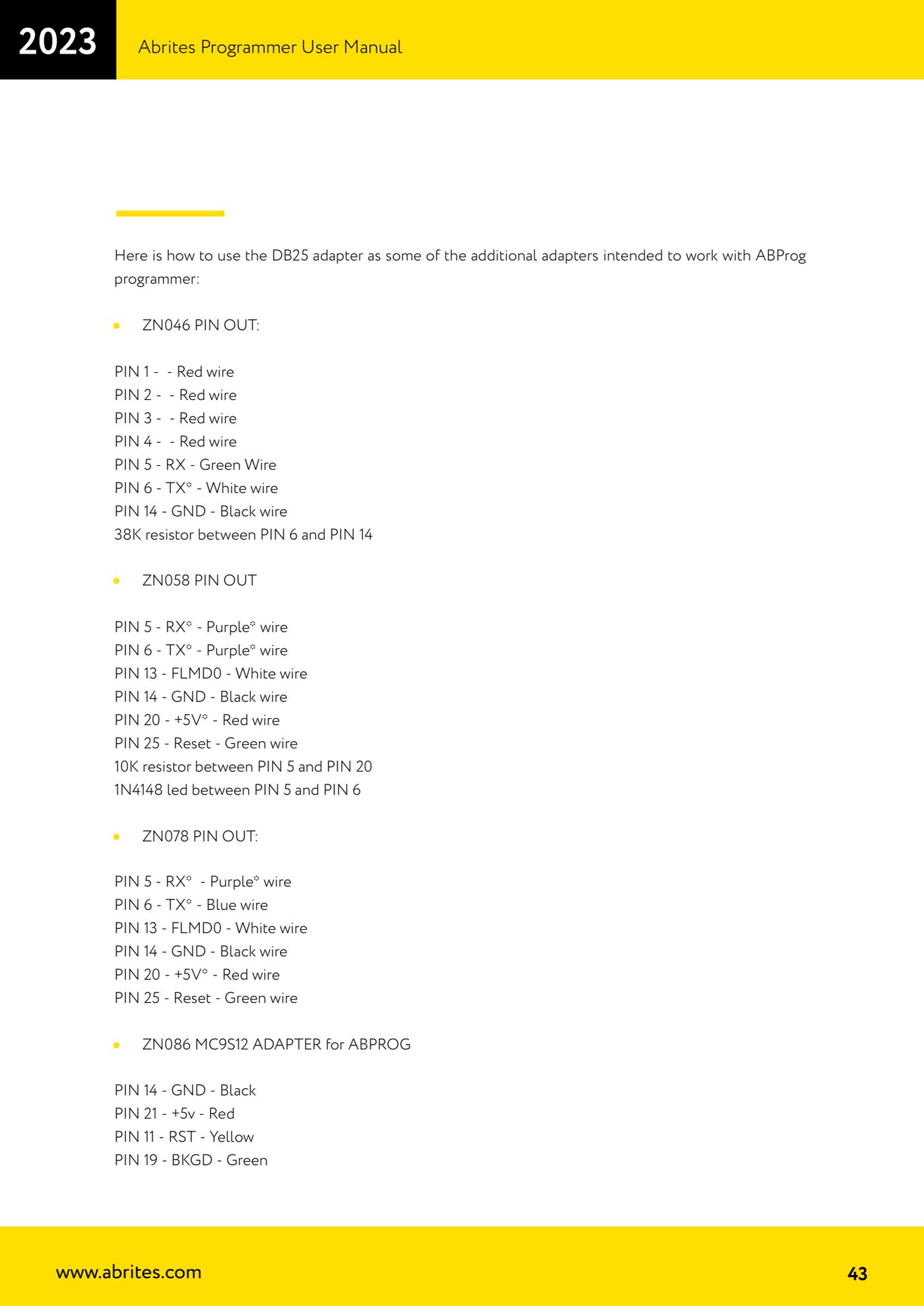
- ZN046 (Key PCB Renewal Adapter): PIN 1, PIN 2, PIN 3 and PIN 4 = red wires; PIN 5 = RX green wire; PIN 6 = TX white wire; PIN 14 = GND black wire. Add a 38K resistor between PIN 6 and PIN 14.
- ZN058 (V850E2 adapter): PIN 5 = RX purple wire; PIN 6 = TX purple wire; PIN 13 = FLMD0 white wire; PIN 14 = GND black wire; PIN 20 = +5V red wire; PIN 25 = Reset green wire. Add a 10K resistor between PIN 5 and PIN 20 and a 1N4148 diode between PIN 5 and PIN 6.
- ZN078 (V850ES adapter): PIN 5 = RX purple wire; PIN 6 = TX blue wire; PIN 13 = FLMD0 white wire; PIN 14 = GND black wire; PIN 20 = +5V red wire; PIN 25 = Reset green wire.
- ZN086 (MC9S12 adapter): PIN 14 = GND black wire; PIN 21 = +5V red wire; PIN 11 = RST yellow wire; PIN 19 = BKGD green wire.
- Solder the wires onto the male DB25 to the pinout you've chosen, respecting the colours given: you'll need them to identify the lines when you connect them to the module or key board.
- Plug the DB25 you've made up into the female DB25 connector on the ABPROG ZN045, the ZN045 to the AVDI and the AVDI to the PC, then carry on with the operation the software provides.
Reference screenshots
Source: Manuale Abrites Programmer, cap. 11 - DB25 Male Connector (p.42-43) · ⏱ estimated time 30-60 min
← All Abrites guides Hardware catalogue
More guides Strumenti
- ABPROG ZN030: what's in the set, hooking it up to the AVDI and starting the Classic software
- Reading and writing SPI, I2C and Microwire EEPROMs with ABPROG and the ZN031/ZN035 adapter
- Erasing and reprogramming M35080VP / M35080V6 incremental EEPROMs with ABPROG
- Wiring an SPI EEPROM straight to the ABPROG DB25 without the ZN031 adapter
- Mercedes-Benz IR keys: reading the SSID, erasing and programming the NEC with ZN032 / ZN033
- Renewing used keys (HITAG/PCF) with the ZN046 adapter and ABPROG
- Solder points on key PCBs for the ZN046 and list of keys supported for renewal
- Reading the EWS3 dump on BMW E46/E39/E53 and others with the ZN055 adapter
- Reading the EEPROM on BMW F-Series FEM/BDC without desoldering, using the ZN057 extension
- Reading and writing NEC V850ES MCUs with the ZN078 adapter and ABPROG
- ABPROG DB25 pinout: building your own ZN046, ZN058, ZN078 and ZN086 adapters
- Reading the immobiliser from a Renault X95 BCM (and Audi BCM) with ABPROG and direct wiring