
Chip-Tools
Wiring an SPI EEPROM straight to the ABPROG DB25 without the ZN031 adapter
Strumenti
Interface Classic
Hardware / Connections
Medium
⏱ 20-40 min
7 steps
If you don't have the ZN031-M35XXX/SPI/I2C adapter to hand you can still read and program the common SPI EEPROMs by wiring them straight to the DB25 connector of the ZN030-ABPROG, as shown in the manual's diagram.


⚠ WarningThe ZN030-ABPROG supplies 5V DC: don't connect memories or boards that need a different voltage, and don't power the module from a second source while the ABPROG is connected.
Procedure
- Get the male DB25 connector included in the ZN030 set and prepare the wires running to the memory.
- Wire the SPI EEPROM legs to the DB25 following the diagram on page 42 of the manual.
- Check continuity on every wire with a multimeter and confirm there are no shorts between pins before plugging the connector in.
- Plug the wired DB25 into the ZN045 ABPROG and connect the ZN045 to the DB-15 on the AVDI.
- Start "ABProg" > "Classic", select "EEPROM" and the exact memory type: wired this way, the standard SPI devices M95080, M95160, M95320, M95640, M95128, M95256 are supported.
- Run the read and check the dump looks sound (no suspicious all-FF or all-00 areas): if it doesn't, go back over the wiring.
- Save the original dump, then go ahead with the write if needed.
Reference screenshots
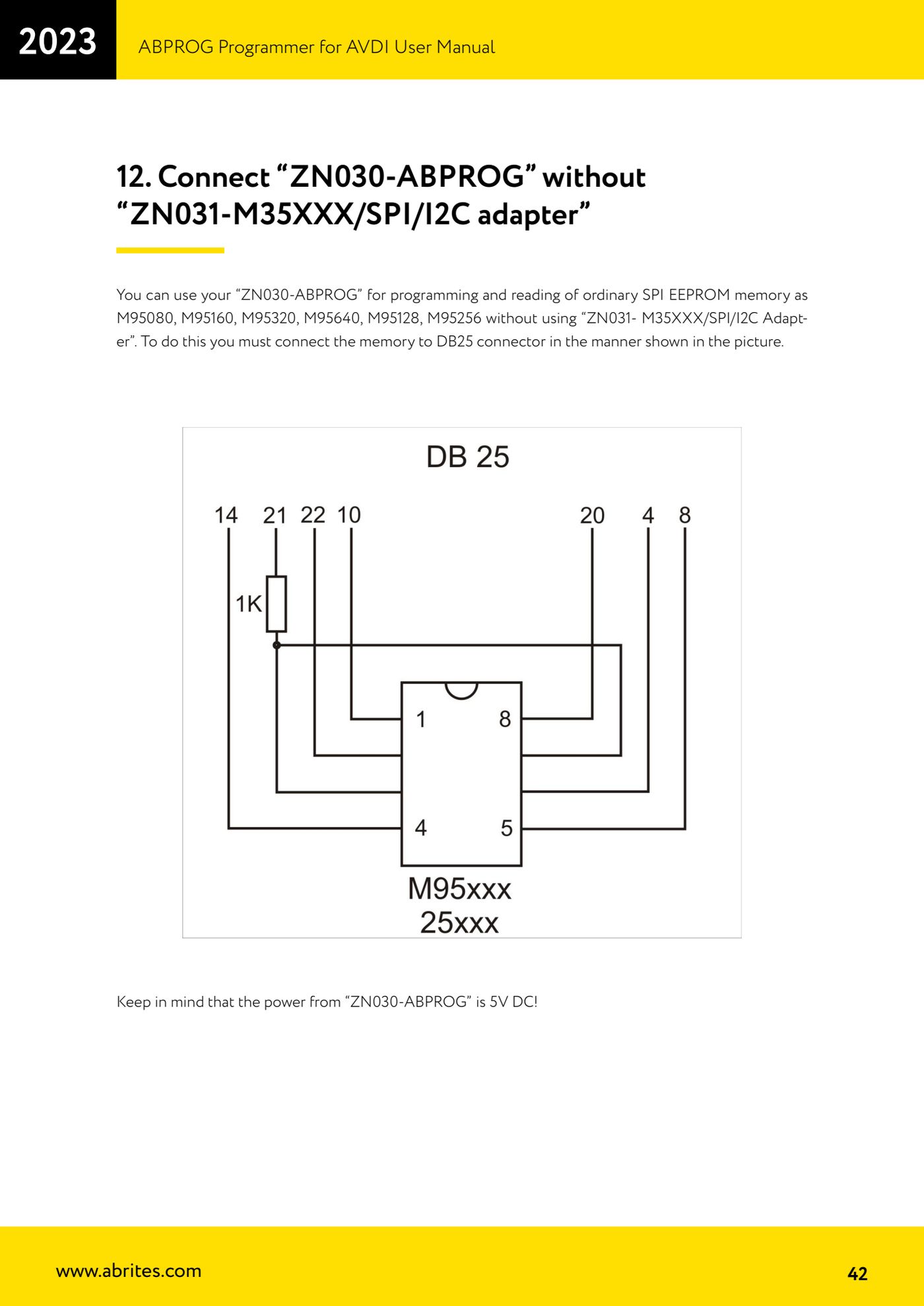
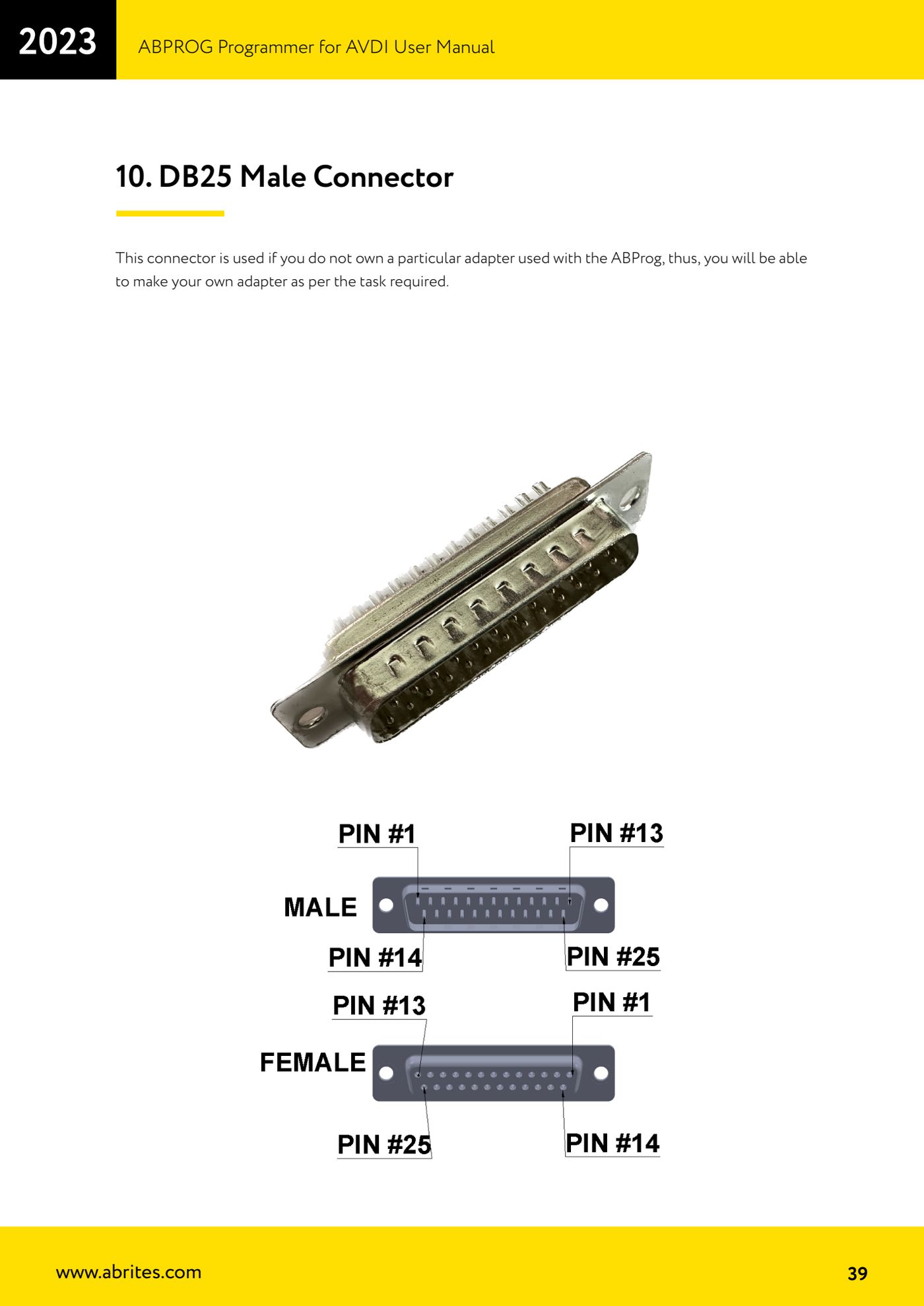
Source: Manuale ABPROG (programmatore), cap. 12 "Connect ZN030-ABPROG without ZN031" (p.42-43) · ⏱ estimated time 20-40 min
← All Abrites guides Hardware catalogue
More guides Strumenti
- ABPROG ZN030: what's in the set, hooking it up to the AVDI and starting the Classic software
- Reading and writing SPI, I2C and Microwire EEPROMs with ABPROG and the ZN031/ZN035 adapter
- Erasing and reprogramming M35080VP / M35080V6 incremental EEPROMs with ABPROG
- Mercedes-Benz IR keys: reading the SSID, erasing and programming the NEC with ZN032 / ZN033
- Renewing used keys (HITAG/PCF) with the ZN046 adapter and ABPROG
- Solder points on key PCBs for the ZN046 and list of keys supported for renewal
- Reading the EWS3 dump on BMW E46/E39/E53 and others with the ZN055 adapter
- Reading the EEPROM on BMW F-Series FEM/BDC without desoldering, using the ZN057 extension
- Reading and writing NEC V850ES MCUs with the ZN078 adapter and ABPROG
- ABPROG DB25 pinout: building your own ZN046, ZN058, ZN078 and ZN086 adapters
- Reading the immobiliser from a Renault X95 BCM (and Audi BCM) with ABPROG and direct wiring
- Mercedes: reading hashes from the EZS over infrared and reading the password from version 57 NECs