
Chip-Tools
Cluster Calibration: mileage calibration on the BSI and instrument cluster (with Disable dashboard synchronisation)
PSA
Interface Classic
Odometer
Advanced
⏱ 15-45 min (up to 45 min on the C5 II cluster)
10 steps
When modules are replaced with new or used parts, a recalibration is nearly always needed. This special function adjusts the mileage stored in the BSI and in the instrument cluster; since BSI and cluster are synchronised, the job has to be done on both, or on the BSI alone by selecting the option that disables dashboard synchronisation.
Required licences
- —
Hardware / cables
 AVDI
AVDI- Programmatore EEPROM
⚠ WarningThe procedure, like Read security code, can take up to 15 minutes (45 minutes for the C5 II cluster) and any interruption can leave the car in service mode: if that happens, resume it as soon as possible to bring the vehicle back to a working state. To protect the battery, pull the wiper fuse and the dipped-beam fuse, as described in the Read security code procedure. The "Write dashboard" option is only available for a few vehicles and requires the model to be preselected manually. At the end it is very important to switch the ignition off and leave the car untouched for a few minutes so the new value is genuinely accepted.
Procedure
- Connect the AVDI to the OBD-II socket with an external power supply hooked up and, to save the battery during this long procedure, pull the wiper fuse and the dipped-beam fuse.
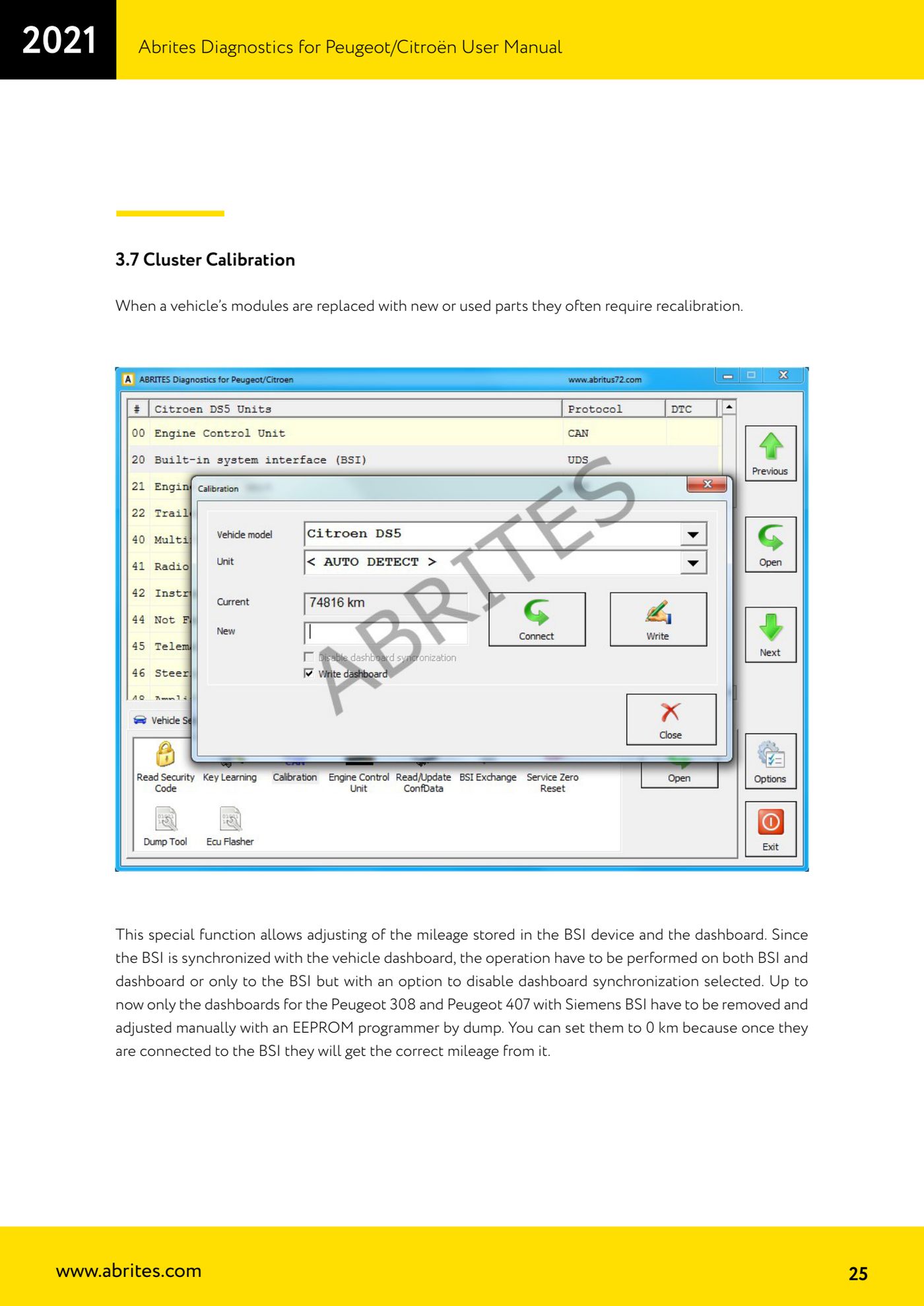
- Open the Calibration special function and select the vehicle and the unit to work on. If you are not sure of the model or the unit, leave both entries on "< AUTO DETECT >".
- Click "Connect" to read the current mileage.
- Choose between the two available working options: "Disable dashboard synchronisation" removes the synchronisation between cluster and BSI, so only the BSI is adjusted and the cluster displays the BSI mileage regardless of its own internal value.
- Alternatively use "Write dashboard": the cluster mileage is updated along with the BSI value. Note that this option is only available for certain vehicles (Citroën C2, C5 II, C4 II, DS4, DS5, Peugeot 508) and requires the vehicle model to be preselected manually.
- Enter the new mileage value and start the procedure, without interrupting it: it can take up to 15 minutes, and up to 45 minutes on the C5 II cluster.
- Special cases: the clusters of the Peugeot 308 and Peugeot 407 with BSI Siemens have to be removed and adjusted by hand with an EEPROM programmer, working on the dump. You can set them to 0 km because, once reconnected to the BSI, they take the correct mileage from it.
- When the final message appears, switch the ignition OFF and leave the car untouched for a few minutes: this is needed for the new odometer value to actually be accepted by the vehicle.
- Reopen the function and press "Connect" again to check that the mileage has been changed correctly.
- If the procedure was interrupted and the car has been left in service mode, resume it as soon as possible to bring it back to a working state.
Reference screenshots
Source: Manuale Peugeot/Citroën (interfaccia classica), cap. 3.7 (p.25-26) · ⏱ estimated time 15-45 min (up to 45 min on the C5 II cluster)
← All Abrites guides Hardware catalogue
More guides PSA
- Standard Peugeot/Citroën diagnostics: unit scan, DTCs, identification and live data
- Reading the PIN (Read security code) and key programming on Peugeot/Citroën
- Engine Control Unit: reading/writing Configuration Data and ECU flash, IMMO OFF and after sales preparation (EDC, SID)
- Read/Update ConfData: backing up and restoring the configuration data of the BSI and instrument cluster
- BSI exchange: replacing the BSI with a used unit (JCI and Valeo CAN) and identifying the hardware version
- Continental BSI 2015+: reading the PIN, EEPROM read/write, BSI exchange and Set PIN
- Mileage correction on Continental BSI 2015+ using the "CAN" Calibration function
- Service Zero Reset: resetting the service/oil change indicator on Peugeot/Citroën
- Dump Tool: reading, saving and clearing crash data from airbag control units
- Vehicle identification, module scan and DTC handling (Peugeot / Citroën / DS)
- Reading live parameters and running actuator tests on PSA control units
- Reading keys and programming PSA keys with PIN reading from the BSI (guided wizard)