
Chip-Tools
Reading real-time parameters (Live Values) on FCA modules
Fiat/FCA
Interface New
Diagnostics
Basic
⏱ 10-20 min
7 steps
This is for following an FCA control unit's parameters in real time during diagnosis: you pick the module, select the parameters you want to watch and observe them while the engine is running or while you actuate a component.
Required licences
- —
Hardware / cables

Procedure
- Connect the AVDI to the OBDII socket and start "FCA Online" from Quick Start; wait for automatic vehicle recognition and the module scan.
- In the module list select the control unit whose parameters you want to see and open it.
- Inside the module select "Live values".
- The software shows the list of parameters available for that control unit.
- Tick the individual parameters you want to monitor, or select all of them to follow them in query mode.
- Start monitoring and watch the values while you carry out the test (key in, engine running, component actuated).
- Compare the values read against the expected ones to pin down the faulty component or circuit.
Reference screenshots
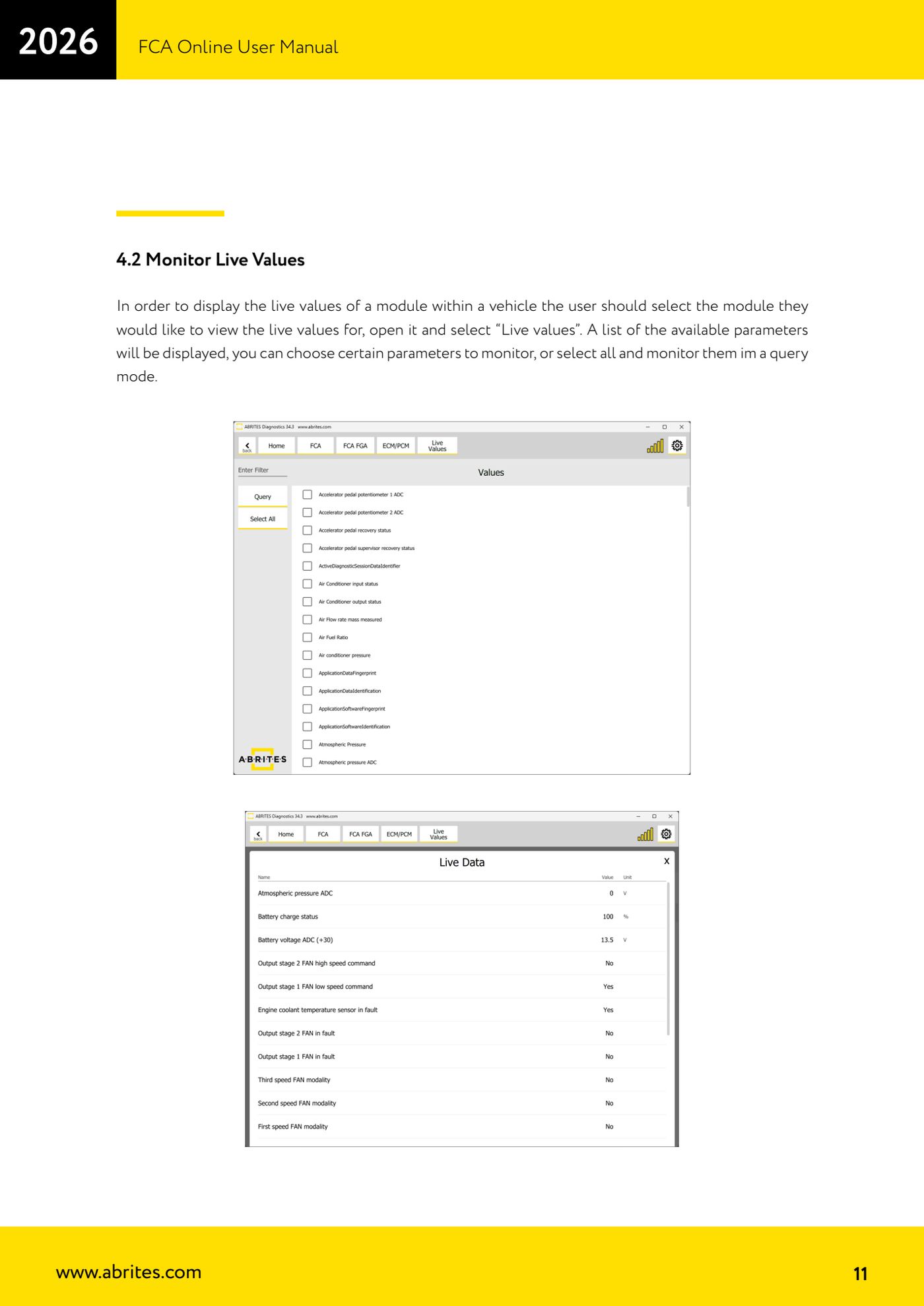
Source: Manuale FCA Online, cap. 4.2 (p.11) · ⏱ estimated time 10-20 min
← All Abrites guides Hardware catalogue
More guides Fiat/FCA
- Vehicle scan, module identification and reading/clearing DTC (Fiat, Alfa Romeo, Lancia, FCA)
- Reading live data (Data Display) and ECU identification on FCA vehicles
- Actuator tests on FCA control units (engine, BCM and other modules)
- BCM, RFH and Key Manager: reading the PIN, Component Protection data and Transponder Maker
- Key programming via OBD on FCA vehicles (with PIN from the RFH and Security Gateway bypass)
- Key programming on FCA keyless models from 2020 onwards in All Keys Lost (CB017 set + ZN051)
- Key programming on Fiat Ducato, Fiat 500L and Iveco Daily 2020+ (PIN from the BCM EEPROM with ABProg and ZN057)
- FCA instrument cluster calibration via OBDII ("Cluster Calibration" and "Cluster Calibration 2")
- ECU Flash Manager: reading and writing flash memory on Marelli and Bosch ECUs (IAW, MJD 6JF, ME7 boot mode)
- ECU Configuration Manager: reading/writing configuration and VIRGIN reset (EDC15, MJD 6JF/8F2, Marelli IAW, ME7)
- Proxi Alignment: BCM configuration and module alignment on FCA vehicles (bench work included)
- Module scan and DTC read/clear with FCA Online (Fiat, Alfa Romeo, Jeep, Lancia)