
Chip-Tools
Module scan and DTC read/clear with FCA Online (Fiat, Alfa Romeo, Jeep, Lancia)
Fiat/FCA
Interface New
Diagnostics
Basic
⏱ 10-20 min
9 steps
This is the first job on any FCA group vehicle: the software identifies the car automatically, works through all available protocols and lists the control units on board with the number of stored faults in each. From here you go into the individual module to read and clear DTCs.
Required licences
- —
Hardware / cables

⚠ WarningFCA Online is server-based software: without an Internet connection it will not work. Before starting, hook the vehicle up to an external power supply so you do not risk voltage drops during the job.
Procedure
- Connect the AVDI to the vehicle's OBDII socket and to the PC. The PC must run Windows 10 64-bit SP1 or later, have at least 4GB of RAM and a stable Internet connection; check that the AMS is active.
- Connect the vehicle to an external power supply / battery maintainer before starting the software.
- Launch the "Abrites Quick Start" application and select one of the FCA group brands.
- On the main screen of the FCA application select the "FCA Online" icon.
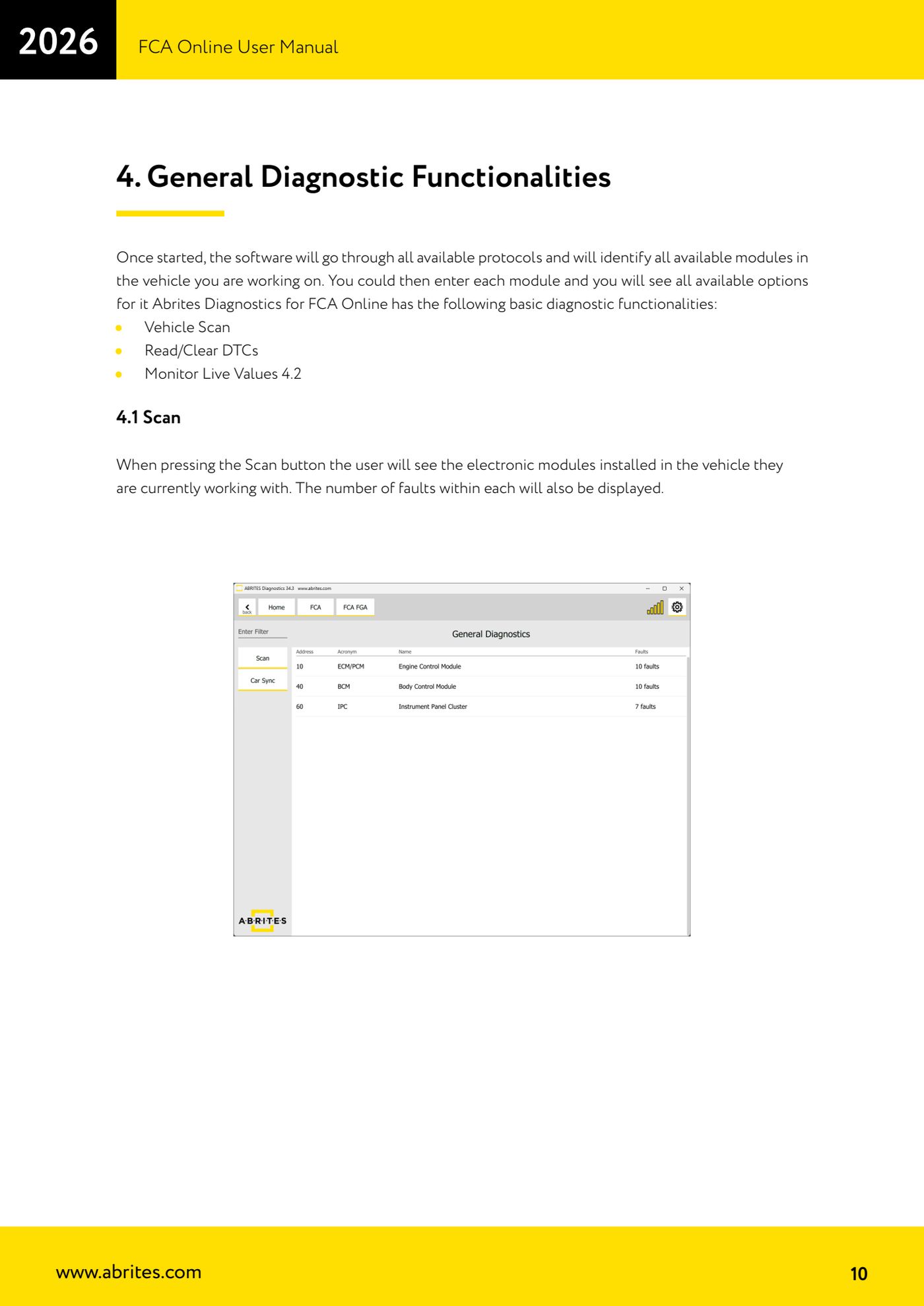
- Wait: the vehicle is recognised automatically, the "General Diagnostics" screen opens and the module scan starts on its own.
- If you need to run the search again, press the "Scan" button: the software goes through all available protocols and shows the list of installed control units with the number of faults present in each.
- Click the module you are interested in to open it and see all the options available for that unit.
- Inside the module use the DTC read functions to see the stored fault codes; once you have carried out the repair, use the clear function to wipe the fault memory.
- Repeat the scan at the end of the job to confirm the faults do not come back.
Reference screenshots
Source: Manuale FCA Online, cap. 2.2-4.1 (p.8-10) · ⏱ estimated time 10-20 min
← All Abrites guides Hardware catalogue
More guides Fiat/FCA
- Vehicle scan, module identification and reading/clearing DTC (Fiat, Alfa Romeo, Lancia, FCA)
- Reading live data (Data Display) and ECU identification on FCA vehicles
- Actuator tests on FCA control units (engine, BCM and other modules)
- BCM, RFH and Key Manager: reading the PIN, Component Protection data and Transponder Maker
- Key programming via OBD on FCA vehicles (with PIN from the RFH and Security Gateway bypass)
- Key programming on FCA keyless models from 2020 onwards in All Keys Lost (CB017 set + ZN051)
- Key programming on Fiat Ducato, Fiat 500L and Iveco Daily 2020+ (PIN from the BCM EEPROM with ABProg and ZN057)
- FCA instrument cluster calibration via OBDII ("Cluster Calibration" and "Cluster Calibration 2")
- ECU Flash Manager: reading and writing flash memory on Marelli and Bosch ECUs (IAW, MJD 6JF, ME7 boot mode)
- ECU Configuration Manager: reading/writing configuration and VIRGIN reset (EDC15, MJD 6JF/8F2, Marelli IAW, ME7)
- Proxi Alignment: BCM configuration and module alignment on FCA vehicles (bench work included)
- Reading real-time parameters (Live Values) on FCA modules