
Chip-Tools
Volvo Car Config: editing configuration parameters and enabling options
Volvo
Interface Classic
Coding / Adaptations
Medium
⏱ 20-40 min
8 steps
The "Car Config" function lets you change parameters in the vehicle configuration data: use it to swap units that are not part of the immobiliser system or to add options the car did not previously have. You can read the Master CCC or the Back-up CCC, edit it and update it.
Required licences
- —
Hardware / cables

⚠ WarningThe function does not cover units that are part of the immobiliser system. Read and keep the original configuration before changing it: it is your only way back if the vehicle reacts badly to the new configuration.
Procedure
- Plug the AVDI into the OBDII socket, turn the ignition ON and start Abrites Diagnostics for Volvo.
- Select the vehicle and open the special functions menu, then "Car Config".
- Read the configuration: you can choose to read the "Master CCC" or the "Back-up CCC", if the vehicle has one.
- Save the configuration you read to file before touching any parameter.
- Find the parameter you need to change in the list and set its new value. Example given in the manual: setting the car up with an automatic transmission on a vehicle previously configured with a manual.
- Update the configuration in the vehicle by confirming the write.
- Cycle the ignition off and on, then read the configuration back to confirm the new value has been taken up.
- Run a full DTC scan and clear the codes generated by the change, then test the function or option concerned in the field.
Reference screenshots
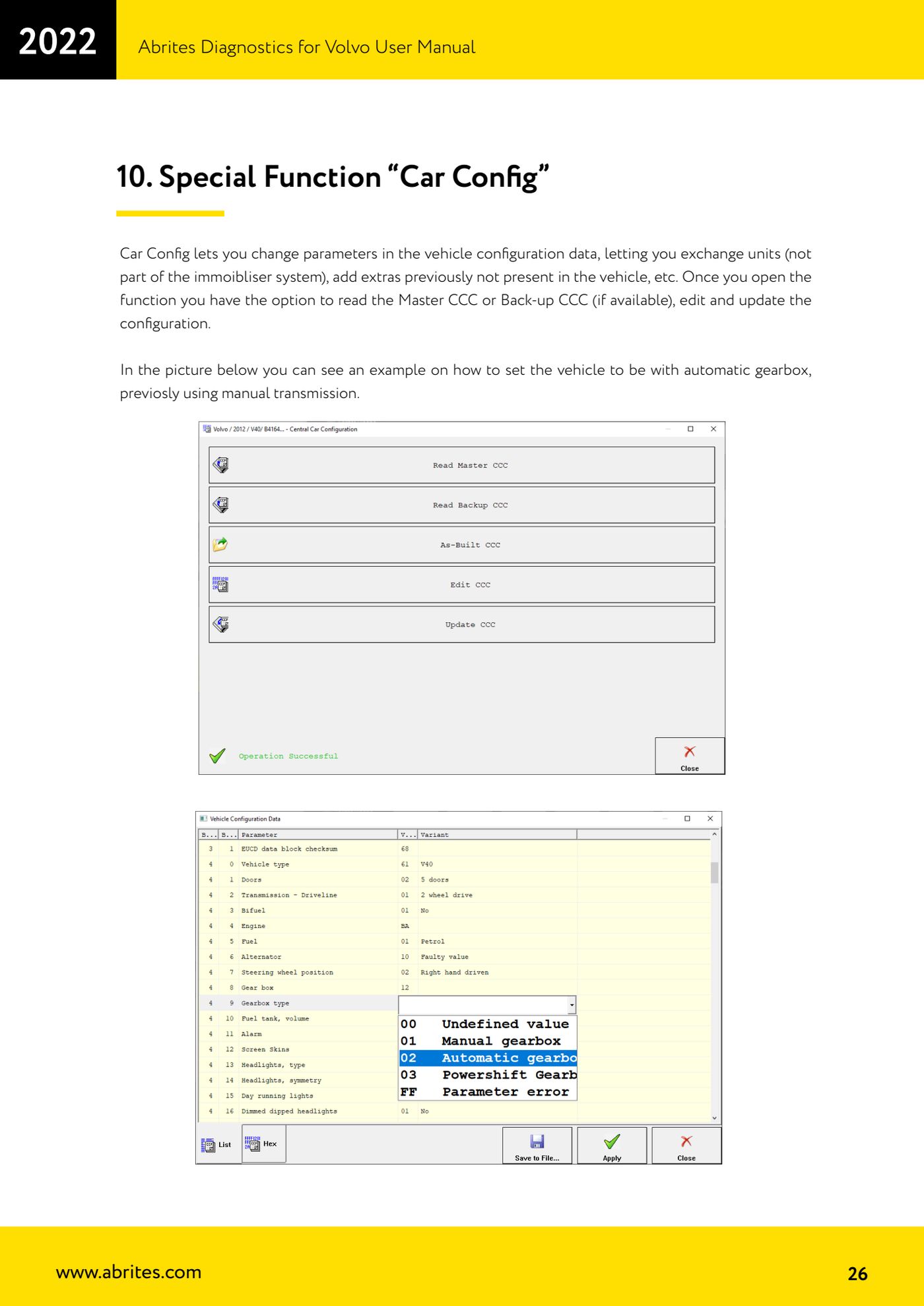
Source: Manuale Volvo, cap. 10 (p.26) · ⏱ estimated time 20-40 min
← All Abrites guides Hardware catalogue
More guides Volvo
- Full module scan and DTC reading/clearing on Volvo with AVDI
- Live Data monitoring (real values) on Volvo modules
- Volvo Service Functions: service history and actuator tests
- Volvo Cluster Calibration: aligning the mileage after module replacement
- Volvo NVData: reading, saving and writing module configuration data
- Volvo Flash function: reading and writing the ECU flash file
- Programming Volvo HITAG2 keys with CEM unlock (Key Learning)
- Bench connection of the Volvo CEM: blue and black socket pinout
- Volvo Module Initialization: initialising a second-hand PATS module
- Extracting the Volvo PIN from CEM, KVM, PCM and ABS dumps
- Reading the Volvo airbag ECU memory and clearing crash data
- Forced DPF regeneration on Volvo diesels with AVDI