
Chip-Tools
Mercedes CEPC: reading and writing Pflash, Dflash and program data over OBDII (announced feature)
Strumenti
Interface Classic
Appendix
Advanced
⏱ varies
6 steps
The manual announces, for upcoming ECU Programming Tool updates, OBDII reading and writing of Pflash, Dflash and program data on Mercedes CEPC units in versions 2.20, 2.3 and 2.4. Here is how to set the job up without putting the unit at risk.
Required licences
- —
Hardware / cables

⚠ WarningWriting inconsistent program data can leave the device non-functional. The manual strongly recommends taking a full backup of Pflash and Dflash first. For the boot mode recovery procedure you have to contact support@abrites.com.
Procedure
- Check that the installed version of the ECU Programming Tool declares support for Mercedes CEPC units: the feature is announced for future updates, so make sure you are up to date before you start.
- Identify the version of the CEPC unit on the vehicle: the manual lists support for versions 2.20, 2.3 and 2.4.
- Connect the AVDI to the OBDII port and keep the vehicle's supply voltage stable for the whole session.
- Before any write, take and save a full backup of Pflash and Dflash: this is the step the manual explicitly recommends.
- Only with the backup safely stored, go ahead with writing the program data, checking the file is consistent with the unit in front of you.
- If the unit stops responding after a write, do not keep trying over OBDII: contact support@abrites.com for the boot mode recovery procedure.
Reference screenshots
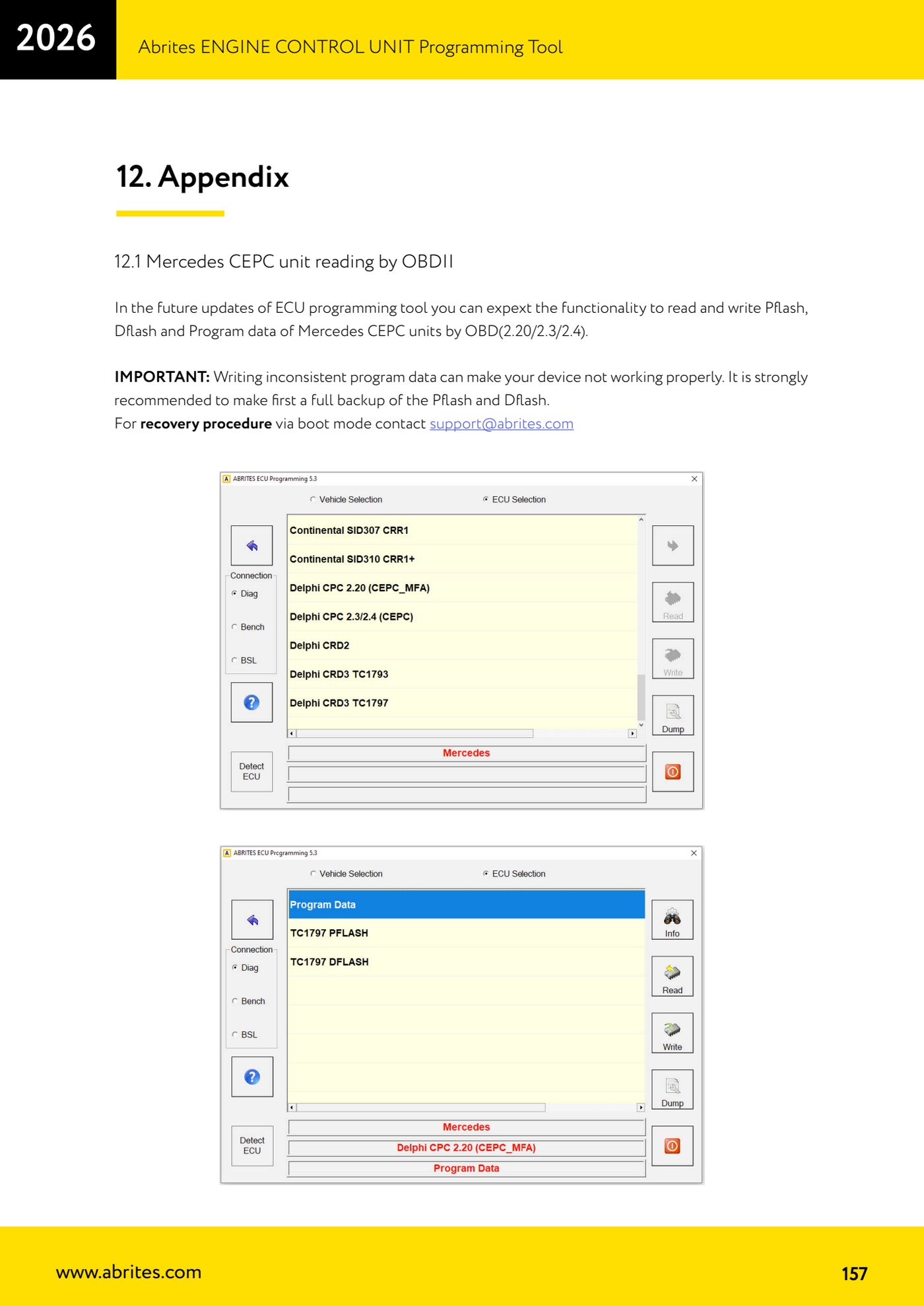
Source: Manuale ECU Programming Tool, parte 3 di 3, cap. 12.1 - Appendix, Mercedes CEPC unit reading by OBDII (p.157) · ⏱ estimated time varies
← All Abrites guides Hardware catalogue
More guides Strumenti
- ABPROG ZN030: what's in the set, hooking it up to the AVDI and starting the Classic software
- Reading and writing SPI, I2C and Microwire EEPROMs with ABPROG and the ZN031/ZN035 adapter
- Erasing and reprogramming M35080VP / M35080V6 incremental EEPROMs with ABPROG
- Wiring an SPI EEPROM straight to the ABPROG DB25 without the ZN031 adapter
- Mercedes-Benz IR keys: reading the SSID, erasing and programming the NEC with ZN032 / ZN033
- Renewing used keys (HITAG/PCF) with the ZN046 adapter and ABPROG
- Solder points on key PCBs for the ZN046 and list of keys supported for renewal
- Reading the EWS3 dump on BMW E46/E39/E53 and others with the ZN055 adapter
- Reading the EEPROM on BMW F-Series FEM/BDC without desoldering, using the ZN057 extension
- Reading and writing NEC V850ES MCUs with the ZN078 adapter and ABPROG
- ABPROG DB25 pinout: building your own ZN046, ZN058, ZN078 and ZN086 adapters
- Reading the immobiliser from a Renault X95 BCM (and Audi BCM) with ABPROG and direct wiring