
Chip-Tools
Renault EDC17: injector coding and DPF regeneration
Renault/Dacia
Interface Classic
Special Functions
Medium
⏱ 30-60 min
8 steps
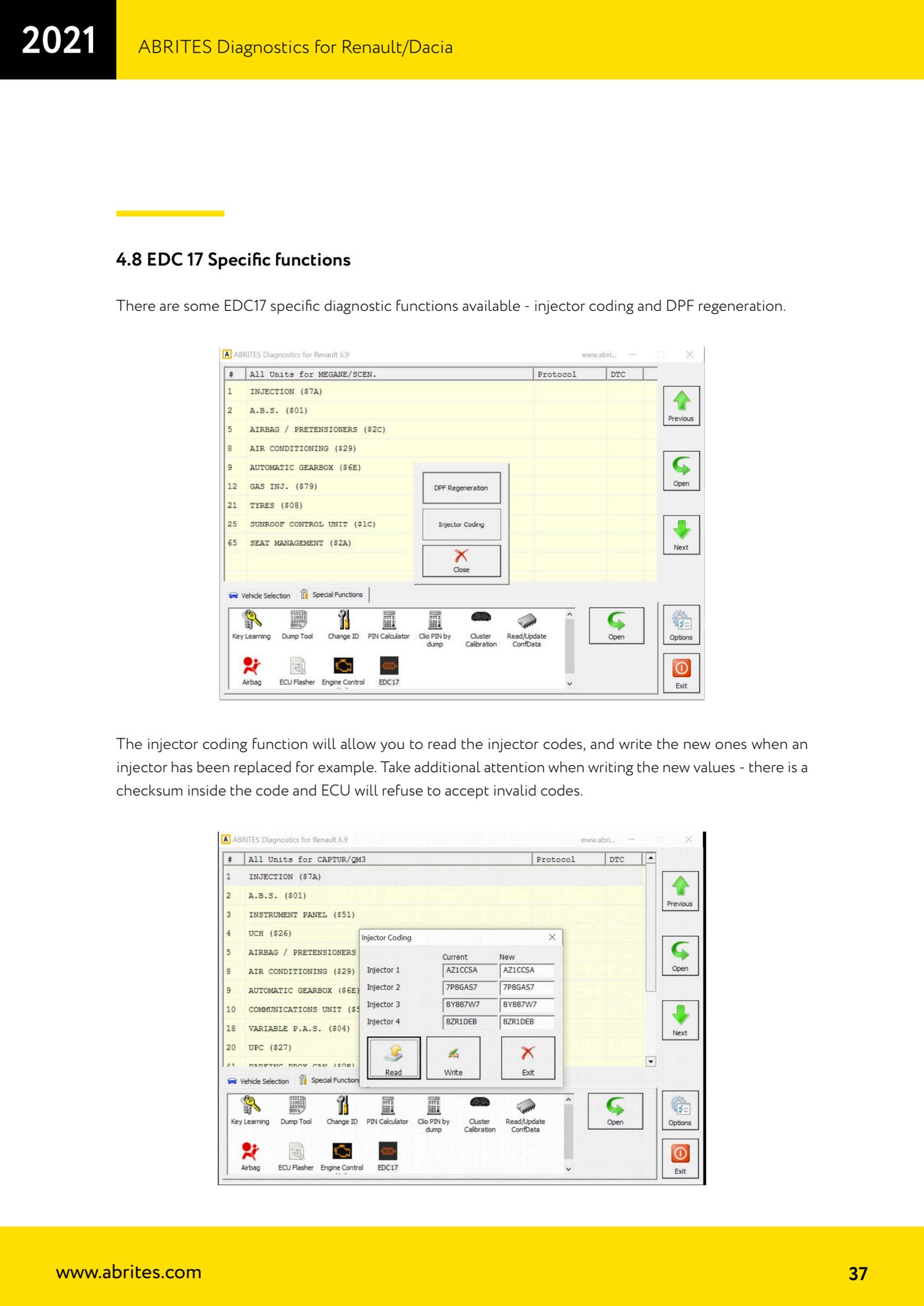
Diagnostic functions specific to EDC17 ECUs: reading and writing injector codes (needed when an injector is replaced) and particulate filter regeneration.
Required licences
- —
Hardware / cables
 AVDI
AVDI- cavo OBDII
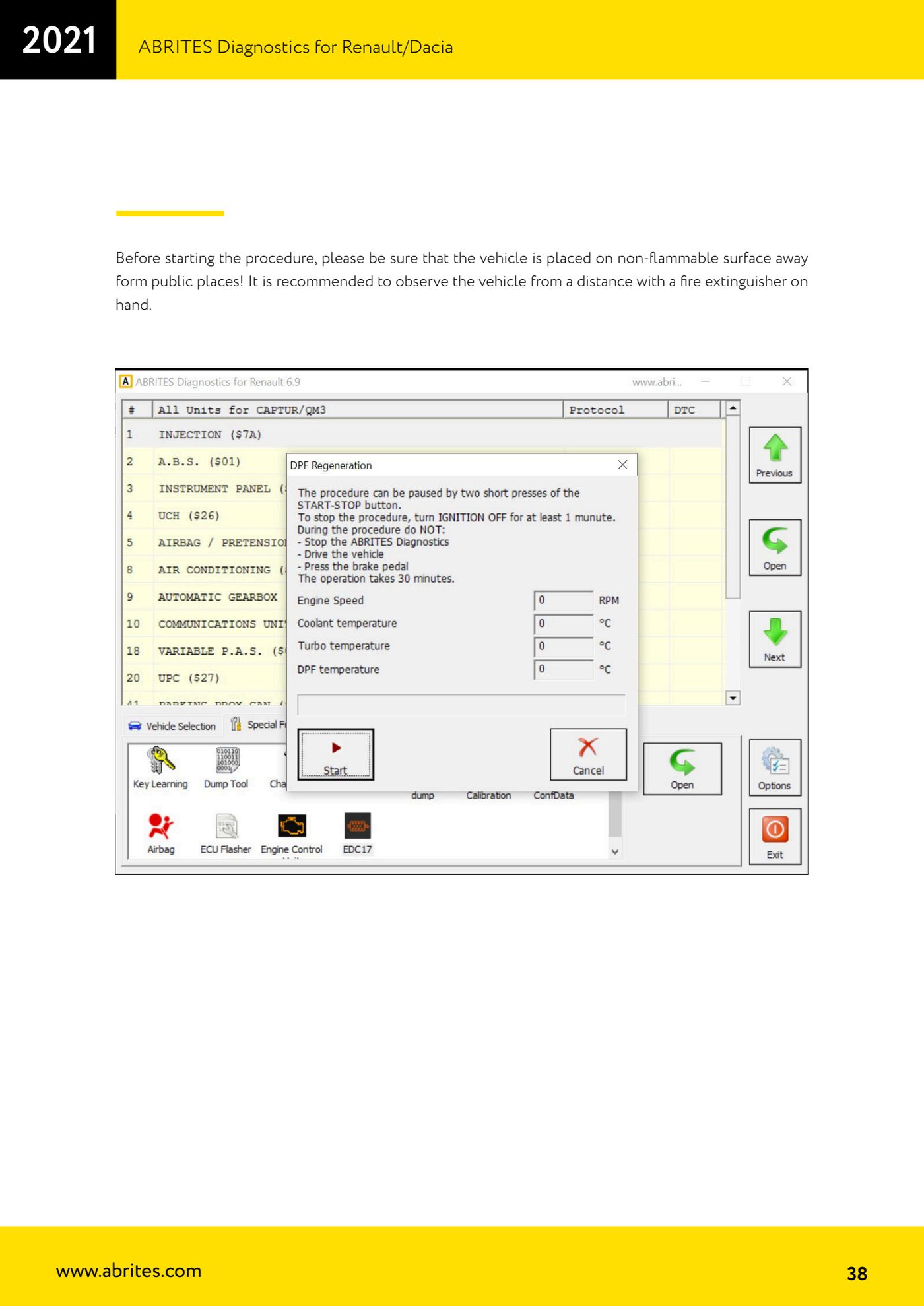
⚠ WarningInjector codes carry a checksum: the ECU rejects invalid codes, so pay full attention when typing the new values. For DPF regeneration, before starting make sure the vehicle is on a non-flammable surface and away from public areas; it is advisable to watch the vehicle from a distance with a fire extinguisher to hand.
Procedure
- Plug the AVDI into the OBDII port, launch the software and open the EDC17-specific functions.
- For injector coding, open the injector coding function and read the injector codes currently stored in the ECU.
- Note or save the codes you read before changing them.
- Type the new code for the replaced injector exactly as printed on the injector: the checksum built into the code means the ECU will reject wrong values.
- Write the new values and re-read to confirm the ECU has accepted them.
- For DPF regeneration, first move the vehicle onto a non-flammable surface away from public areas, with a fire extinguisher to hand.
- Start the DPF regeneration function and follow the on-screen instructions, watching the vehicle from a distance for the whole procedure.
- When finished read the DTCs and the DPF live values to confirm the regeneration worked.
Reference screenshots
Source: Manuale Renault/Dacia, cap. 4.8 (p.36-38) · ⏱ estimated time 30-60 min
← All Abrites guides Hardware catalogue
More guides Renault/Dacia
- Renault/Dacia: module scan, ECU identification and DTC read/clear with AVDI
- Renault/Dacia: live data (list and graph) and actuator tests
- Renault/Dacia: PIN reading and key/card learning - common procedure
- Renault X95 (Megane III, Scenic III, Fluence): learning virgin cards and already-working cards
- Renault X95 from 2011 with updated immobiliser software: cards via ABPROG
- Renault Clio IV: programming ABRITES key cards with PROTAG
- Renault: immobiliser PIN calculation from the key code and Clio PIN from EEPROM dump
- Renault/Dacia: editing dumps with "Dump Tool" and writing the VIN with "Change ID"
- Renault/Dacia: cluster mileage calibration and disabling the ABS synchronisation
- Renault: reading/writing configuration data, flash and IMMO erase on the supported engine ECUs
- Bosch EDC15C3 and EDC15C13 Renault: DB9 Female pinout for bench work
- Renault SID301, SIRIUS 32 and SIM32: DB9 Female pinout and ECU data for bench work