
Chip-Tools
Renault Clio IV / Captur: reading the handsfree module with ABPROG and DB25
Renault/Dacia
Interface Classic
Keys / Immo
Advanced
⏱ 30-60 min
7 steps
The connection procedure for reading the handsfree module on Clio IV and Captur. Use it when the data needed for key work has to be taken straight from the module and is not available through diagnostics.


⚠ WarningThe DB25 Male connector must be connected to the ABPROG, and the ABPROG must be connected to the AVDI. Only with this chain of connections can the handsfree module be read.
Procedure
- Remove the handsfree module from the car and take it to the bench.
- Connect the DB25 Male to the ABPROG as per the manual's diagram.
- Connect the ABPROG to the AVDI and the AVDI to the PC.
- Wire the handsfree module to the DB25 connector following the connections shown in the diagram.
- Launch the Renault/Dacia software and start the module read.
- Save the content you read to file before doing anything else.
- Refit the module to the car and check that the key/handsfree system works.
Reference screenshots
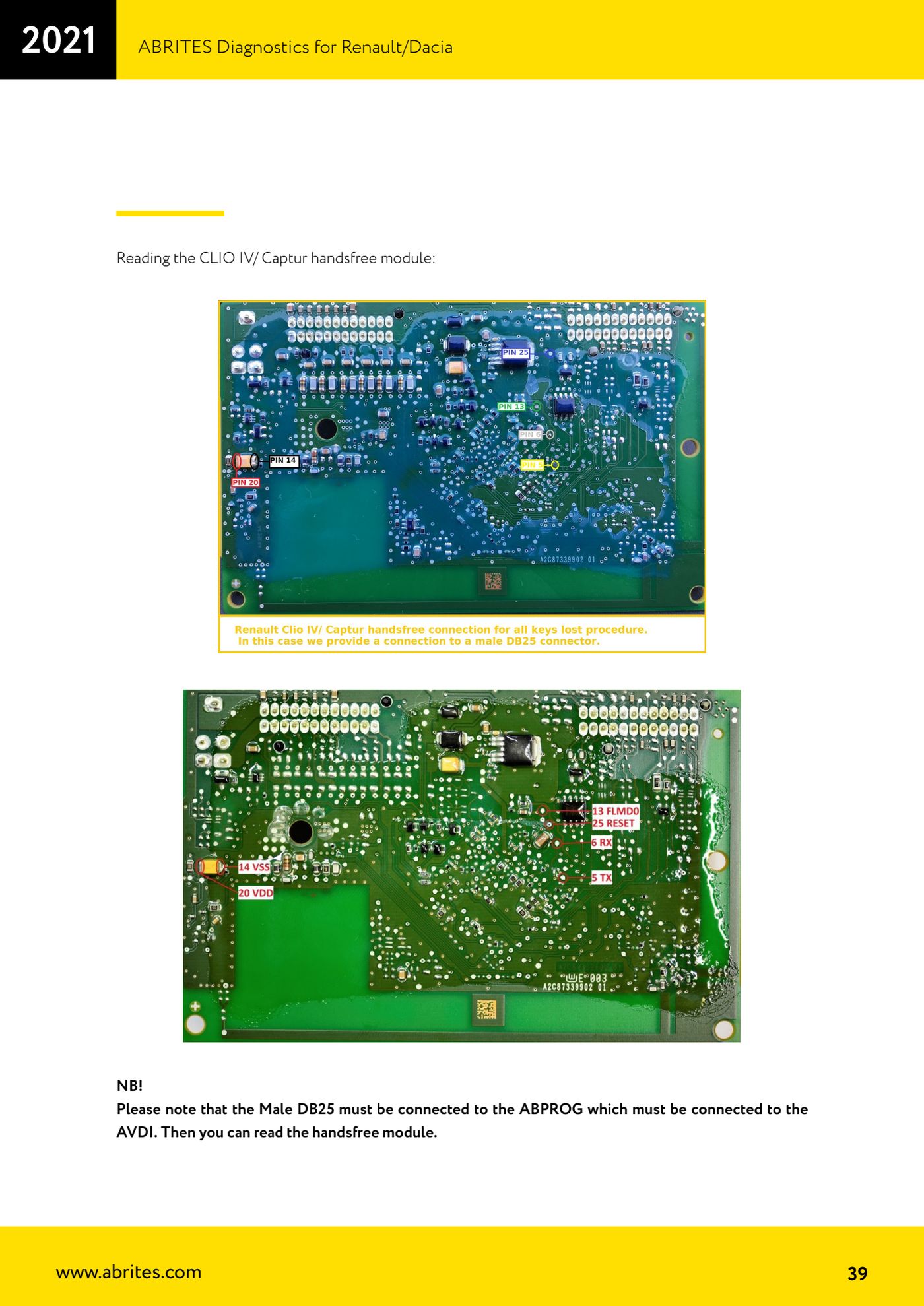
Source: Manuale Renault/Dacia, cap. 4.8 - lettura modulo handsfree Clio IV/Captur (p.39) · ⏱ estimated time 30-60 min
← All Abrites guides Hardware catalogue
More guides Renault/Dacia
- Renault/Dacia: module scan, ECU identification and DTC read/clear with AVDI
- Renault/Dacia: live data (list and graph) and actuator tests
- Renault/Dacia: PIN reading and key/card learning - common procedure
- Renault X95 (Megane III, Scenic III, Fluence): learning virgin cards and already-working cards
- Renault X95 from 2011 with updated immobiliser software: cards via ABPROG
- Renault Clio IV: programming ABRITES key cards with PROTAG
- Renault: immobiliser PIN calculation from the key code and Clio PIN from EEPROM dump
- Renault/Dacia: editing dumps with "Dump Tool" and writing the VIN with "Change ID"
- Renault/Dacia: cluster mileage calibration and disabling the ABS synchronisation
- Renault: reading/writing configuration data, flash and IMMO erase on the supported engine ECUs
- Bosch EDC15C3 and EDC15C13 Renault: DB9 Female pinout for bench work
- Renault SID301, SIRIUS 32 and SIM32: DB9 Female pinout and ECU data for bench work