
Chip-Tools
Renault: adapting a renewed UCH with the new VIN and the original PIN
Renault/Dacia
Interface Classic
Coding / Adaptations
Advanced
⏱ 20-40 min
9 steps
After renewing a UCH with the "Renew" function, this procedure adapts it to the car by writing the new VIN and using the original PIN. It is the step that makes a replaced or donor UCH operational.
Required licences
- —
Hardware / cables
 AVDI
AVDI- cavo OBDII
⚠ WarningMake sure you have the car's ORIGINAL PIN code before you start: without the original PIN the adaptation cannot be completed.
Procedure
- Open the "Renew" function for the UCH and select the car's correct module.
- Confirm with "Yes" at the warning and wait for the unit to come up as renewed.
- Get hold of the car's original PIN code (readable with the software's PIN functions or calculable from the dump) before going any further.
- Press "Adapt" and enter the new VIN to be written into the module.
- When prompted, take the key card out and turn the ignition OFF.
- Enter the car's original PIN in the software window.
- Insert the key card and turn the ignition ON.
- Carry out the ignition OFF/ON cycle the software asks for.
- Wait for the operation completed successfully message: the new UCH is adapted. Check cranking, central locking and that no DTCs remain.
Reference screenshots
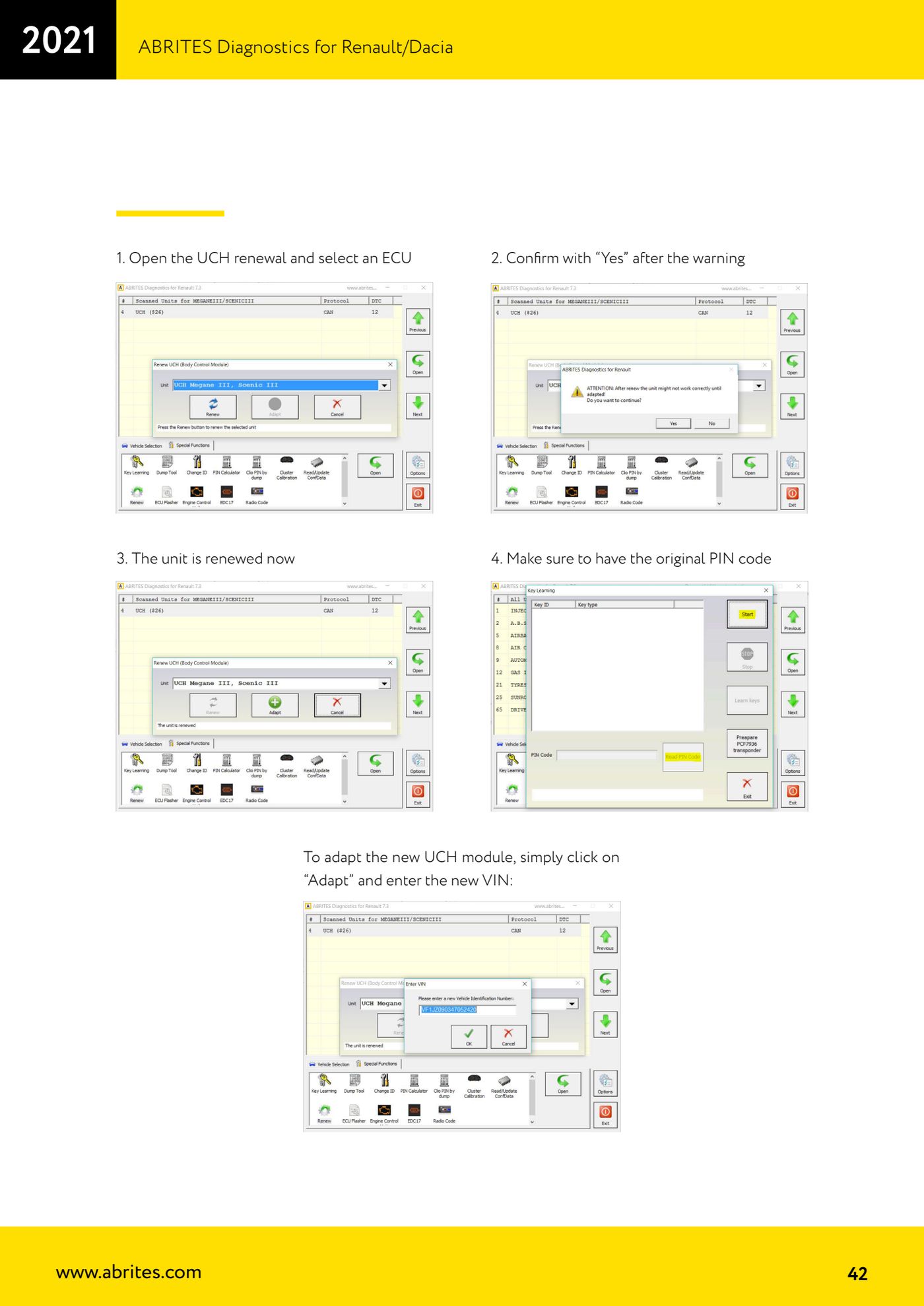
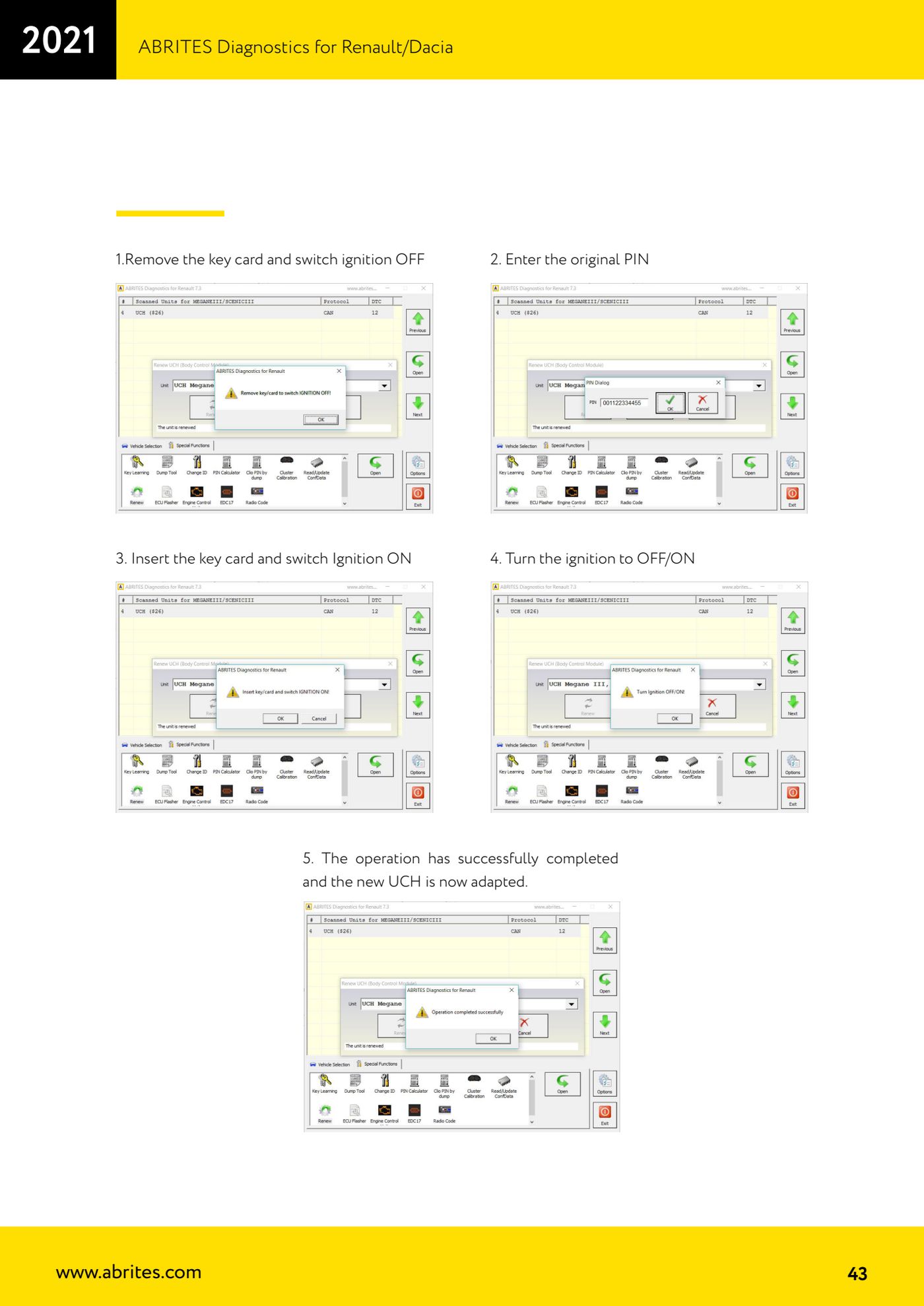
Source: Manuale Renault/Dacia, cap. 4.9 - UCH renewal e adattamento (p.41-43) · ⏱ estimated time 20-40 min
← All Abrites guides Hardware catalogue
More guides Renault/Dacia
- Renault/Dacia: module scan, ECU identification and DTC read/clear with AVDI
- Renault/Dacia: live data (list and graph) and actuator tests
- Renault/Dacia: PIN reading and key/card learning - common procedure
- Renault X95 (Megane III, Scenic III, Fluence): learning virgin cards and already-working cards
- Renault X95 from 2011 with updated immobiliser software: cards via ABPROG
- Renault Clio IV: programming ABRITES key cards with PROTAG
- Renault: immobiliser PIN calculation from the key code and Clio PIN from EEPROM dump
- Renault/Dacia: editing dumps with "Dump Tool" and writing the VIN with "Change ID"
- Renault/Dacia: cluster mileage calibration and disabling the ABS synchronisation
- Renault: reading/writing configuration data, flash and IMMO erase on the supported engine ECUs
- Bosch EDC15C3 and EDC15C13 Renault: DB9 Female pinout for bench work
- Renault SID301, SIRIUS 32 and SIM32: DB9 Female pinout and ECU data for bench work