
Chip-Tools
Preparing a HITAG2 dealer key for the Cayenne (up to 2010) and finding the 7th byte
Porsche
Interface Classic
Keys / Immo
Advanced
⏱ 30-60 min (up to 45 min for the 7th byte search alone)
11 steps
This prepares a virgin HITAG2 key/transponder for use as a dealer key on the Cayenne up to 2010, getting the component security bytes from the ECU over OBDII or from a Kessy/ECU dump. You need it when you don't have a key ordered from the dealer.
Required licences
- —
Hardware / cables
 AVDI
AVDI- cavo OBDII
- programmatore chiavi HiTag2 o Abrites key programmer
- transponder PCF7936 vergine o chiave vergine
⚠ WarningWith the Tango programmer the "Find 7th byte from working key" function does NOT work: you need a Hitag2 or an Abrites programmer. During the manual 7th byte search you must only INSERT the key into the ignition lock, do NOT turn it. Keep the programmer at least 15 cm away from the ignition lock, otherwise you'll interfere with the car reading the key. If you don't have a working key for the car, you have to bridge the fuses as described in the appendix to get communication with the ECU.
Procedure
- On 2004-2007 models with a HITAG2 key/transponder use a virgin PCF7936 transponder or a virgin key. The transponder must be in encrypted ("Crypto"/Cipher) mode: with your HiTag2 programmer replace 0x06 with 0x0E in the first byte of the configuration page (page 3; page 0 is the transponder ID, pages 1 and 2 are the secret key). If the value is already 0x0E, the transponder is already in cipher mode.
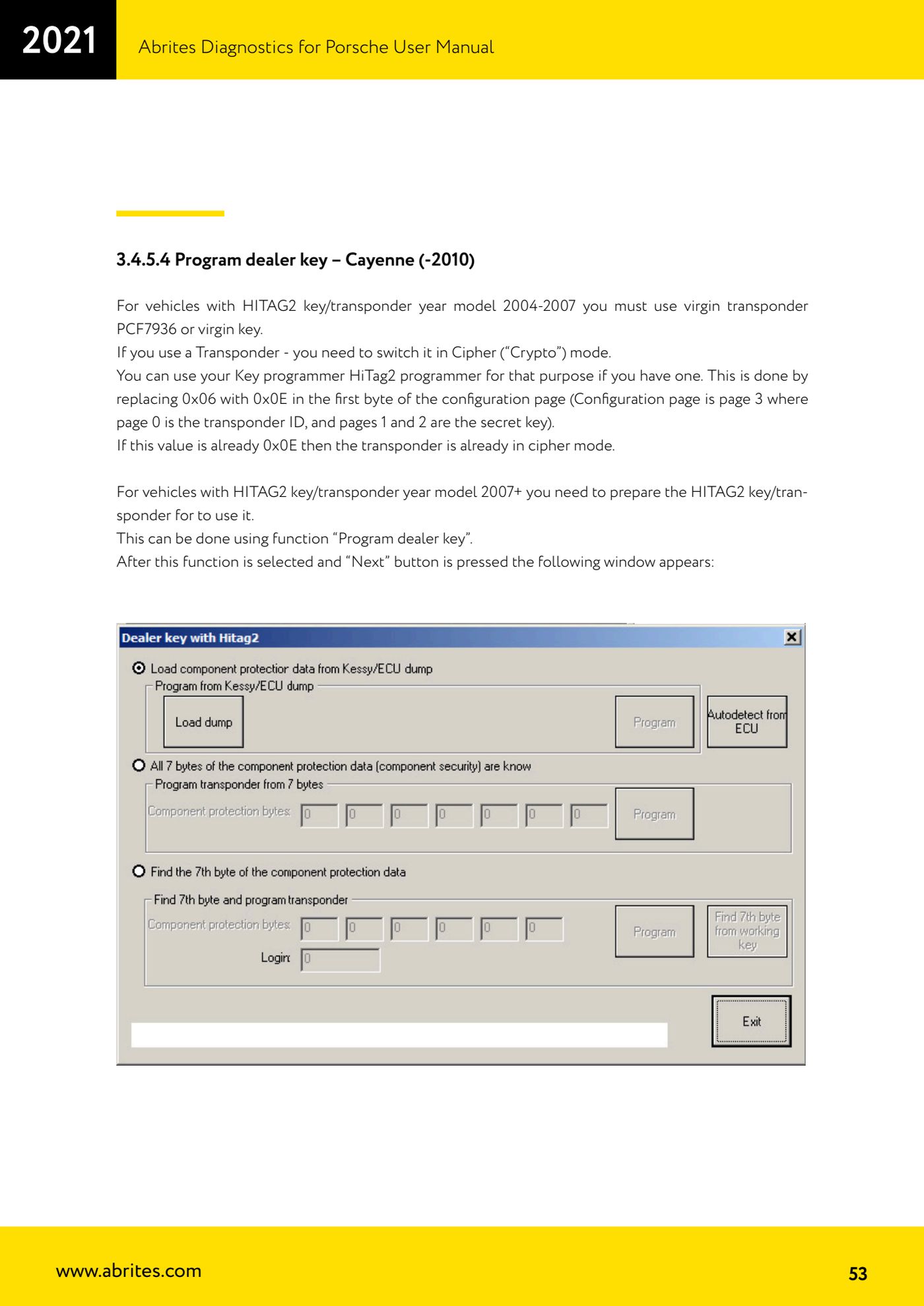
- On 2007-onwards models prepare the HITAG2 key/transponder with the "Program dealer key" function: connect the AVDI to the OBDII, open the "Special Functions", select "Key learning", model "Cayenne (-2010)", function "Program dealer key" and press "Next".
- Method A - nothing removed, all over OBDII: press "Autodetect from ECU". The software tries to read the component security bytes from the ECU automatically and decides for itself whether the 7th byte needs to be searched for. If you don't have a working key for the car, first bridge the fuses as described in the appendix to get communication with the ECU.
- If after the read you have all 7 bytes, you can program the key directly: press "Program".
- If you only have 6 bytes and you do have a working key for the car: put it in the programmer and press "Find 7th byte from working key"; the 7th byte is found in a few seconds (doesn't work with Tango, you need a Hitag2 or an Abrites programmer).
- If you only have 6 bytes and do NOT have a working key: search for the 7th byte manually. Connect the interface to the OBDII and connect the programmer as well, then press "Program": the software tells you when to put the key in the ignition lock and when to put it back in the programmer. Only insert the key, do NOT turn it. The search takes about 20-25 minutes, worst case up to 45 minutes.
- To work faster you can keep the programmer near the ignition lock, but at least 15 cm away, otherwise the car reading the key will be disturbed.
- Tip: for the 7th byte search use a plastic key or a blank transponder, at least the first few times. If the key locks up (flat battery, PC hangs, etc.) you can recover the encryption key with "Find 7th byte from working key" and restore the key with the Hitag2 key tool.
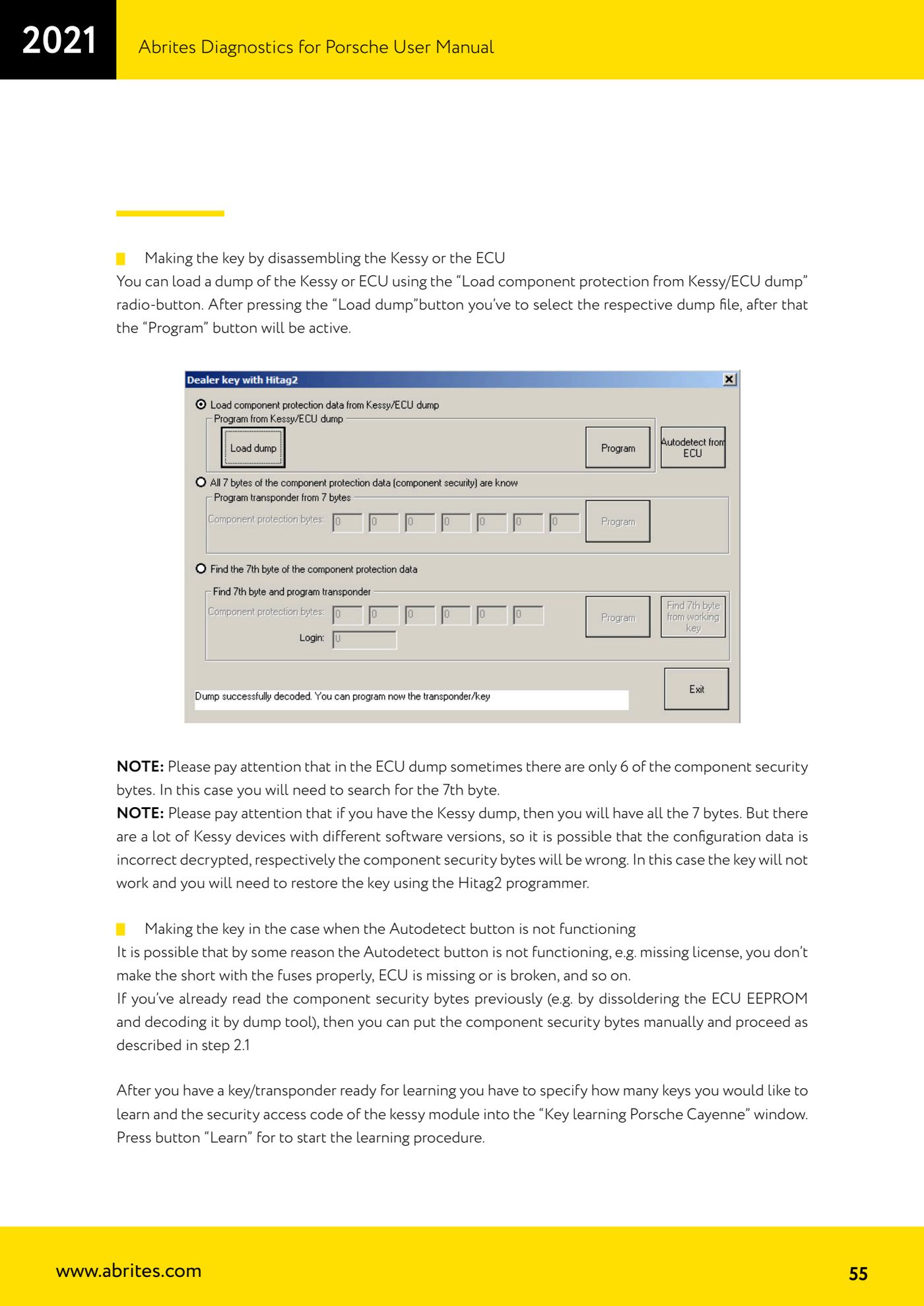
- Method B - removing the Kessy or the ECU: select the "Load component protection from Kessy/ECU dump" radio button, press "Load dump", pick the dump file; the "Program" button then becomes active. Note: the ECU dump sometimes contains only 6 of the component security bytes and you still have to find the 7th. With the Kessy dump you get all 7 bytes, but there are many Kessy software versions: if the configuration data is decrypted incorrectly the bytes come out wrong, the key won't work and has to be restored with the Hitag2 programmer.
- Method C - if "Autodetect" doesn't work (missing licence, fuse bridge not done properly, ECU missing or faulty): if you have previously read the component security bytes, for example by desoldering the ECU EEPROM and decoding it with the Dump Tool, enter them manually and carry on as in step 4.
- With the key/transponder ready for learning, in the "Key learning Porsche Cayenne" window enter how many keys you want to learn and the security access code of the Kessy module, then press "Learn" to start the learning.
Reference screenshots
Source: Manuale Porsche (interfaccia classica), seconda parte, cap. 3.4.5.4 (p.53-55) · ⏱ estimated time 30-60 min (up to 45 min for the 7th byte search alone)
← All Abrites guides Hardware catalogue
More guides Porsche
- Porsche software setup: protocols, K-Line baud rates, pins and CAN resistance
- Scanning control units, identification, actual values and reading/clearing DTCs
- Coding control unit options with "Coding - Settings" (Boxster 987 PAS example)
- Automatic coding, manual coding and restoring from file (UDS CAN TP units)
- Actuator tests ("Actuator tests") on Porsche control units
- Writing the VIN into a control unit with "Change ID"
- Control unit replacement: copying the configuration data with "Control Unit Replacement"
- CAN instrument cluster 911 997, Boxster 987 and Cayman: ConfData, mileage reading and cluster reset
- Service interval reset and oil level measurement: 911 997, Boxster 987, Cayman
- Reading and erasing the instrument cluster event memory (Instrument Cluster CAN)
- Service interval reset for Panamera, Cayenne 2011+, Macan, 918 Spyder, 911 991 and Boxster/Cayman 981
- Writing and changing the maintenance intervals: Panamera (2010-2012) and Cayenne (2011+)