
Chip-Tools
Nissan/Infiniti PIN code calculation: from BCM, glove box label, ICU or SEC
Nissan/Infiniti
Interface New
Keys / Immo
Medium
⏱ 10-20 min
7 steps
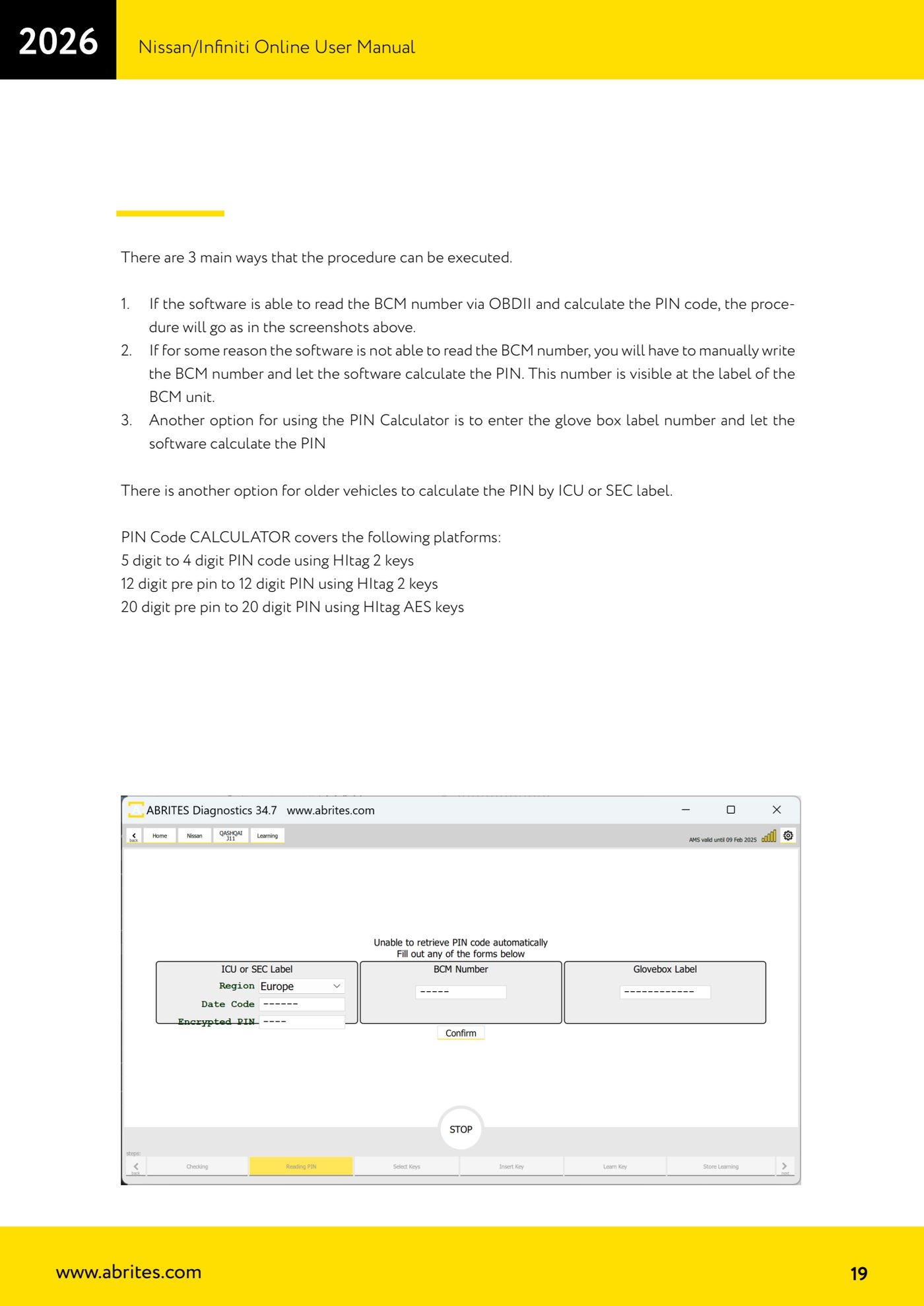
When key learning cannot work out the PIN on its own, the built-in calculator derives it from an identification number: the BCM number read over OBDII or printed on its label, the number on the glove box label, or on older cars the number on the ICU or SEC label.
Required licences
- —
Hardware / cables

Procedure
- Start the "Key Learning" procedure: under normal conditions the software reads the BCM number over OBDII and works out the PIN by itself, with no further steps.
- If the BCM number cannot be read over OBDII, choose manual entry: strip out enough trim to read the label on the BCM unit, where the number is printed, and type it into the software to have the PIN calculated.
- Alternatively use the number printed on the glove box label and let the software calculate the PIN.
- On older cars, if you have none of the above, calculate the PIN from the ICU or SEC label number.
- Check that the platform is covered by the calculator: 5-digit PIN to 4-digit PIN with Hitag 2 keys; 12-digit pre-PIN to 12-digit PIN with Hitag 2 keys; 20-digit pre-PIN to 20-digit PIN with Hitag AES keys.
- Once you have the PIN, carry on with guided key learning following the on-screen prompts.
- Write the PIN on the job sheet: you will need it for future work on the same car.
Reference screenshots
Source: Manuale Nissan/Infiniti Online, cap. 5 (p.19) · ⏱ estimated time 10-20 min
← All Abrites guides Hardware catalogue
More guides Nissan/Infiniti
- Module scan and DTC read/clear on Nissan/Infiniti with the AVDI
- Reading live parameters (list and graph) and actuator testing on Nissan/Infiniti
- Calculating and extracting the Nissan/Infiniti PIN Code (ICU, SEC, BCM, OBDII, glovebox label)
- Nissan key programming with NATS-2, NATS-4, NATS-5 and NATS-5+ immobiliser
- EEPROM NATS2/5 Memory Manager: reading, saving and writing NATS configuration data
- Pinout of NATS 2, NATS 4 and NATS-5/5+ Siemens immobiliser units for bench work
- EM002 ESL/steering lock emulator for Renault/Nissan: 6-pin and 8-pin connection diagrams
- Starting Abrites Nissan/Infiniti Online and selecting the vehicle
- Module scan and DTC read/clear on Nissan and Infiniti
- Real-time parameter monitoring (Live Values) on Nissan and Infiniti
- Actuator Testing on Nissan and Infiniti
- Dealer-level advanced functions: the "procedures" menu of Nissan/Infiniti modules