
Chip-Tools
Full vehicle scan and DTC read/clear (Chrysler, Dodge, Jeep)
Fiat/FCA
Interface Classic
Diagnostics
Basic
⏱ 10-20 min
9 steps
This is the basic function of the Abrites Diagnostics for Chrysler, Dodge, Jeep software: it finds all the control units on board, reads their fault codes and lets you clear the temporary ones. It is the first step of any job, before moving on to the Special Functions.
Required licences
- —
Hardware / cables
 AVDI
AVDI- cavo OBD-II
- Adattatore J1850 (su alcuni modelli)
⚠ Warning"Clear DTCs" only removes temporary codes: faults caused by a genuine defect come straight back. Do not use clearing to "close out" a job without having fixed the fault.
Procedure
- Check the prerequisites: AVDI interface, PC with Windows 7 or later, software updated to the latest version, active AMS and a stable Internet connection.
- Connect the AVDI to the vehicle's OBD-II socket and to the PC, then switch the ignition ON. Diagnostics always go through the OBD-II connector; the software handles K-Line, CAN-BUS and J1850 (for J1850 some models need the dedicated adapter).
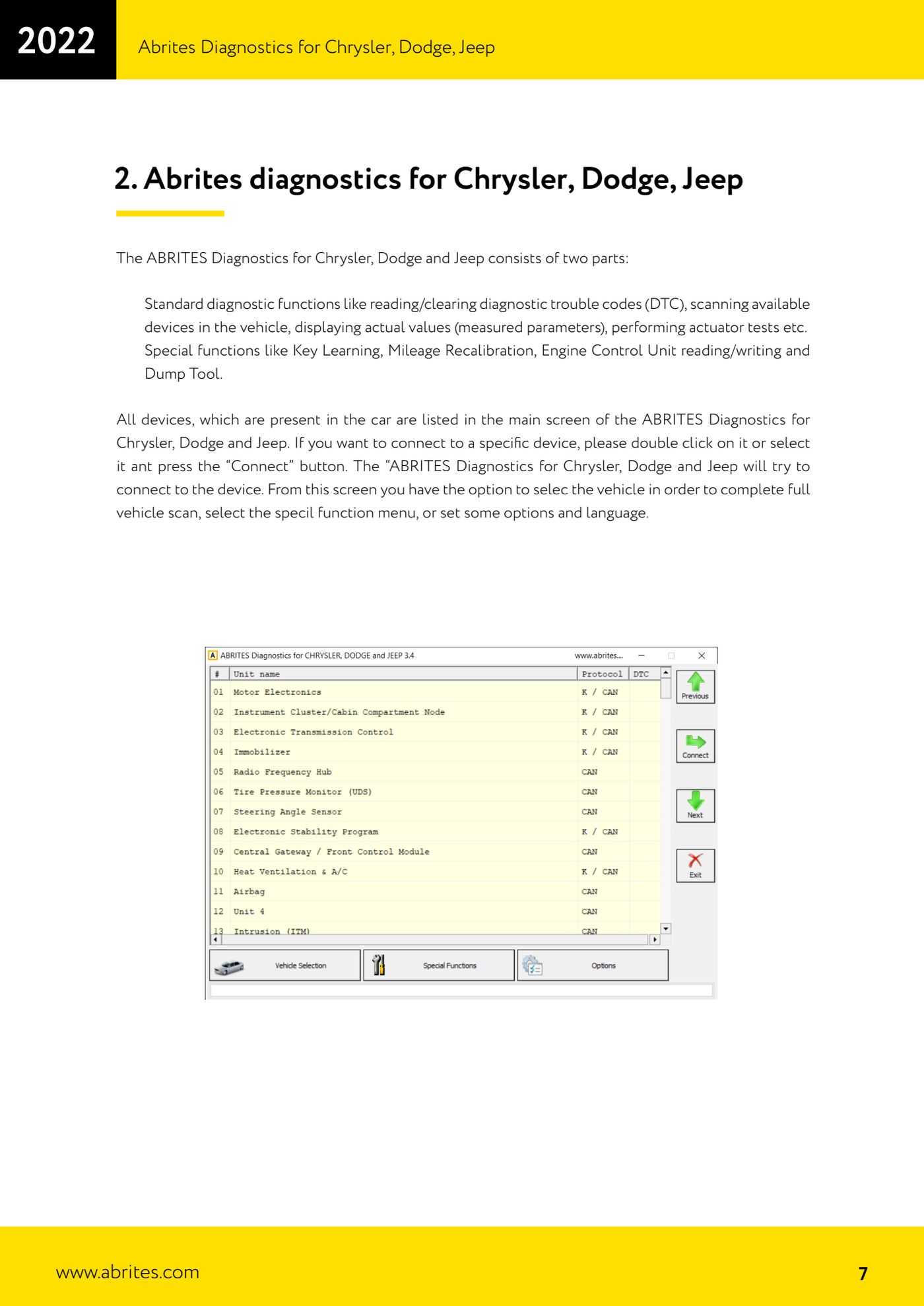
- Start "Abrites Diagnostics for Chrysler, Dodge, Jeep": the main screen shows the control units detected on board.
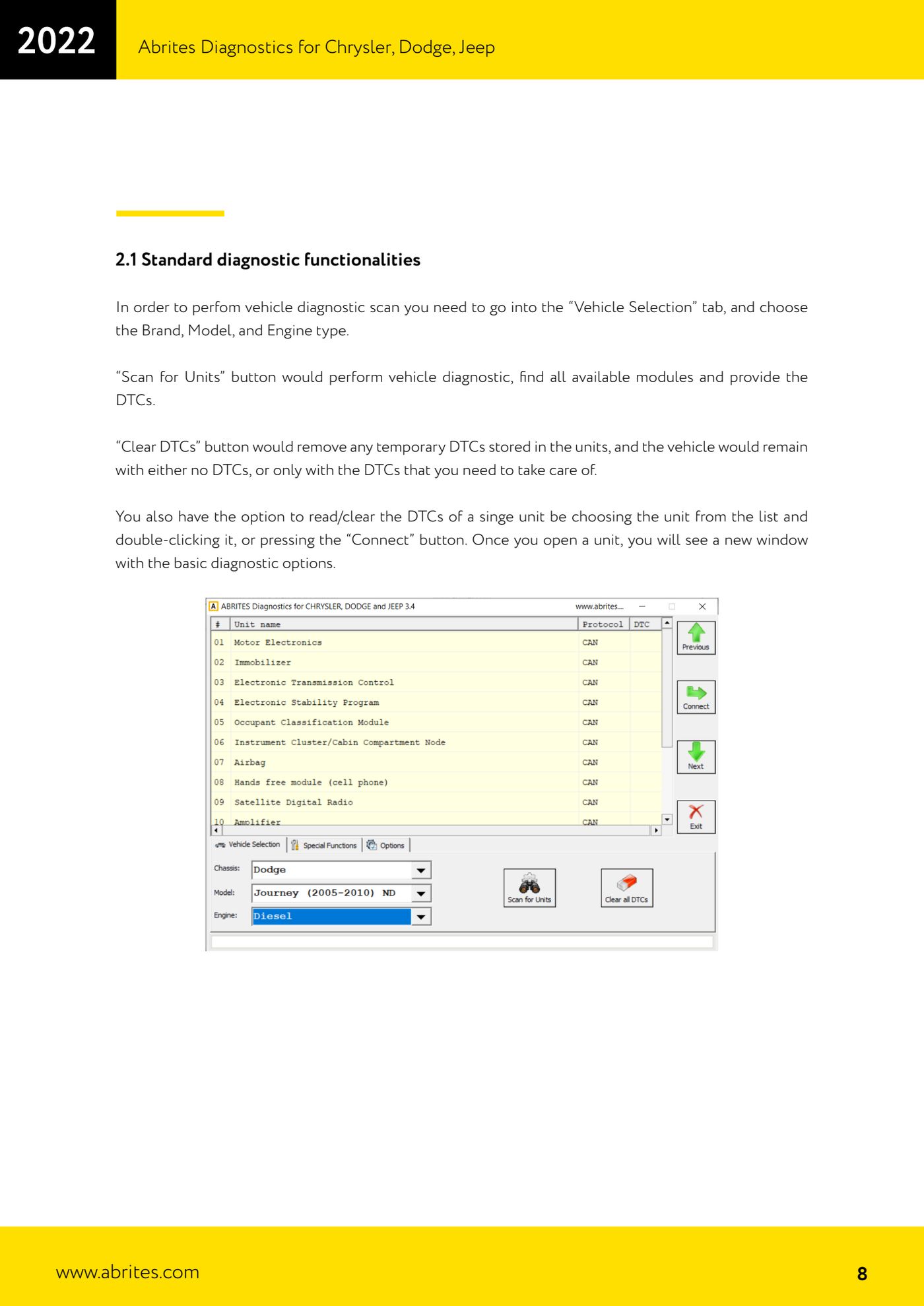
- Open the "Vehicle Selection" tab and set the Brand, Model and Engine type of the vehicle you are working on.
- Press "Scan for Units": the software runs the full scan, lists all available modules and shows the DTCs stored in each one.
- Go through the list of codes and note the ones to work on before clearing anything.
- To work on a single control unit, select it in the list and double-click it or press "Connect": the window with that module's diagnostic functions opens, where you will find its own "Read DTCs" and "Clear DTCs".
- Once you have fixed the faults, press "Clear DTCs" from the main screen to clear the temporary codes from all units.
- Run "Scan for Units" again to see which faults have genuinely gone and which have come back.
Reference screenshots
Source: Manuale Chrysler / Dodge / Jeep, cap. 1 e 2.1 (p.6-8) · ⏱ estimated time 10-20 min
← All Abrites guides Hardware catalogue
More guides Fiat/FCA
- Vehicle scan, module identification and reading/clearing DTC (Fiat, Alfa Romeo, Lancia, FCA)
- Reading live data (Data Display) and ECU identification on FCA vehicles
- Actuator tests on FCA control units (engine, BCM and other modules)
- BCM, RFH and Key Manager: reading the PIN, Component Protection data and Transponder Maker
- Key programming via OBD on FCA vehicles (with PIN from the RFH and Security Gateway bypass)
- Key programming on FCA keyless models from 2020 onwards in All Keys Lost (CB017 set + ZN051)
- Key programming on Fiat Ducato, Fiat 500L and Iveco Daily 2020+ (PIN from the BCM EEPROM with ABProg and ZN057)
- FCA instrument cluster calibration via OBDII ("Cluster Calibration" and "Cluster Calibration 2")
- ECU Flash Manager: reading and writing flash memory on Marelli and Bosch ECUs (IAW, MJD 6JF, ME7 boot mode)
- ECU Configuration Manager: reading/writing configuration and VIRGIN reset (EDC15, MJD 6JF/8F2, Marelli IAW, ME7)
- Proxi Alignment: BCM configuration and module alignment on FCA vehicles (bench work included)
- Module scan and DTC read/clear with FCA Online (Fiat, Alfa Romeo, Jeep, Lancia)