
Chip-Tools
Reading and writing the VIN in control units ("Program IDs")
BMW
Interface New
Coding / Adaptations
Medium
⏱ 15-30 min
7 steps
The "Program IDs" function shows, on a single screen, the identification numbers (VIN) stored in every control unit on the vehicle and lets you change them. It is needed when replacing modules and also after flashing the DME firmware, because some control units have to be realigned to the VIN once the update is done.
Required licences
- —
Hardware / cables
 AVDI
AVDI- PC Windows
⚠ WarningSome identifiers may only be programmed in line with local legislation: changing the VIN in control units must only be done in legitimate cases (module replacement on the same vehicle, realignment after flashing).
Procedure
- Connect the AVDI to the vehicle and start the BMW/Mini Online software; leave the vehicle on external power.
- Press the "Program IDs" button.
- Read the table: for each control unit the identification number (VIN) stored inside it is shown. Compare the values: a module with a VIN different from the rest is typically a used module taken off another vehicle.
- Check the module's history through the UIF (user info fields), which record the work already carried out on that control unit.
- To align a module to the vehicle, change its identifier by entering the correct VIN and confirm the write.
- After flashing the DME firmware, go back into "Program IDs" and check the module's VIN: some control units need it rewriting once the update is done.
- Run the "Scan" again to check that no faults relating to module identification have appeared.
Reference screenshots
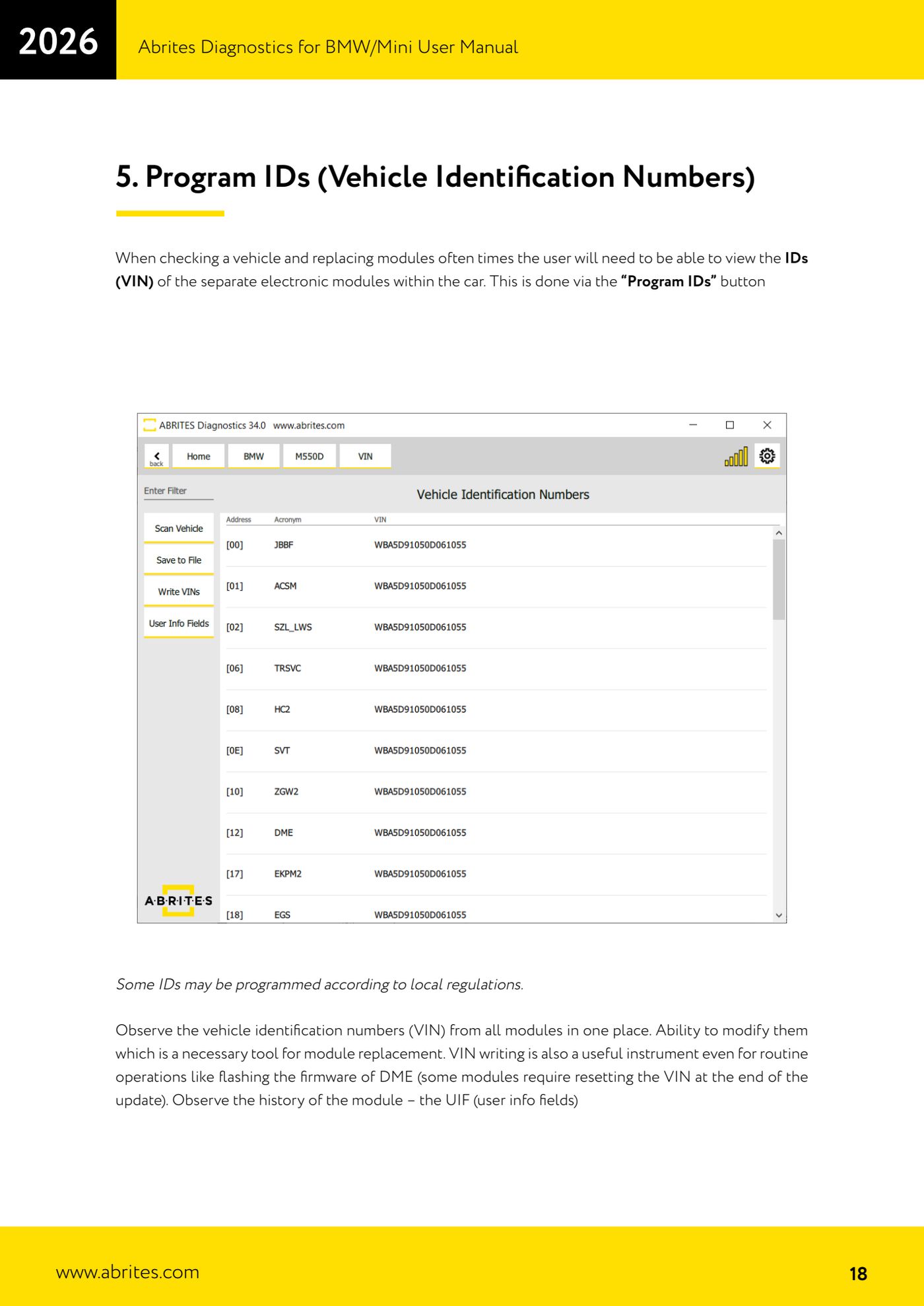
Source: Manuale BMW/Mini, prima parte, cap. 5 (p.18) · ⏱ estimated time 15-30 min
← All Abrites guides Hardware catalogue
More guides BMW
- Module scan and fault code (DTC) clearing on BMW/Mini E series and F series
- Reading real-time parameters ("Live values") with graphing and file comparison
- Actuator tests with simultaneous reading of measured values
- Central coding and Vehicle Order: adding or removing options and retrofits
- Programming (flashing) control unit firmware with free choice of version
- MD/MG engine control unit replacement on BMW G series (DME Exchange with DFlash)
- CAS1/CAS2/CAS3/CAS3+ key programming (BMW E series) via OBDII
- FEM/BDC key programming (BMW F series) with EWS Manager
- FEM/BDC key programming over OBDII (BMW F series) - all keys lost and spare key
- Connections for F series BDC: ENET cable CB015 or OBDII CB100/CB106
- Preparing FEM and BDC units (software above version 85) with M95256 EEPROM reading
- EWS Functions menu on a prepared FEM/BDC: keys, mileage reset, backup and virginize