
Chip-Tools
Preparing a dealer key on vehicles with Hitag2 transponder (Kessy)
VAG
Interface Classic
Keys / Immo
Advanced
⏱ 20-45 min
11 steps
Preparing the dealer key on vehicles with Hitag2 transponder: the job can be done entirely over OBDII, or by loading a Kessy or ECU dump, or by entering the CS manually if it is already known.


⚠ WarningIMPORTANT: while searching for the 7th byte manually you must only insert the key, DO NOT TURN IT. Keep the programmer at least 15 cm away from the ignition lock, otherwise it will interfere with the car reading the key. If you do not have a working key for the vehicle, you must bridge the fuses as described in the appendix to get communication with the ECU.
Procedure
- In the "Key learning" special function press the dealer key preparation button: the Hitag2 window opens.
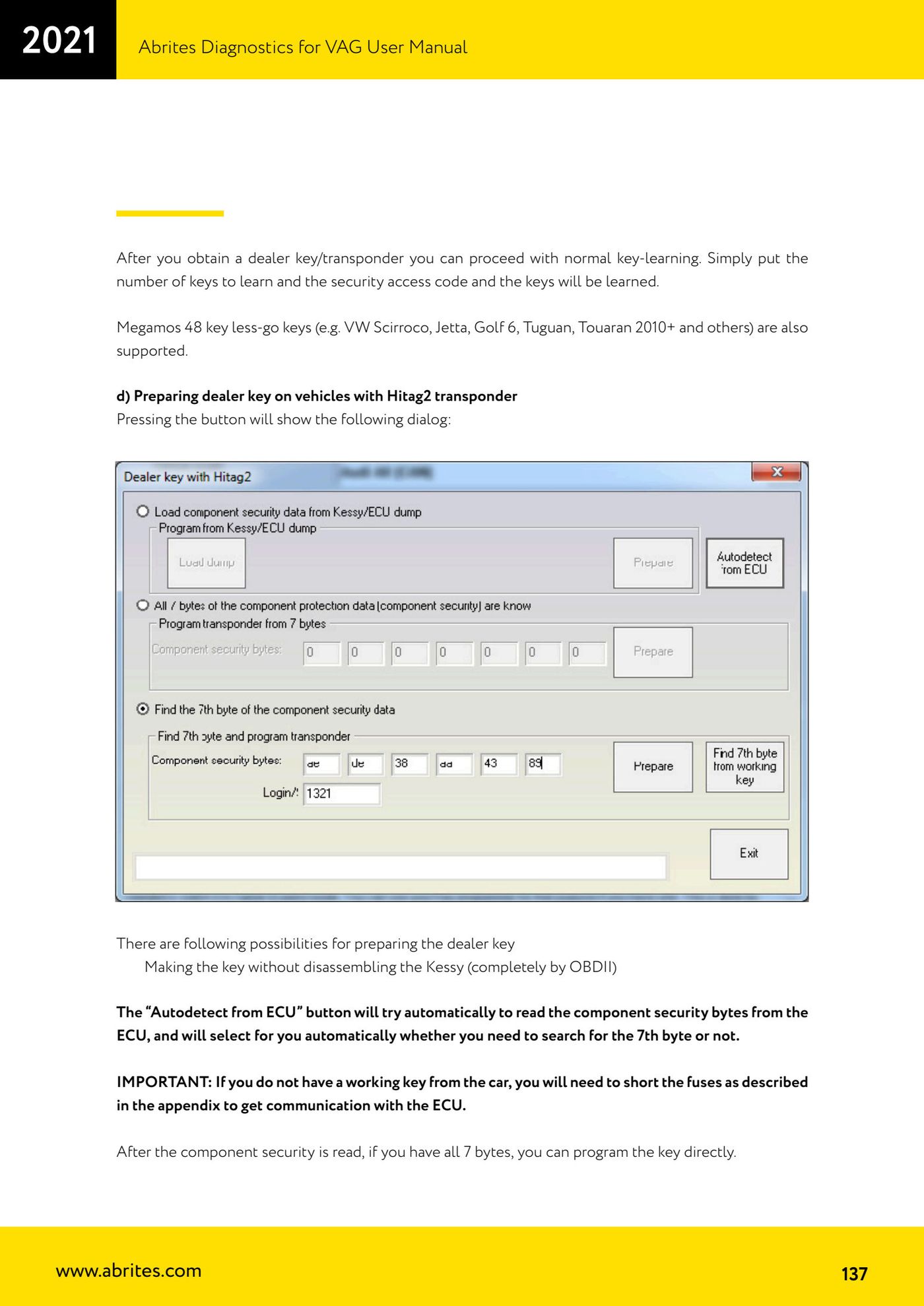
- OBDII method without removing the Kessy: press "Autodetect from ECU"; the software attempts to read the component security bytes from the ECU and automatically decides whether the 7th byte needs to be found.
- If you have all 7 bytes you can program the key straight away.
- If you only have 6 bytes and a working key is available: put it in the programmer and press "Find 7th byte from working key"; the 7th byte is found within seconds.
- If you only have 6 bytes and no working key: search for the 7th byte manually. Plug the interface into the OBDII socket and connect the programmer as well; press "Program" and follow the prompts telling you when to put the key in the ignition lock and when to put it in the programmer. The procedure takes about 20-25 minutes, up to 45 minutes.
- Tip: use a plastic key or a blank transponder when searching for the 7th byte, at least the first few times. If the key locks up (flat battery, frozen computer, etc.) you can recover the encryption key with "Find 7th byte from working key" and then restore the key with the Tag key tool.
- Method with the Kessy or ECU removed: select the "Load component protection from Kessy/ECU dump" radio button, press "Load dump", pick the dump file; the "Program" button then becomes active.
- Note on dumps: an ECU dump sometimes contains only 6 component security bytes, in which case you have to find the 7th as above. A Kessy dump contains all 7 bytes, but there are many Kessy software versions and the EEPROM can be decrypted incorrectly (especially on later vehicles): in that case the CS will be wrong, the key will not work and you will have to restore it with the Hitag2 programmer.
- Checking the Kessy dump decryption: get the PIN code from the dump tool and try entering it in the immobilizer; if it is accepted, the EEPROM decryption is correct.
- Method with a known CS (e.g. by desoldering the ECU EEPROM and decoding it with the dump tool): enter the component security bytes manually and carry on as above.
- With the dealer key prepared, state how many keys you want to program, enter the security access and press "Learn".
Reference screenshots
Source: Manuale VAG (Offline), cap. 2.8.2.1.2 d) (p.137-138) · ⏱ estimated time 20-45 min
← All Abrites guides Hardware catalogue
More guides VAG
- General diagnostics and fault code (DTC) read/clear
- Basic settings — factory reset (throttle body, steering, clutch)
- Adaptations — customer-requested changes
- Long coding — enabling hidden features
- MMI Functions — enable/disable infotainment features
- Wireless CarPlay / Android Auto
- Video in motion
- BCM2 unlock with the ZN080 set (solder-free)
- Reading CS on bench (PCR2.1, Simos 8.x/1x.xx, DCM6.2, TCU AL551/DL501/DQxxx)
- DSG mileage recalibration
- Service Intervals
- ECU programming with .frf files