
Chip-Tools
Instrument cluster via K-Line: EEPROM read/write (mileage, PIN)
VAG
Interface Classic
Special Functions
Medium
⏱ 20-40 min
8 steps
The "instrument K-Line" special function opens a direct connection to the instrument cluster or the immobiliser over K-Line (KWP1281 or KWP2000) and lets you read and write the EEPROM to recover mileage and PIN. The connection is always made over K-Line, regardless of the protocol configuration options.
Required licences
- —
Hardware / cables

⚠ WarningSelecting the wrong cluster type can lock the cluster up so that it refuses diagnostic requests until you reset it by removing power (battery or fuse): this typically happens with Bosch clusters opened as "Instrument cluster (VDO66, VDO86, Motometer)". With "Instrument Cluster Audi A4 BOSCH RB4 CRYPTO 2001+" and "Instrument Cluster Audi A4 BOSCH RBx" the EEPROM will read either way, but writing changes with the wrong type selected can damage the cluster. While the RB8 EEPROM is being read the cluster goes into service mode and displays "L0 x-y": if it stays there (PC shut down, interface unplugged, flat battery) you must re-read the RB8 cluster EEPROM and set the immobiliser status back to 6.
Procedure
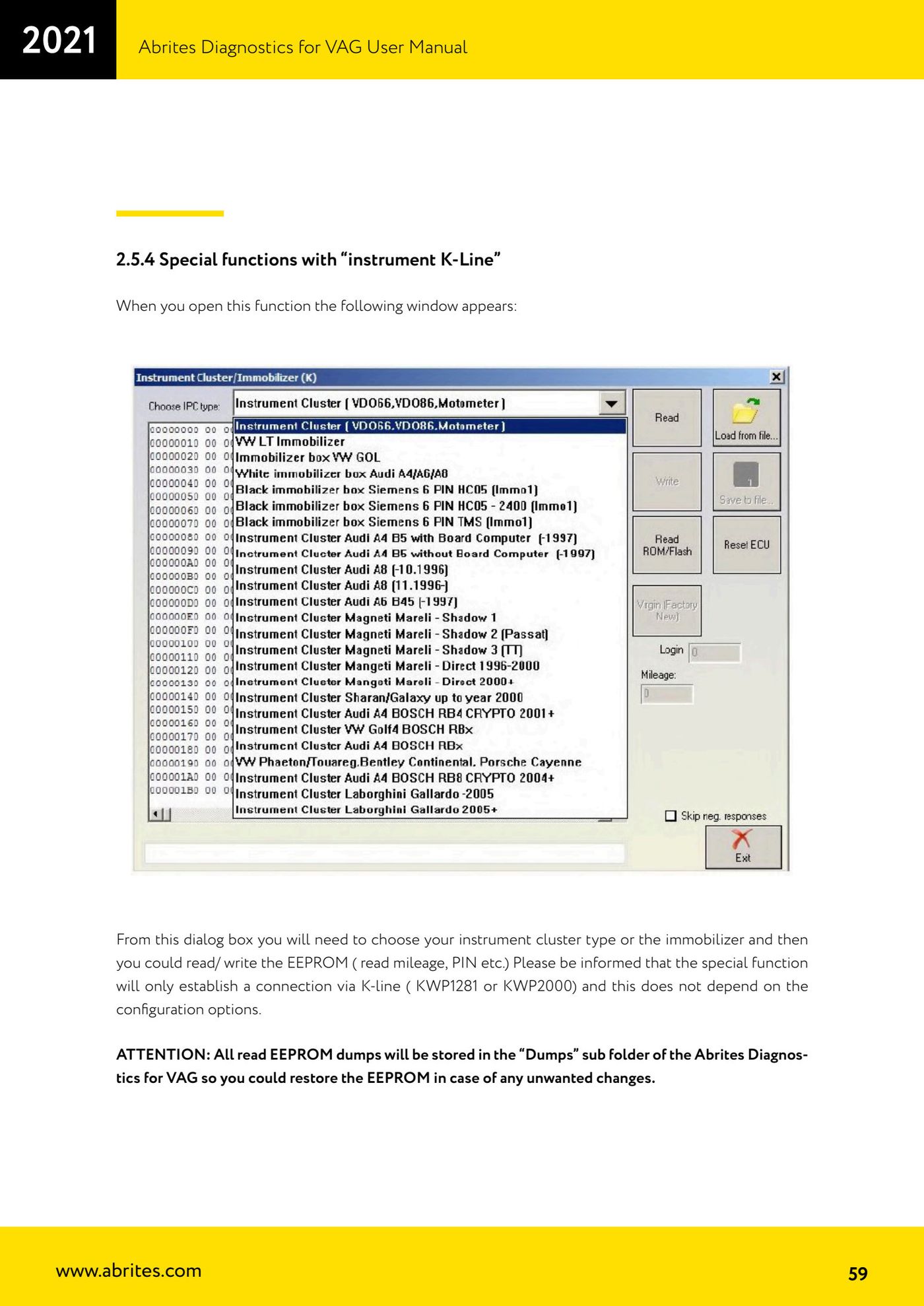
- Open the "instrument K-Line" special function: the module selection window appears.
- Select from the list the exact instrument cluster type, or the immobiliser fitted to the vehicle.
- Run the EEPROM read: on most clusters the software extracts mileage and immobiliser data automatically.
- Check that the dump you have read is saved in the "Dumps" subfolder of Abrites Diagnostics for VAG: you will need it to restore the EEPROM if any unwanted changes are made.
- If you need to establish whether the Audi A4 cluster is "RBx" or "RB4 CRYPTO 2001+": first pick "Instrument Cluster Audi A4 BOSCH RBx" and read the EEPROM.
- If the mileage shown matches the real mileage and the displayed login is accepted, the correct type is "Instrument Cluster Audi A4 BOSCH RBx"; otherwise it is an "Instrument Cluster Audi A4 BOSCH RB4 CRYPTO 2001+".
- For Magneti Marelli clusters, refer to Appendix A of the manual.
- If connection to a Motometer cluster fails, send the "motometers.txt" text file to support@abrites.com: the cluster will be added to the database within three working days.
Reference screenshots
Source: Manuale VAG (Offline), cap. 2.5.4 (p.59-60) · ⏱ estimated time 20-40 min
← All Abrites guides Hardware catalogue
More guides VAG
- General diagnostics and fault code (DTC) read/clear
- Basic settings — factory reset (throttle body, steering, clutch)
- Adaptations — customer-requested changes
- Long coding — enabling hidden features
- MMI Functions — enable/disable infotainment features
- Wireless CarPlay / Android Auto
- Video in motion
- BCM2 unlock with the ZN080 set (solder-free)
- Reading CS on bench (PCR2.1, Simos 8.x/1x.xx, DCM6.2, TCU AL551/DL501/DQxxx)
- DSG mileage recalibration
- Service Intervals
- ECU programming with .frf files