
Chip-Tools
Full Subaru module scan and DTC reading/clearing with the AVDI
Subaru
Interface New
Diagnostics
Basic
⏱ 10-20 min
8 steps
The first job on any Subaru: scan all the control units on board, read the fault codes module by module and clear them. It is the basis for understanding the state of the vehicle before any key, service or programming work.
Required licences
- —
Hardware / cables

⚠ WarningThe Subaru software is based on online servers: the PC must stay connected to the Internet with a stable connection and an active AMS, otherwise the functions will not run.
Procedure
- Connect the AVDI to the vehicle OBDII socket and to the PC, then turn the ignition ON.
- Check the PC is connected to the Internet: Subaru diagnostics works with online servers and without a connection the functions will not start.
- Start "Abrites Diagnostics for Subaru" from the Quick start icon on the desktop, clicking the make logo in the Abrites diagnostic suite.
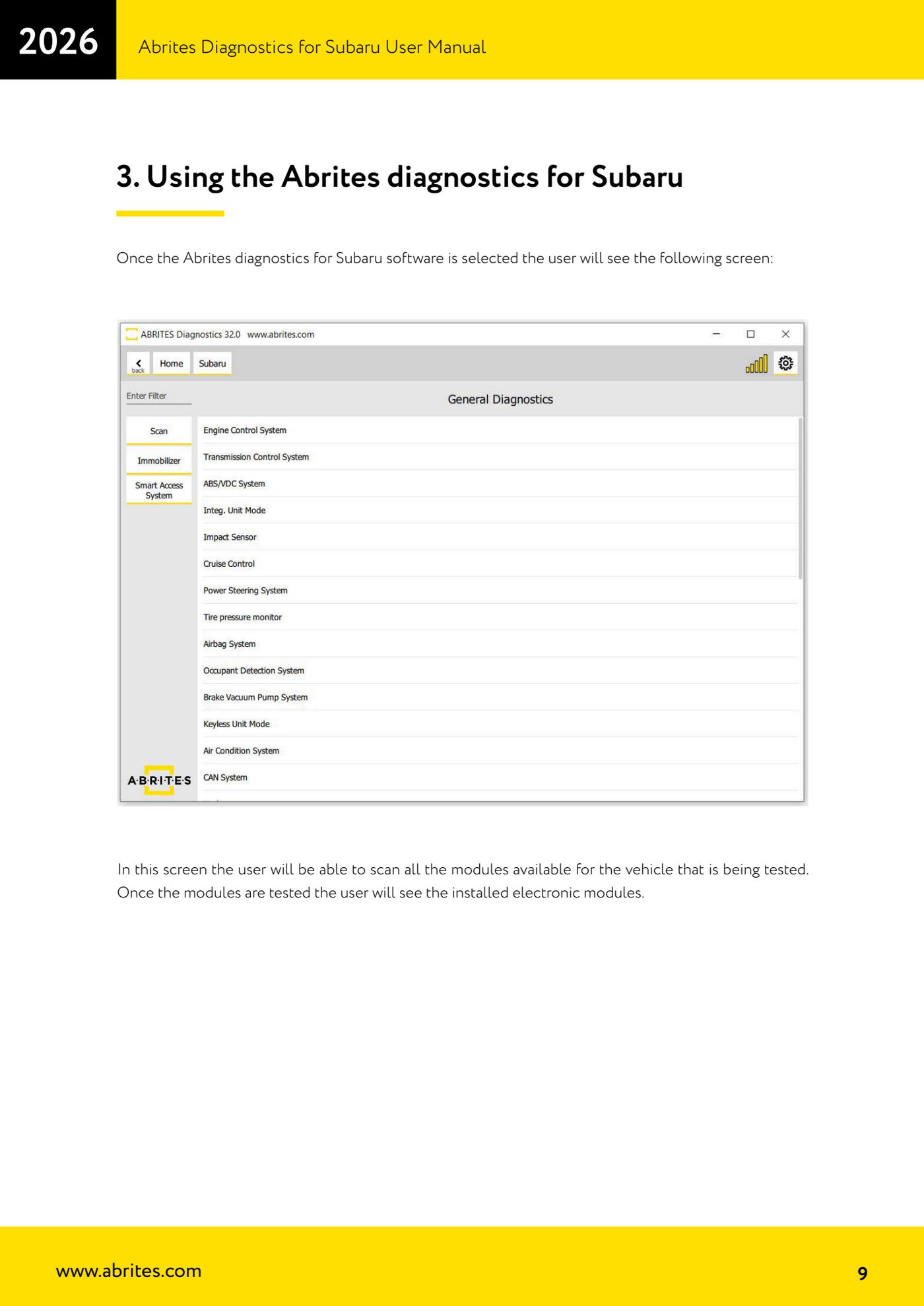
- On the main screen press the scan button: the software starts interrogating all the electronic modules on the vehicle.
- At the end of the scan a list of the control units fitted appears with their fault codes. Enter each module to see the details of the unit and its DTCs.
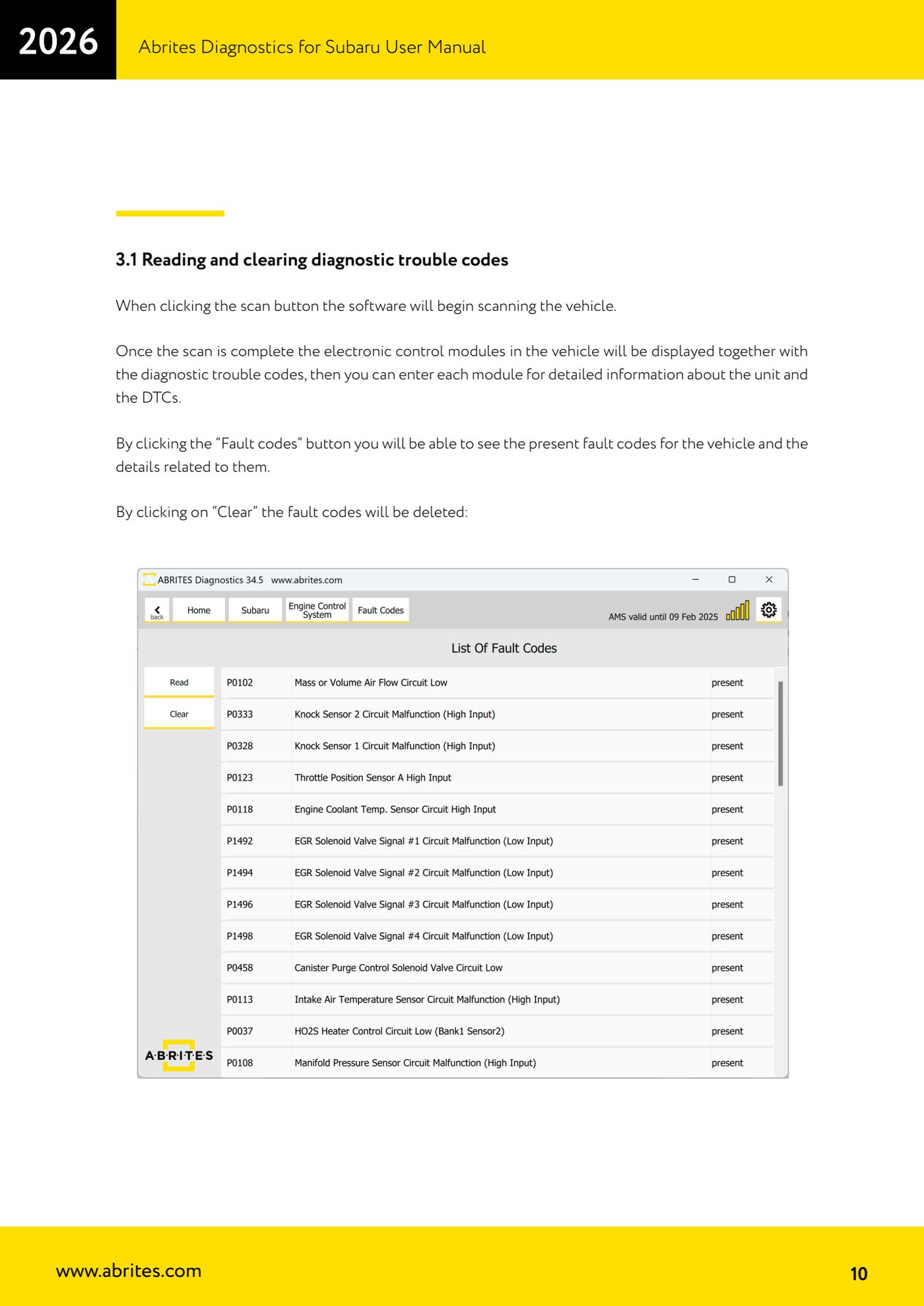
- Press "Fault codes" to display the codes present and the information attached to each one.
- Once you have noted the codes and repaired the fault, press "Clear" to erase the faults from the selected module.
- Repeat the scan and read to confirm the DTCs do not come back with the ignition ON and with the engine running.
Reference screenshots
Source: Manuale Abrites Diagnostics for Subaru, cap. 3 e 3.1 (p.9-10) · ⏱ estimated time 10-20 min
← All Abrites guides Hardware catalogue
More guides Subaru
- Reading real-time parameters (Live Data) from Subaru control units
- Registered key count and erasing all keys (Immobilizer and Smart Access System)
- Programming an additional key on a Subaru with a mechanical key (Immobilizer or BCM)
- Immobilizer Reset for all keys lost on Subaru with an Immobilizer unit
- All Keys Lost on Subaru with BCM using TA41 and PROTAG
- All Keys Lost on Subaru with BCM using the ZN066 adapter
- Engine ECM registration after Subaru key programming
- Programming an additional key on a Subaru with Smart Access System (smart key)
- All Keys Lost on Subaru smart key: Smart System Reset and reprogramming
- ESL (steering lock) adaptation in All Keys Lost on Subaru smart key with ZN085, TA68 and CB012
- Key Learning internal CAN: All Keys Lost on Subaru from 2023 via OBDII and internal CAN with the CB012 (Alarm OFF, Smart System Reset, Key Registration)
- Forced DPF regeneration on Subaru diesels over OBDII