
Chip-Tools
Reading and programming transponders with Tag Key Tool: "Read/Detect", "Program" and the emulation list
Strumenti
Interface Classic
Keys / Immo
Medium
⏱ 10-20 min
8 steps
This is the core function of the Tag Key Tool: reading a transponder's memory, writing the whole memory or individual fields, and preparing a compatible transponder that emulates the original one when the source transponder is read-only.
Required licences
- —
Hardware / cables
 AVDI
AVDI PROTAG (ZN002)
- transponder T5
- transponder PIT
- TPX1
- TPX2
- TPX3
- TPX4
⚠ WarningMany transponder memory fields can only be programmed once: before writing, check the specifications of the transponder you are working on. The transponder or key must stay correctly positioned inside the PROTAG for the whole read and programming operation.
Procedure
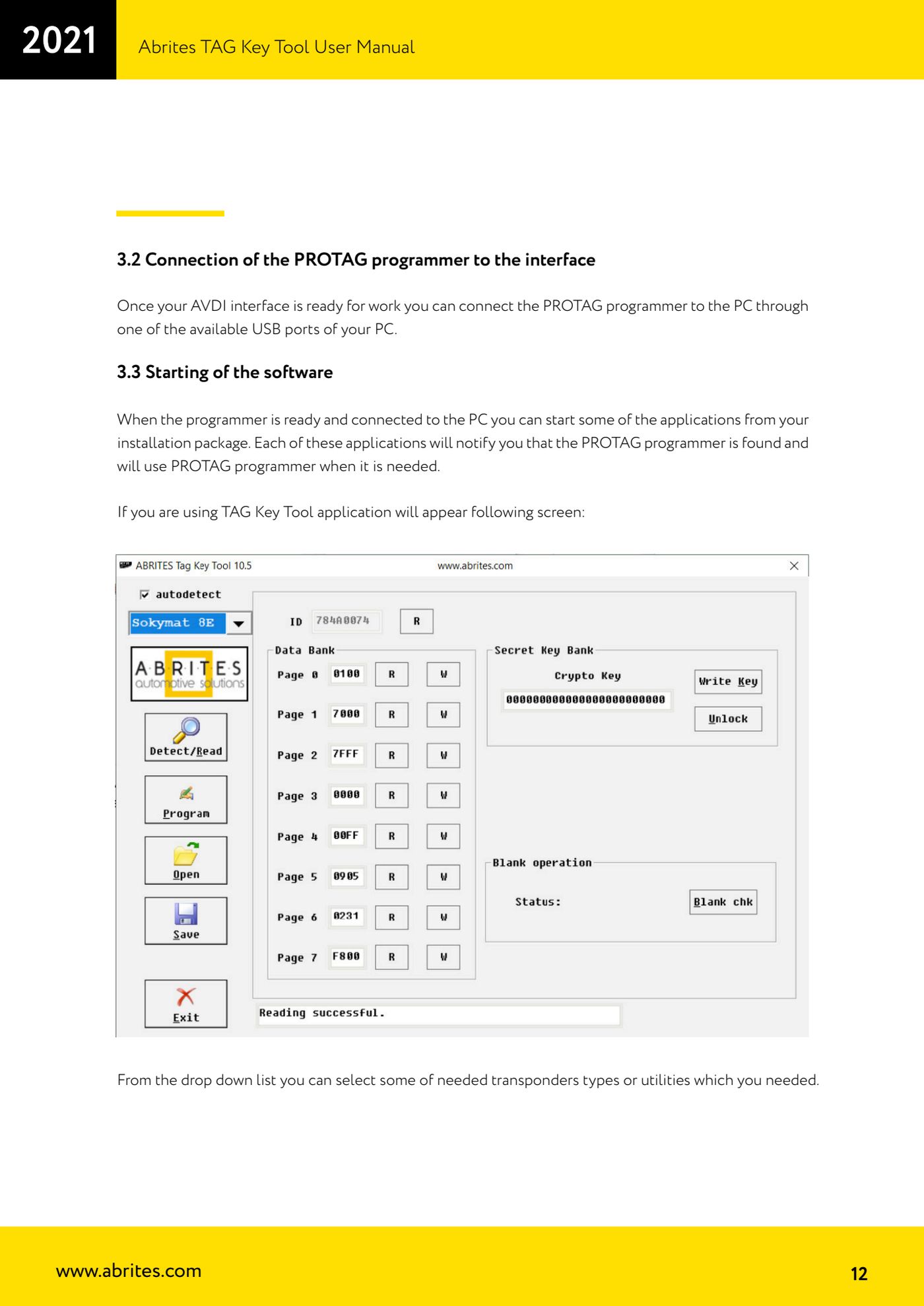
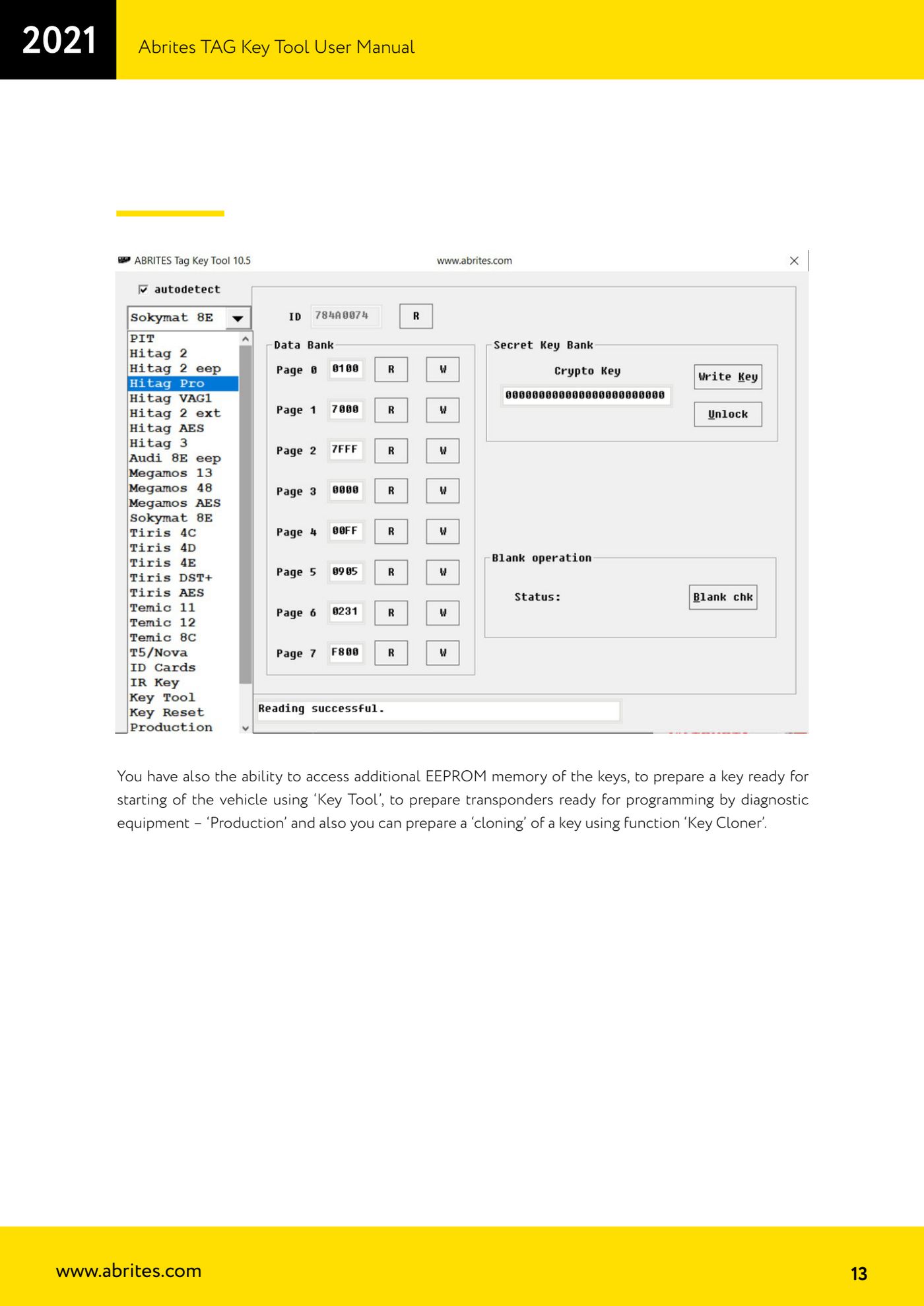
- Connect the PROTAG and start the Tag Key Tool: the main screen shows a drop-down menu with the transponder types and the available utilities.
- From the drop-down menu select the transponder type you need to work on (or the utility you need: "Key Tool", "Production", "Key Cloner", access to the additional key EEPROM memory).
- Place the transponder or key in the correct slot of the PROTAG, away from metal.
- Press "Read/Detect" to read the whole transponder memory, if the type allows it. The screen shows the memory fields that were read.
- To read or write a single field instead of the whole memory, use the small "R" (read) and "W" (write) buttons next to the field you are interested in.
- To write the whole memory press "Program". If the source transponder is read-only, "Program" is used to prepare a compatible transponder that emulates its behaviour.
- Choose the target transponder according to the emulation list: Megamos 13 is emulated with T5 or PIT; Temic 11/12 is emulated with T5; Texas 4C is emulated with TPX1 (available from Tag Key Tool version 5.2); Texas 4D/4E is emulated with TPX2; HITAG-2 is emulated with TPX3/TPX4 (available from Tag Key Tool version 5.2).
- Keep the transponder still in position until the operation is finished and check the programming result on screen.
Reference screenshots
Source: Manuale Tag Key Tool, cap. 3.3 e 4 (p.12-14) · ⏱ estimated time 10-20 min
← All Abrites guides Hardware catalogue
More guides Strumenti
- ABPROG ZN030: what's in the set, hooking it up to the AVDI and starting the Classic software
- Reading and writing SPI, I2C and Microwire EEPROMs with ABPROG and the ZN031/ZN035 adapter
- Erasing and reprogramming M35080VP / M35080V6 incremental EEPROMs with ABPROG
- Wiring an SPI EEPROM straight to the ABPROG DB25 without the ZN031 adapter
- Mercedes-Benz IR keys: reading the SSID, erasing and programming the NEC with ZN032 / ZN033
- Renewing used keys (HITAG/PCF) with the ZN046 adapter and ABPROG
- Solder points on key PCBs for the ZN046 and list of keys supported for renewal
- Reading the EWS3 dump on BMW E46/E39/E53 and others with the ZN055 adapter
- Reading the EEPROM on BMW F-Series FEM/BDC without desoldering, using the ZN057 extension
- Reading and writing NEC V850ES MCUs with the ZN078 adapter and ABPROG
- ABPROG DB25 pinout: building your own ZN046, ZN058, ZN078 and ZN086 adapters
- Reading the immobiliser from a Renault X95 BCM (and Audi BCM) with ABPROG and direct wiring