
Chip-Tools
Engine oil service reset and clutch pedal position learn (Opel/Vauxhall)
Opel
Interface Classic
Service
Basic
⏱ 10 min
7 steps
After a service with an oil change the control units have to be told the maintenance has been done: this function resets the vehicle's oil life counter. The clutch pedal position learn over OBD is available on the same screen.
Required licences
- —
Hardware / cables

Procedure
- Carry out the oil change and finish the mechanical work before resetting the counter.
- Connect the AVDI, ignition ON, and open "Abrites Diagnostics for Opel/Vauxhall".
- Run the module scan and double-click the engine module.
- Press the engine oil reset button ("Engine oil reset"): the software resets the vehicle counter, telling the car the oil has been changed.
- Check on the instrument cluster that the oil life reading or the service light is back to full.
- If you need to relearn the clutch pedal position, press "Clutch pedal position learn" on the same screen: the position is learned over OBD.
- Follow the on-screen prompts about the pedal position, then close the function and read any DTCs generated during the operation.
Reference screenshots
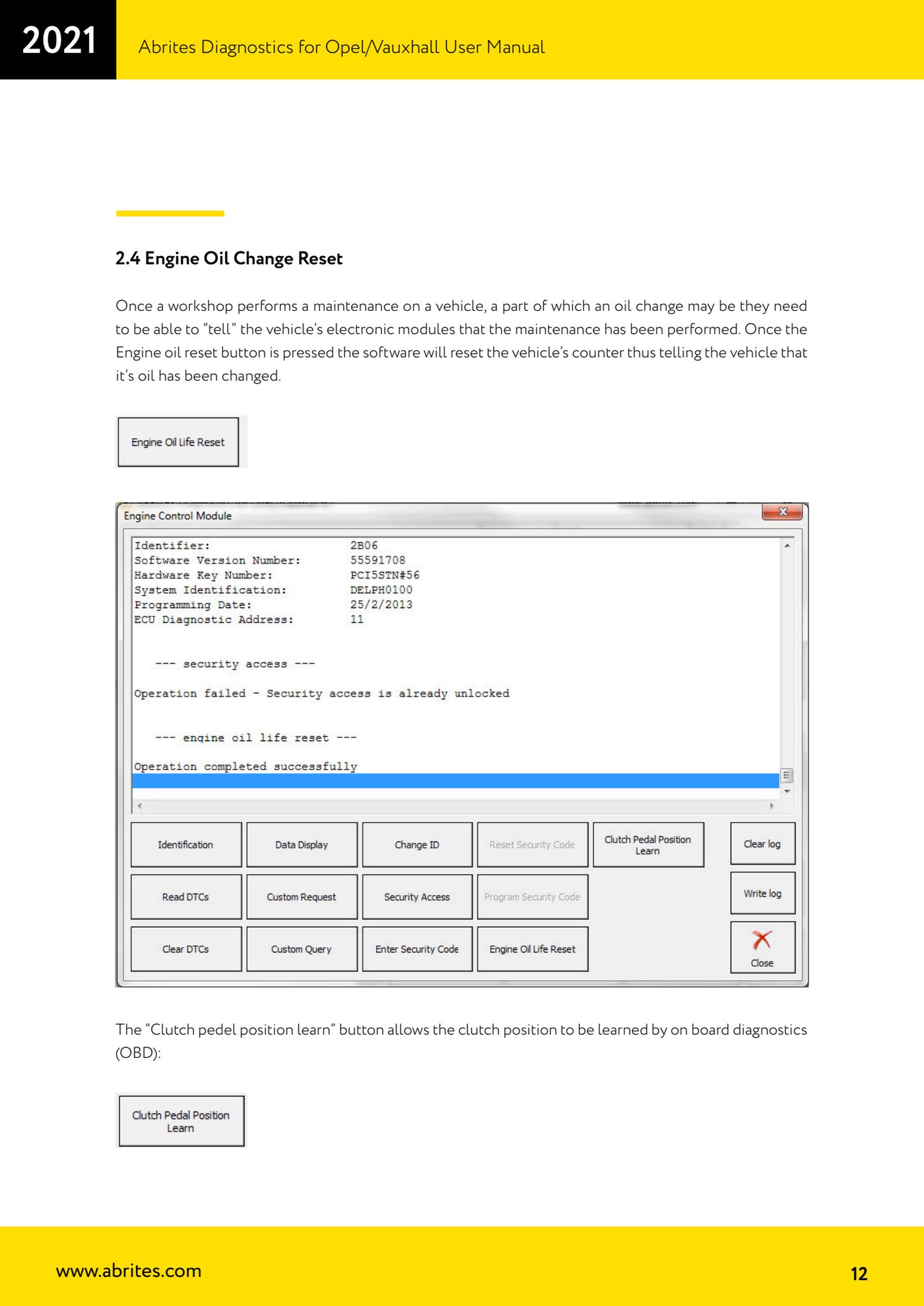
Source: Manuale Opel/Vauxhall (anche Buick/Cadillac/Chevrolet/GMC), cap. 2.4 (p.12) · ⏱ estimated time 10 min
← All Abrites guides Hardware catalogue
More guides Opel
- Vehicle scan and module identification on Opel/Vauxhall (Buick/Cadillac/Chevrolet/GMC)
- Reading and clearing DTCs on Opel/Vauxhall
- Live Data reading and actuator tests on Opel/Vauxhall modules
- Security access and module ID change for used control units (Opel/Vauxhall)
- Reading the Security Code (PIN) from an Opel/Vauxhall, Buick, Cadillac, Chevrolet, GMC control unit
- Opel/Vauxhall key programming with Key Learning (program keys / add key)
- Legacy Mode: erasing transponder keys and mechanical key number (Astra H, Corsa D, Vectra C/Signum, Zafira B)
- Key programming on Opel Vivaro and Movano (all keys in a single session)
- CAN Calibration: Opel/Vauxhall odometer correction (Corsa C note)
- Reading and updating Configuration Data and ECU Flasher on Opel/Vauxhall
- Reading the Radio Code of Opel/Vauxhall multimedia units
- Clearing crash data on Opel/Vauxhall airbag modules (TEMIC 68HC908, SIEMENS 68HC11E9)