
Chip-Tools
CAN Calibration: Opel/Vauxhall odometer correction (Corsa C note)
Opel
Interface Classic
Odometer
Medium
⏱ 20-40 min
9 steps
When a module is replaced, new or used, calibrating it is essential for the vehicle to work properly. The CAN Calibration function reads the current odometer value in the selected unit and lets you write the correct one.
Required licences
- —
Hardware / cables

⚠ WarningOn the Corsa C instrument cluster the trip button has to be held down while the odometer is being written; once the operation has completed successfully the cluster has to be manually reset by disconnecting the battery or by pulling fuse F3 for a few minutes.
Procedure
- Connect the AVDI to the vehicle and to the PC and turn the ignition ON.
- Open the Opel/Vauxhall software and start "CAN Calibration" from the "Special Functions" list.
- Select the vehicle and then the unit to be calibrated.
- Read the current value shown on screen and write it down before you change it.
- Enter the correct odometer value in the field provided.
- On Corsa C: before writing, hold down the trip button on the instrument cluster and keep it held for the whole operation.
- Press "Write" and wait for the operation-completed-successfully message; the new value is now updated.
- On Corsa C, then perform a manual cluster reset: disconnect the battery or pull fuse F3 for a few minutes, then reconnect.
- Turn the ignition back on and check that the value displayed on the dash is the one you wrote.
Reference screenshots
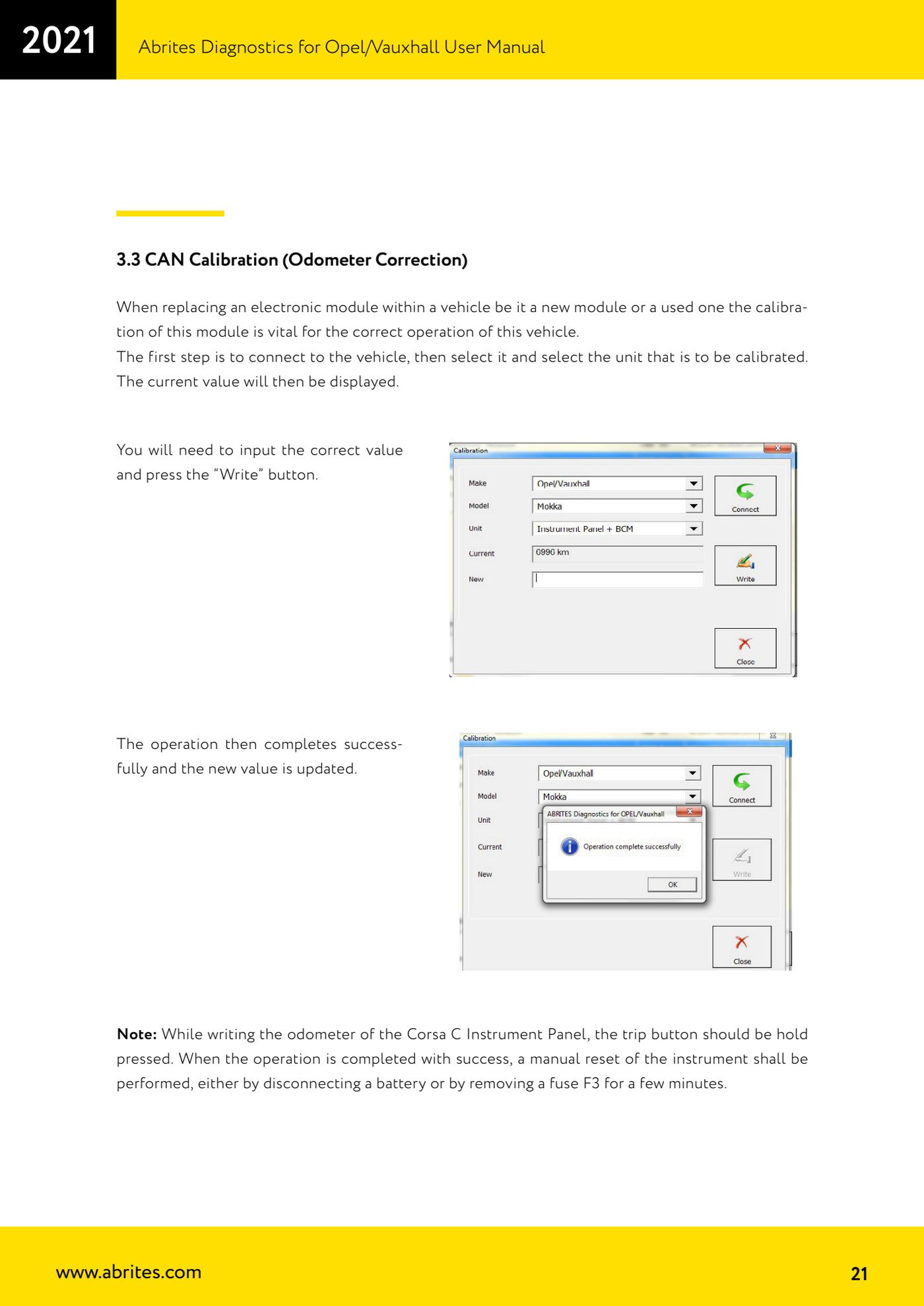
Source: Manuale Opel/Vauxhall (anche Buick/Cadillac/Chevrolet/GMC), cap. 3.3 (p.21) · ⏱ estimated time 20-40 min
← All Abrites guides Hardware catalogue
More guides Opel
- Vehicle scan and module identification on Opel/Vauxhall (Buick/Cadillac/Chevrolet/GMC)
- Reading and clearing DTCs on Opel/Vauxhall
- Live Data reading and actuator tests on Opel/Vauxhall modules
- Engine oil service reset and clutch pedal position learn (Opel/Vauxhall)
- Security access and module ID change for used control units (Opel/Vauxhall)
- Reading the Security Code (PIN) from an Opel/Vauxhall, Buick, Cadillac, Chevrolet, GMC control unit
- Opel/Vauxhall key programming with Key Learning (program keys / add key)
- Legacy Mode: erasing transponder keys and mechanical key number (Astra H, Corsa D, Vectra C/Signum, Zafira B)
- Key programming on Opel Vivaro and Movano (all keys in a single session)
- Reading and updating Configuration Data and ECU Flasher on Opel/Vauxhall
- Reading the Radio Code of Opel/Vauxhall multimedia units
- Clearing crash data on Opel/Vauxhall airbag modules (TEMIC 68HC908, SIEMENS 68HC11E9)