
Chip-Tools
PATS Initialization: matching the PCM to the instrument cluster (IPC/HEC), BCM or FIP on Ford/Mazda
Ford/Mazda
Interface Classic
Keys / Immo
Advanced
⏱ 20-40 min
8 steps
Function used to match the PCM to the instrument cluster (IPC/HEC) and/or the BCM, or to the injection pump (FIP), depending on the case. It is typically needed after one of these modules has been replaced, when the vehicle will not start because the modules do not recognise each other.
Required licences
- —
Hardware / cables

⚠ WarningThe key in the ignition MUST already be programmed to the vehicle: if the key is not learned to the PATS, module initialization is not possible. Program the key first, then run the initialization.
Procedure
- Establish which module was replaced and which match is needed: PCM (Powertrain Control Module) to IPC/HEC (instrument cluster, Hybrid Electrical Cluster), to BCM (Body Control Module) or to FIP (Fuel Injection Pump).
- Put a key that is ALREADY programmed to the vehicle into the ignition: without a valid key the function cannot complete.
- Connect the AVDI, get a stable supply on the vehicle, start the software and select the correct vehicle context.
- Open the "Special Functions" list and select "PATS Initialization" (double-click or the "Open" button).
- Pick the match the job calls for (PCM-IPC/HEC, PCM-BCM or PCM-FIP) and follow the on-screen instructions.
- Wait for it to complete without switching the ignition off or disconnecting the interface.
- At the end of the procedure switch the ignition off and back on, start the engine and check the immobilizer light goes out as it should.
- Read the DTCs again on the PCM, cluster and BCM and clear the faults generated during the job.
Reference screenshots
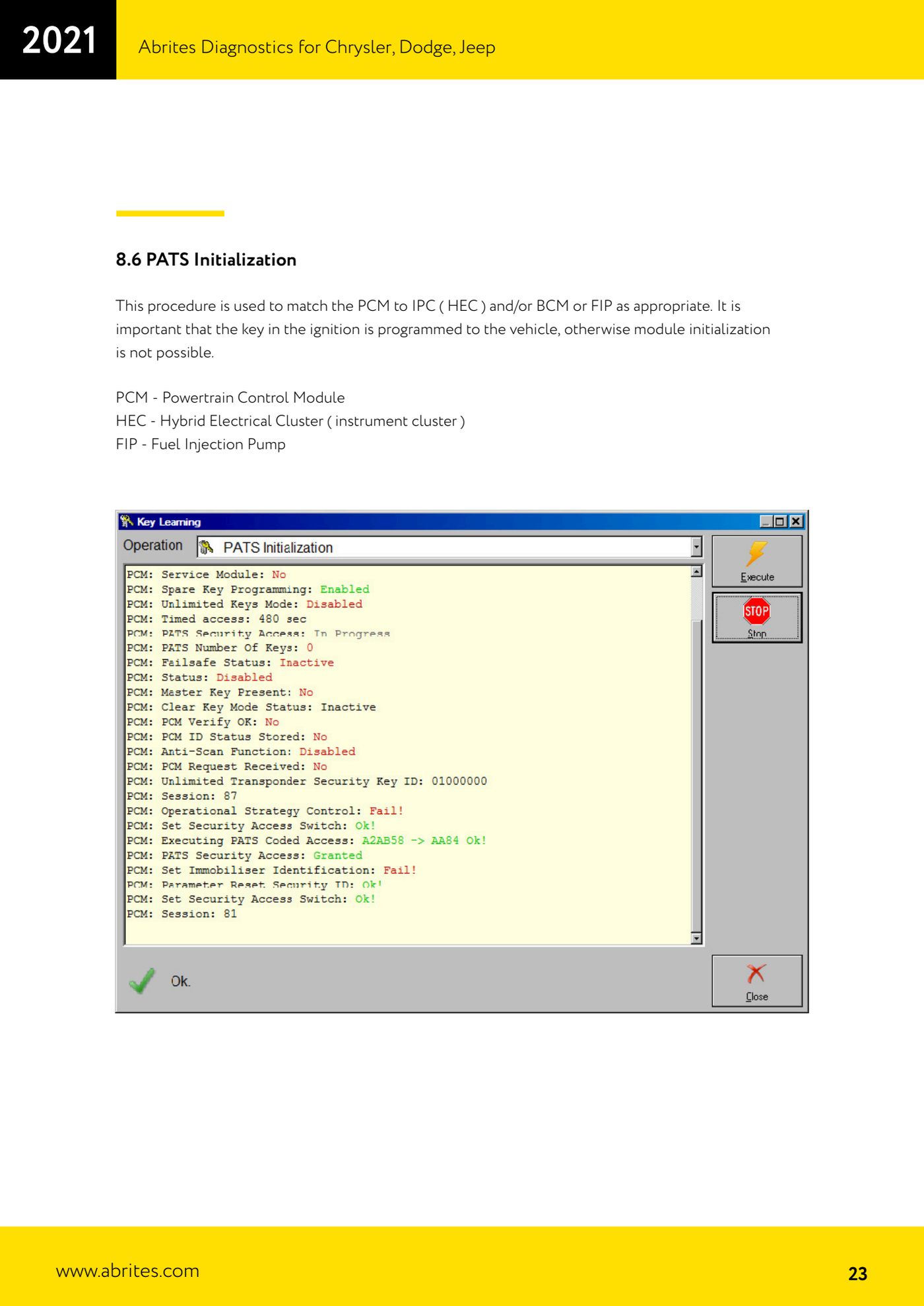
Source: Manuale Ford/Mazda, parte 1 di 2, cap. 8.6 (p.23) · ⏱ estimated time 20-40 min
← All Abrites guides Hardware catalogue
More guides Ford/Mazda
- Starting Abrites Diagnostics for Ford/Mazda: vehicle context and ECU scanning ("Scan all")
- ECU identification, DTC read/clear and Live Data on Ford/Mazda
- Getting to the Ford/Mazda "Special Functions": Memory Read/Write and Key Learning
- PATS Key Learning: adding keys on Ford/Mazda (including with the alarm triggered)
- Key programming on Mazda CX-30 and Mazda 3 from 2019 with special function MZ001
- Ford key programming from 2021 (F-150, Maverick, Mustang Mach-E, Transit): incode from the outcode or bench read of the BCM with the ZN085
- PATS Erase All Keys: erasing all keys from the Ford/Mazda PATS memory
- Spare Key Programming and Unlimited Key Mode: enabling/disabling Ford/Mazda key programming
- PATS OUT/IN code calculator for Ford/Mazda IDS (SINGLE xx40 and DOUBLE xx44 outcodes)
- VID block (Vehicle Identification Data) in the Ford/Mazda PCM: reading and configuring parameters
- Supported protocols and OBDII pins on Ford/Mazda: HS-CAN, MS-CAN, K-Line and J1850 PWM
- Ford PMI (Programmable Module Installation): transferring As-Built data to a new module