
Chip-Tools
Changing or removing the Ford speed limiter in the PCM (Speed Limiter)
Ford/Mazda
Interface New
Special Functions
Medium
⏱ 10-15 min
6 steps
The Speed Limiter function lets you change the speed limiter set in the car, raising or lowering it, or remove the limit set by the manufacturer. The write itself can take up to 2 minutes.
Required licences
- —
Hardware / cables

⚠ WarningThe operation is only possible if the specific model and specific vehicle configuration support this function. The software reads the module, unlocks it and writes the new parameter into the PCM: keep the AVDI connection, the vehicle power supply and the internet connection stable for the whole procedure, which can take up to 2 minutes.
Procedure
- Connect the AVDI to the vehicle's OBDII socket and to the PC, start "Abrites diagnostics for Ford Online" and wait for vehicle detection (or select the vehicle manually).
- Check that you have a stable internet connection and an active AMS: the function works through online servers.
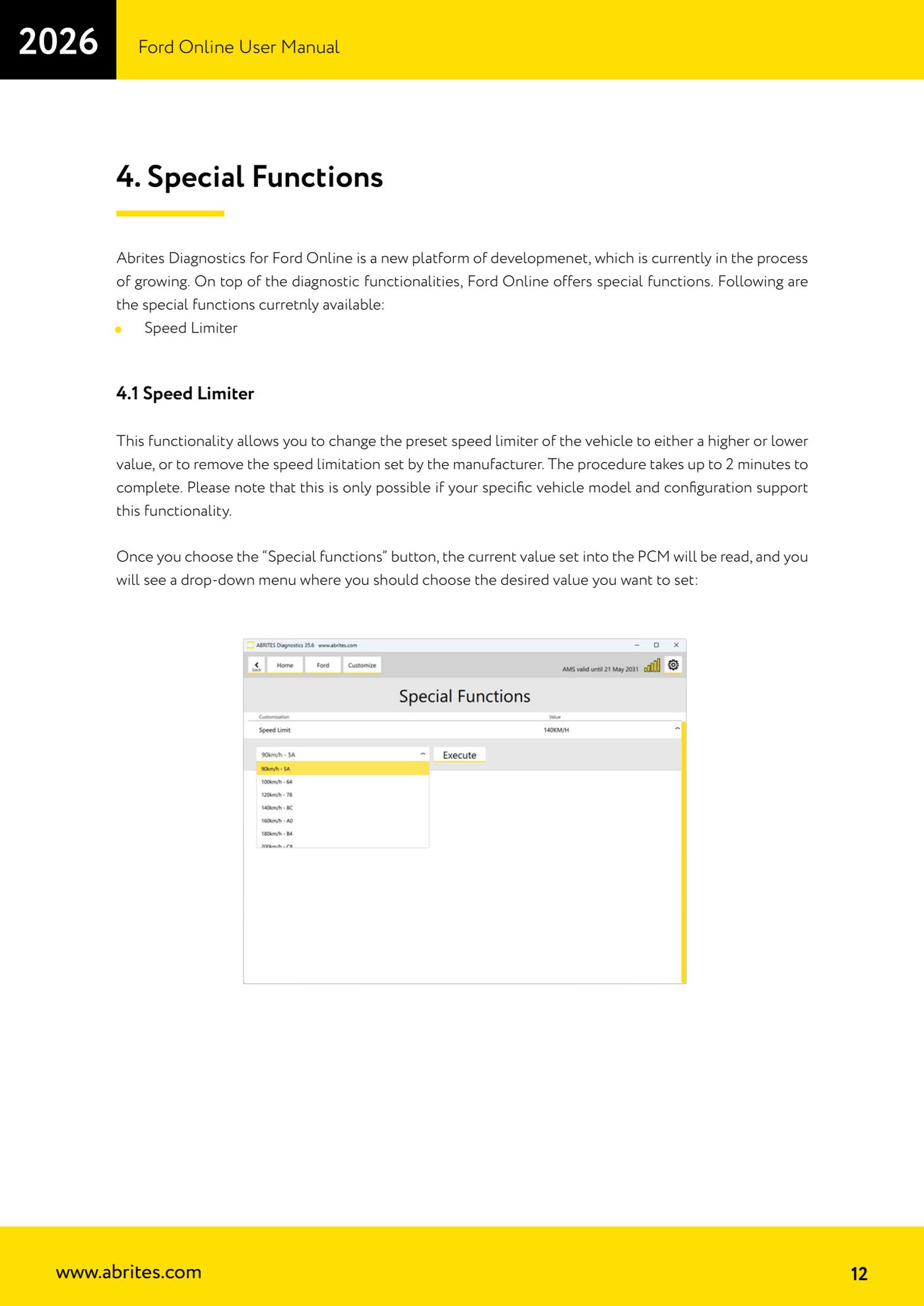
- Press the "Special functions" button: the software reads the limiter value currently set in the PCM and shows it on screen.
- Open the drop-down menu and select the speed value you want to set, or the option that removes the manufacturer's limit.
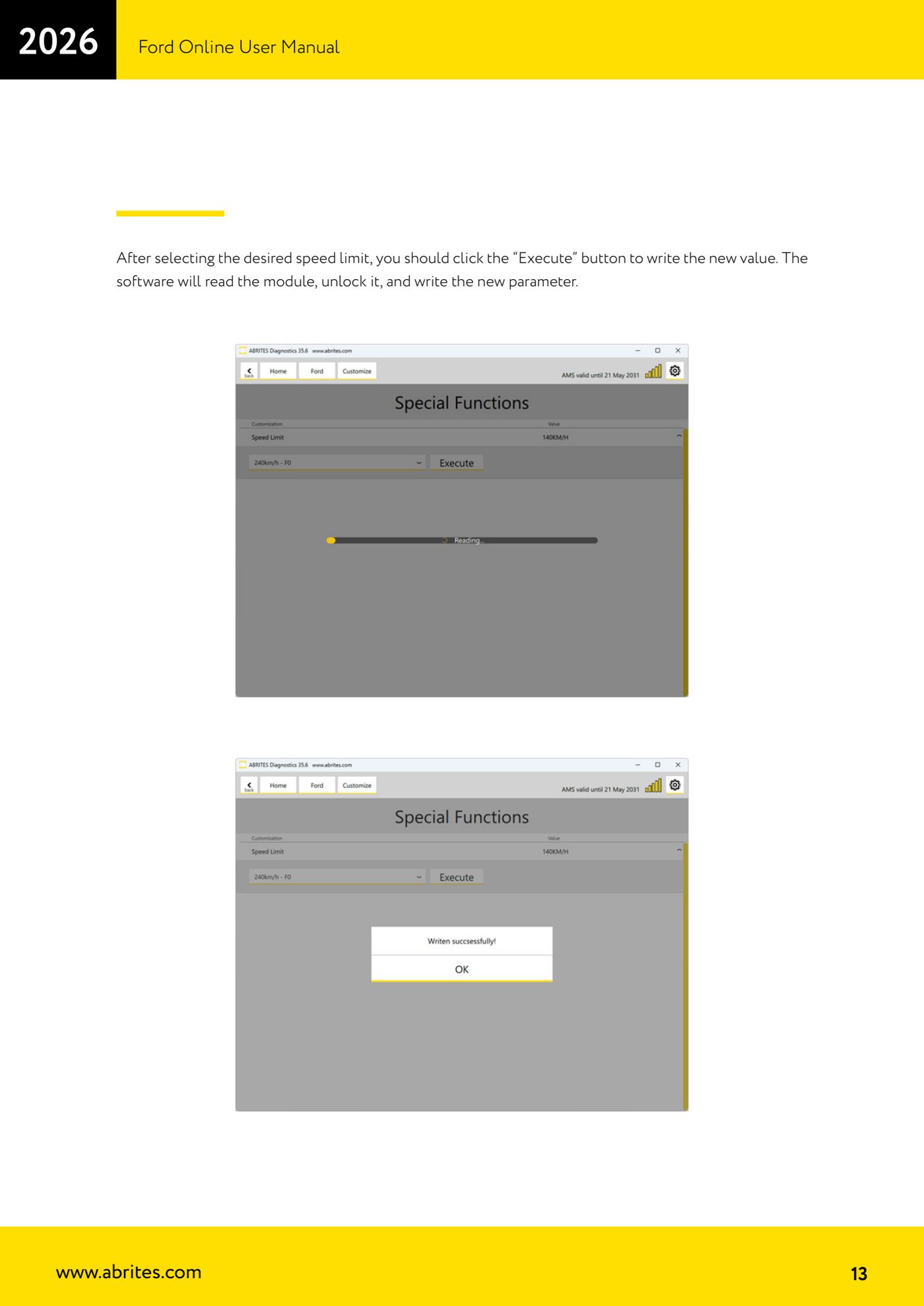
- Press the "Execute" button to write the new value: the software reads the module, unlocks it and writes the parameter. The procedure takes up to 2 minutes; do not break the connection or switch the ignition off.
- When it finishes, go back into the function to read the value back and confirm it matches the one you chose; if the model or configuration does not support the function, the operation will not succeed.
Reference screenshots
Source: Manuale Ford Online, cap. 4 e 4.1 (p.12-13) · ⏱ estimated time 10-15 min
← All Abrites guides Hardware catalogue
More guides Ford/Mazda
- Starting Abrites Diagnostics for Ford/Mazda: vehicle context and ECU scanning ("Scan all")
- ECU identification, DTC read/clear and Live Data on Ford/Mazda
- Getting to the Ford/Mazda "Special Functions": Memory Read/Write and Key Learning
- PATS Key Learning: adding keys on Ford/Mazda (including with the alarm triggered)
- Key programming on Mazda CX-30 and Mazda 3 from 2019 with special function MZ001
- Ford key programming from 2021 (F-150, Maverick, Mustang Mach-E, Transit): incode from the outcode or bench read of the BCM with the ZN085
- PATS Erase All Keys: erasing all keys from the Ford/Mazda PATS memory
- PATS Initialization: matching the PCM to the instrument cluster (IPC/HEC), BCM or FIP on Ford/Mazda
- Spare Key Programming and Unlimited Key Mode: enabling/disabling Ford/Mazda key programming
- PATS OUT/IN code calculator for Ford/Mazda IDS (SINGLE xx40 and DOUBLE xx44 outcodes)
- VID block (Vehicle Identification Data) in the Ford/Mazda PCM: reading and configuring parameters
- Supported protocols and OBDII pins on Ford/Mazda: HS-CAN, MS-CAN, K-Line and J1850 PWM