
Chip-Tools
MQB Immo Data: reading and transferring MQB cluster immo data
VAG
Interface Classic
Keys / Immo
Advanced
⏱ varies
6 steps
The "MQB Immo Data" function lets you read and save the immo data from an MQB instrument cluster and write it to another MQB cluster, so it can be adapted to the vehicle.
Required licences
- —
Hardware / cables

⚠ WarningThe donor MQB cluster must have a working key so it can be unlocked before the adaptation, and it must be identical to the original to avoid problems. Once the new cluster has been adapted with the new immo data, the original keys will still start the car but the remote will not work: the keys have to be reprogrammed to get the remote working again.
Procedure
- Go into the "CAN Instrument" function.
- Click on "Immo Data".
- Wait for the cluster security unlock attempts.
- Wait for the immo data to be read and save it.
- Write the saved data to the other MQB cluster to adapt it.
- Reprogram the keys to restore remote operation.
Reference screenshots
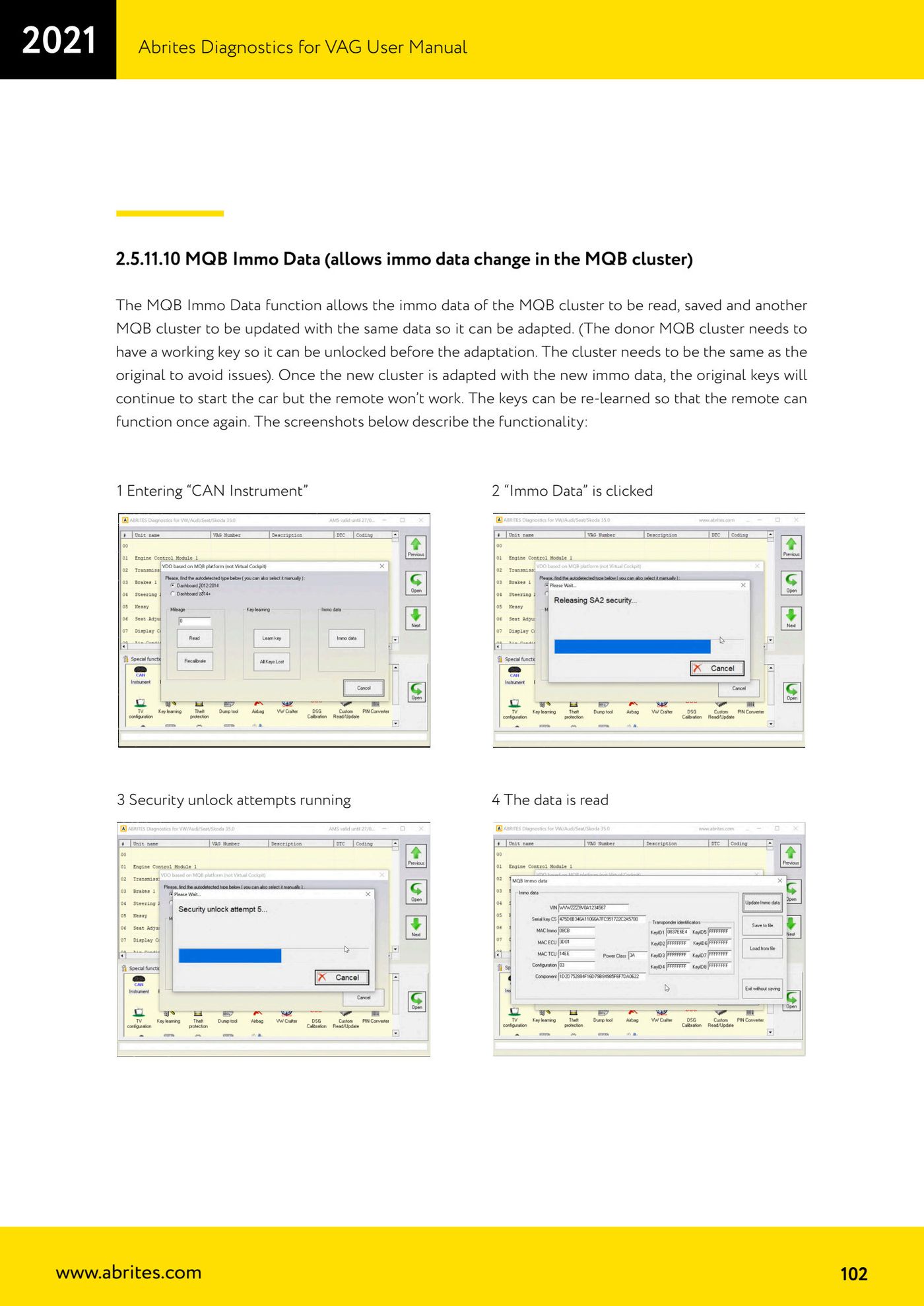
Source: Manuale VAG (Offline), cap. 2.5.11.10 (p.102) · ⏱ estimated time varies
← All Abrites guides Hardware catalogue
More guides VAG
- General diagnostics and fault code (DTC) read/clear
- Basic settings — factory reset (throttle body, steering, clutch)
- Adaptations — customer-requested changes
- Long coding — enabling hidden features
- MMI Functions — enable/disable infotainment features
- Wireless CarPlay / Android Auto
- Video in motion
- BCM2 unlock with the ZN080 set (solder-free)
- Reading CS on bench (PCR2.1, Simos 8.x/1x.xx, DCM6.2, TCU AL551/DL501/DQxxx)
- DSG mileage recalibration
- Service Intervals
- ECU programming with .frf files