
Chip-Tools
Key learning in Standard Mode
VAG
Interface Classic
Keys / Immo
Advanced
⏱ 30-60 min
14 steps
Standard mode of the "Key learning" special function takes more operator input than the wizard, but gives you full control over dealer key preparation and learning. Use it when automatic part detection is not reliable.


⚠ WarningIf a wrong login is entered several times, the immobiliser blocks any further attempts: the "Lock times - login acknowledge" field shows how many attempts are left before a new login will be accepted. Cycling the ignition on and off repeatedly makes the immobiliser stop recognising the transponder ("Lock timers - transponder acknowledge"), which is typical when making keys on Passat B6/CC.
Procedure
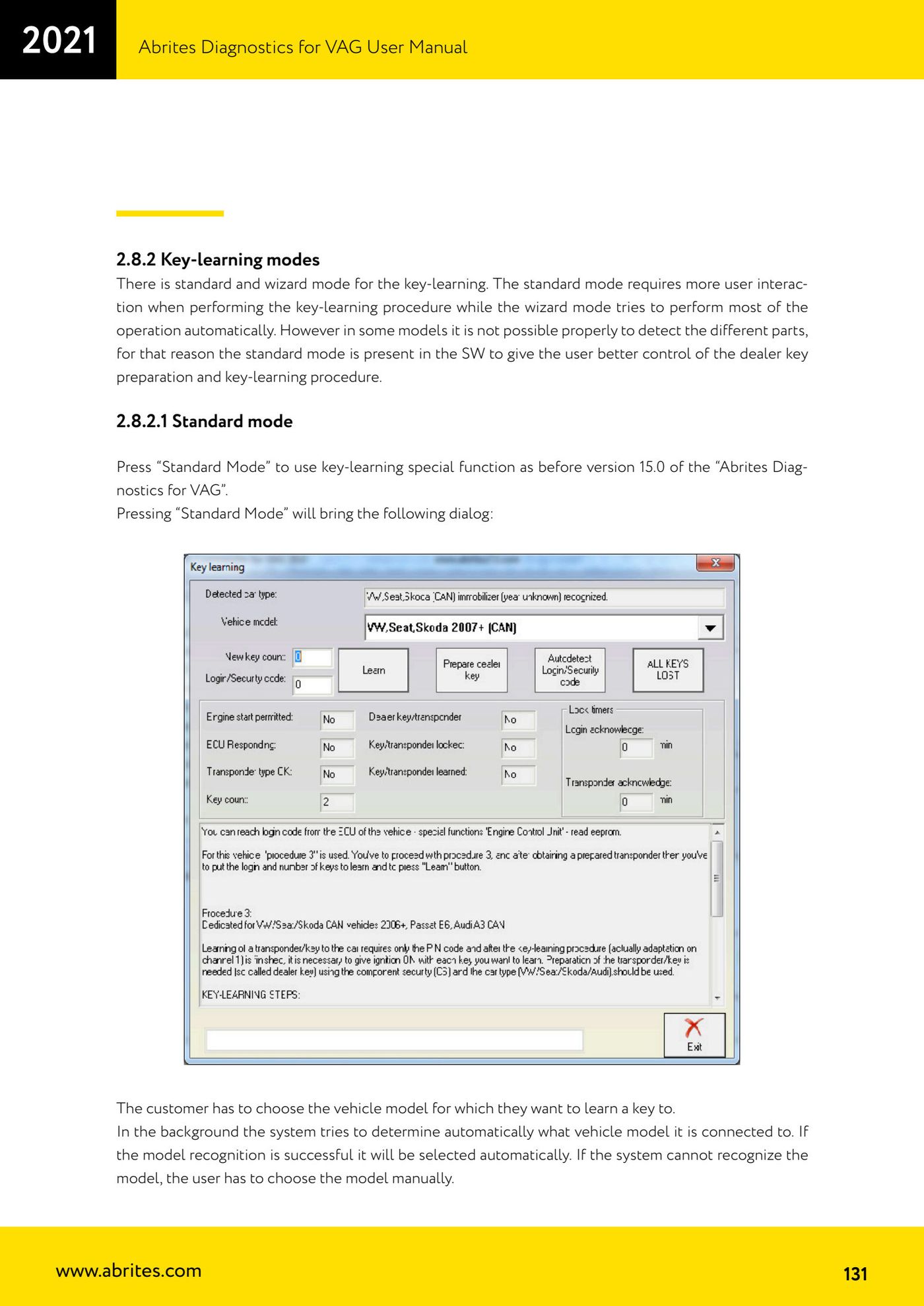
- In the "Key learning" special function press "Standard Mode": the model selection window opens.
- The software tries to detect the connected model automatically; if detection succeeds it is selected for you, otherwise select the model manually.
- Careful: detection can be wrong. For example, there is no way to tell "VW CAN -2007" from "VW CAN (2007+)", so "VW CAN (2007+)" is selected by default.
- If, for that model, key learning and dealer key preparation are done in separate special functions, the software tells you which function to use.
- Check the status shown in the fields: "Engine start permitted" (No = key or engine ECU not recognised by the immobiliser, invalid key, ECU not adapted, or wait time), "ECU Responding" (immobiliser-to-engine ECU communication), "Transponder type OK" (correct transponder type for that vehicle; it also reads No when there is no key in the ignition switch), "Key count" (keys currently learned), "Dealer key/transponder", "Key/transponder locked" (whether the transponder is writable), "Key/transponder learned", "Lock times - login acknowledge" and "Lock timers - transponder acknowledge".
- Get the Login (PIN): enter it manually or use the "Autodetect Login/security code" button to search for the PIN/CS automatically.
- If the vehicle's procedure calls for pre-coding, prepare the key first with the "Program dealer key" / "Prepare dealer key" button.
- Enter the security access code and the number of keys to be learned.
- Turn the ignition ON (with a new or existing key).
- Press the "Learn" button.
- On some VW/Seat/Skoda models a key can be added without deactivating the others: if the immobiliser supports it, the software asks whether to add the key or to erase all keys and learn only the ones available. If it is not supported, this step is skipped.
- Wait for the "adaptation finished" message.
- Remove the key and cycle the ignition ON/OFF with all the remaining keys. On Touareg/Phaeton/Bentley/Cayenne/A8 hold each key in the CRANK position until the steering unlocks; on Passat B6/CC/B7 turn each key only to the first position instead of the normal ignition position.
- Check that the "Key count" field has updated to the new value: that means all keys have been learned correctly.
Reference screenshots
Source: Manuale VAG (Offline), cap. 2.8.2.1 - 2.8.2.1.1 (p.131-133) · ⏱ estimated time 30-60 min
← All Abrites guides Hardware catalogue
More guides VAG
- General diagnostics and fault code (DTC) read/clear
- Basic settings — factory reset (throttle body, steering, clutch)
- Adaptations — customer-requested changes
- Long coding — enabling hidden features
- MMI Functions — enable/disable infotainment features
- Wireless CarPlay / Android Auto
- Video in motion
- BCM2 unlock with the ZN080 set (solder-free)
- Reading CS on bench (PCR2.1, Simos 8.x/1x.xx, DCM6.2, TCU AL551/DL501/DQxxx)
- DSG mileage recalibration
- Service Intervals
- ECU programming with .frf files