
Chip-Tools
JCI cluster with NEC and 95320 EEPROM: mileage, EEPROM, immo data and key adding
VAG
Interface Classic
Keys / Immo
Medium
⏱ 30-60 min
7 steps
A dedicated function for Johnson Controls instrument clusters with an NEC microcontroller, 95320 EEPROM and UDS diagnostic protocol. It lets you read the mileage, read and write the EEPROM, read and write the immobiliser data and add a dealer key.
Required licences
- —
Hardware / cables

Procedure
- Open "CAN Instrument" and select "JCI with NEC uC and 95320 EEPROM (CAN UDS)": the dedicated dialog window opens.
- Press "Read mileage" to read the current mileage.
- Press "Read EEPROM" to read the EEPROM data and "Write EEPROM" to write it back.
- Press "Read Immo data" to read the immobiliser data.
- Once read, you can edit the immo data and write it with "Write Immo data".
- To add a key, after reading the immo data press "Add key": a dealer key is prepared.
- Add the new key to the immo data and write the updated immo data back into the immobiliser.
Reference screenshots
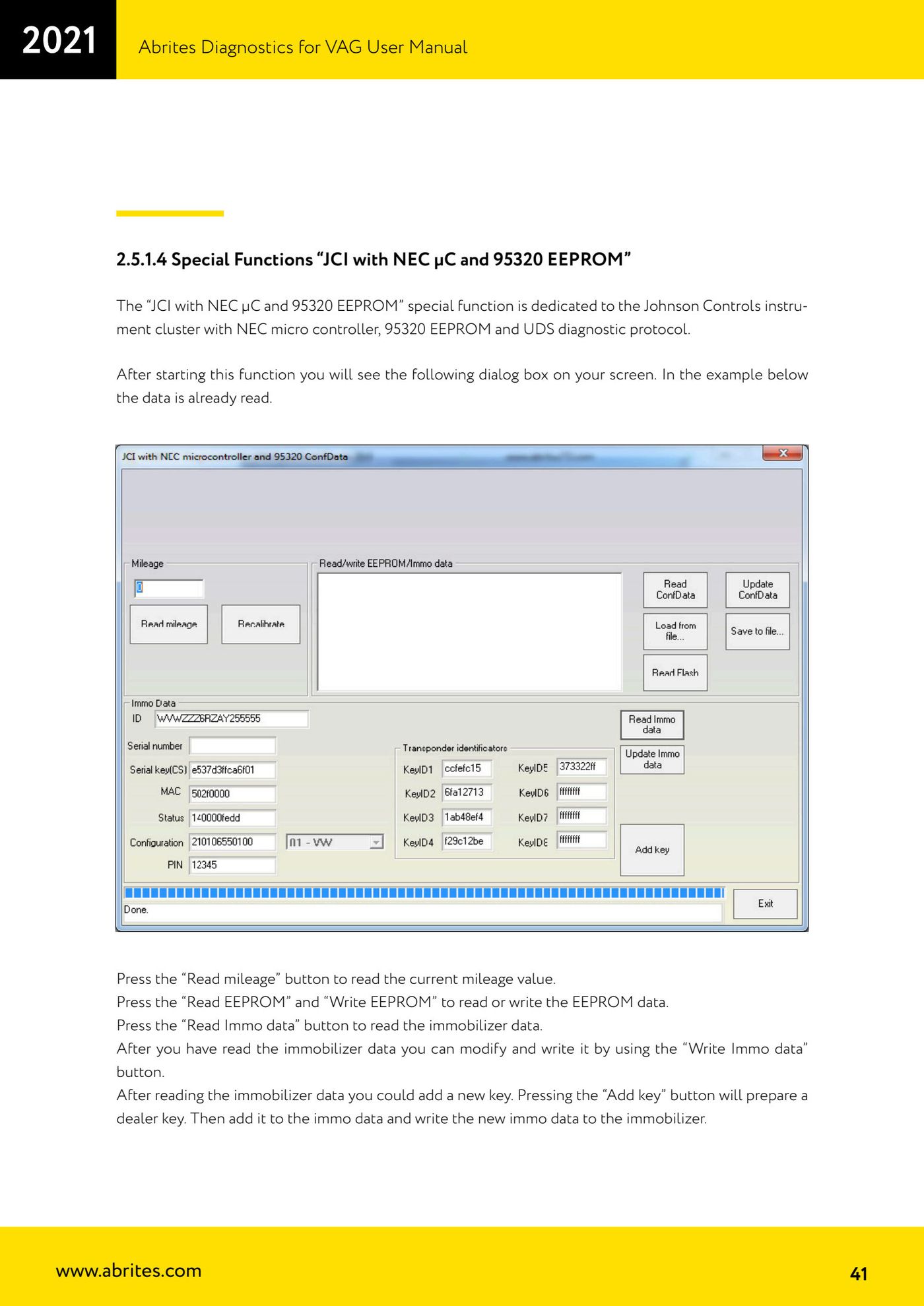
Source: Manuale VAG (Offline), cap. 2.5.1.4 (p.41) · ⏱ estimated time 30-60 min
← All Abrites guides Hardware catalogue
More guides VAG
- General diagnostics and fault code (DTC) read/clear
- Basic settings — factory reset (throttle body, steering, clutch)
- Adaptations — customer-requested changes
- Long coding — enabling hidden features
- MMI Functions — enable/disable infotainment features
- Wireless CarPlay / Android Auto
- Video in motion
- BCM2 unlock with the ZN080 set (solder-free)
- Reading CS on bench (PCR2.1, Simos 8.x/1x.xx, DCM6.2, TCU AL551/DL501/DQxxx)
- DSG mileage recalibration
- Service Intervals
- ECU programming with .frf files