
Chip-Tools
Custom memory access: manual reading and programming of a control unit's memory
VAG
Interface Classic
Flashing / Programming
Advanced
⏱ varies
5 steps
Lets you read and program the memory of certain electronic control units by sending direct requests — useful for investigation work and for reading/programming flash memory (for example the internal flash of an EDC16). It is available both from the "Special functions" list and from the standard diagnostic dialog.
Required licences
- —
Hardware / cables

⚠ WarningYou must specify which diagnostic session to enter before starting the read/programming: the wrong session on a flash write can damage the control unit. To stay in the diagnostic session that is already running, enter session "0".
Procedure
- Choose where to open the function from: the "Special functions" list (opening the diagnostic connection, security access and entering the session are all handled automatically by ABRITES Diagnostics for VAG), or the standard diagnostic dialog (in that case you open the diagnostic connection, perform the security access and enter the session yourself before starting the read/write).
- Open "Custom memory access Download/Upload/ReadMemory".
- Specify the diagnostic session to enter before starting the read/programming (the manual's example uses session "86"); enter "0" to keep the diagnostic session already active.
- Set the request parameters and start the memory read (ReadMemory/Upload) or programming (Download).
- Check the result: the requests sent refer to the currently active session of the control unit selected in the dialog.
Reference screenshots
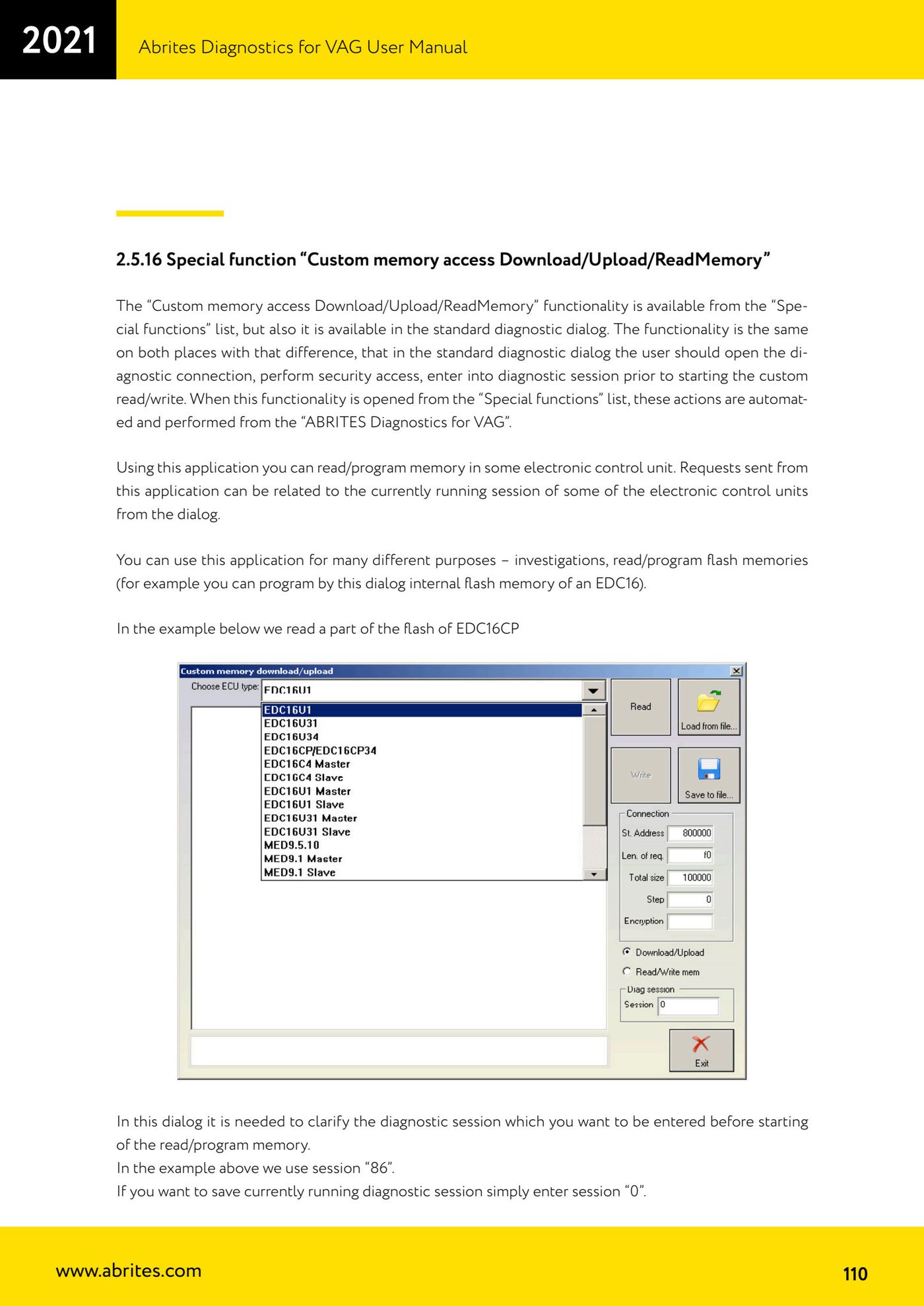
Source: Manuale VAG (Offline), cap. 2.5.16 (p.110) · ⏱ estimated time varies
← All Abrites guides Hardware catalogue
More guides VAG
- General diagnostics and fault code (DTC) read/clear
- Basic settings — factory reset (throttle body, steering, clutch)
- Adaptations — customer-requested changes
- Long coding — enabling hidden features
- MMI Functions — enable/disable infotainment features
- Wireless CarPlay / Android Auto
- Video in motion
- BCM2 unlock with the ZN080 set (solder-free)
- Reading CS on bench (PCR2.1, Simos 8.x/1x.xx, DCM6.2, TCU AL551/DL501/DQxxx)
- DSG mileage recalibration
- Service Intervals
- ECU programming with .frf files