
Chip-Tools
Basic diagnostics: identification, DTCs, Scan All, live values and actuator tests
Mercedes
Interface Classic
Diagnostics
Basic
⏱ 10-30 min
10 steps
Standard diagnostic functions of Abrites Diagnostics for Mercedes/Maybach/Smart: reading the control unit identification, reading and clearing fault codes, finding every control unit fitted to the car, viewing live data and driving the actuators. This is the first step of any job.
Required licences
- —
Hardware / cables
- —
⚠ WarningActual Values differ from model to model: if you do not select the correct vehicle context on the main screen (e.g. E-Class, Diesel, 2007) the list shown may not be the right one. Not every control unit supports the Reset function: check the outcome in the diagnostic log.
Procedure
- Connect the interface to the car and start Abrites Diagnostics for Mercedes/Maybach/Smart.
- Select the correct vehicle context on the main screen (class, fuel type, year), otherwise the live values may be wrong.
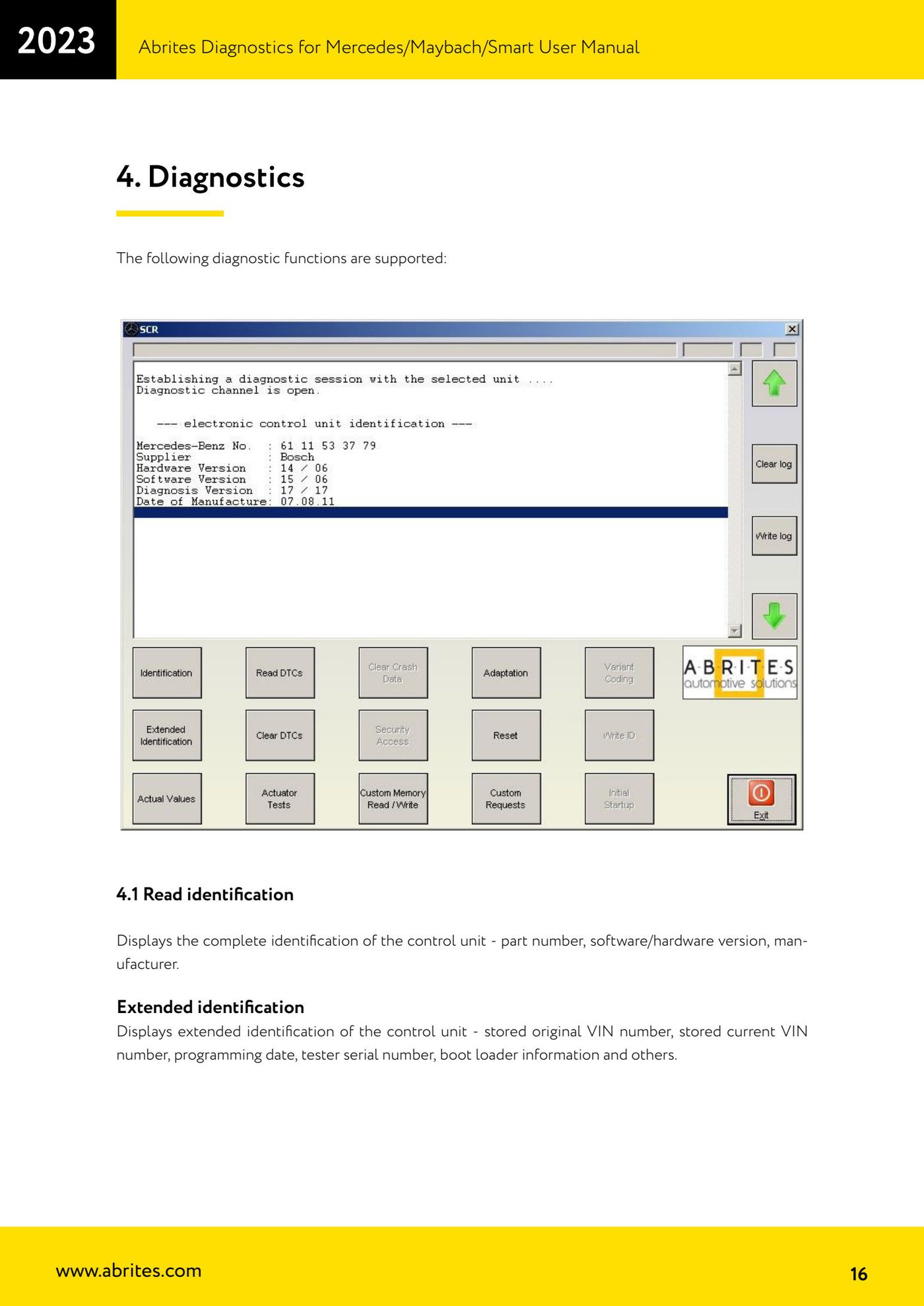
- Use "Read identification" to read the full control unit identification: part number, software/hardware version, manufacturer.
- Use "Extended identification" for the extended identification: original stored VIN, current stored VIN, programming date, tester serial number, boot loader information and more.
- Use "Read DTCs" to read all stored and pending fault codes with the full description (e.g. "9101 Fault in CAN communication with control unit ESP."); save the list to file if needed.
- Use "Scan All" to find every Mercedes-Benz control unit fitted to the car and read all of their fault codes.
- With "Actual Values" read the live data (oil temperature, fuel level, engine rpm, battery voltage, etc.).
- With the actuator test ("Actuator test") drive components and systems: injectors, throttle valve, adaptive strategy, fuel pump, horn, electric mirrors, lights on/off. Many components can be checked by ear (relay click, pump buzz): bear in mind actuators can be anywhere on the vehicle - under the dash, in the engine bay or in the boot.
- If you need a hardware reset of the control unit under test, use "Reset" and check the diagnostic log to see whether it went through.
- After the repair use "Clear DTCs" to erase the stored faults: the software shows a message as soon as the control unit confirms. To check the faults really have been cleared, click "Read DTCs" again.
Reference screenshots
Source: Manuale Mercedes (Offline), cap. 4 Diagnostics (p.16-17) · ⏱ estimated time 10-30 min
← All Abrites guides Hardware catalogue
More guides Mercedes
- Diagnostics and vehicle selection (VIN, chassis, over 1300 modules)
- Mercedes-Benz bus and truck diagnostics
- Mercedes Coding (VMAX, side sensors, parameters)
- Mercedes ECU Flashing (CFF files)
- Mercedes FBS4 Manager (722.9 and CRD3 renew, VIN change)
- Smart Functions (DPF mileage reset, DPF ash, VIM, seat belt alarm, sun roof, 360° cameras)
- FBS4 odometer correction with MN030 + emulators (EM008/EM014/EM018)
- Exhaust flaps — exhaust valve control
- CPC Torque limiter — torque limit
- VMax calibration — speed limiter
- Speed Limit Calibration — eVito 447 (electric)
- Mercedes AdBlue Reset: resetting the AdBlue system after component replacement or the remaining mileage warning