
Chip-Tools
Starting Abrites Diagnostics for DAF and connecting the AVDI to the vehicle
Camion / Bus
Interface Classic
Diagnostics
Basic
⏱ 10 min
7 steps
"Abrites Diagnostics for DAF" is the Windows software for diagnostics on DAF vehicles. It is the starting point for any job on the vehicle: connecting the AVDI interface, launching the application and getting to the diagnostic functions (scanning, key programming, module replacement, ECU programming, configuration and coding).
Required licences
- —
Hardware / cables

⚠ WarningChock all wheels before working on the vehicle. Always work in a well-ventilated area with exhaust gases routed out of the workshop, and do not use the product where fuel, fuel vapours or other combustibles could ignite. Do not underestimate the shock risk from the voltages present on the vehicle and in the workshop supply. The software and the interface are intended for users trained and experienced in vehicle diagnostics and reprogramming.
Procedure
- Make sure you have the AVDI interface, made by Abrites, which acts as the link between the PC and the vehicle's control units. Abrites software must only be used with the AVDI.
- Install the Abrites diagnostic suite on the Windows PC: "Abrites Diagnostics for DAF" is installed together with the other Abrites diagnostic applications, as part of the suite supplied to the user by e-mail.
- Chock the vehicle's wheels and make sure your working position is safe and ventilated before connecting anything.
- Connect the AVDI to the vehicle's OBDII port and to the PC, then switch the ignition on.
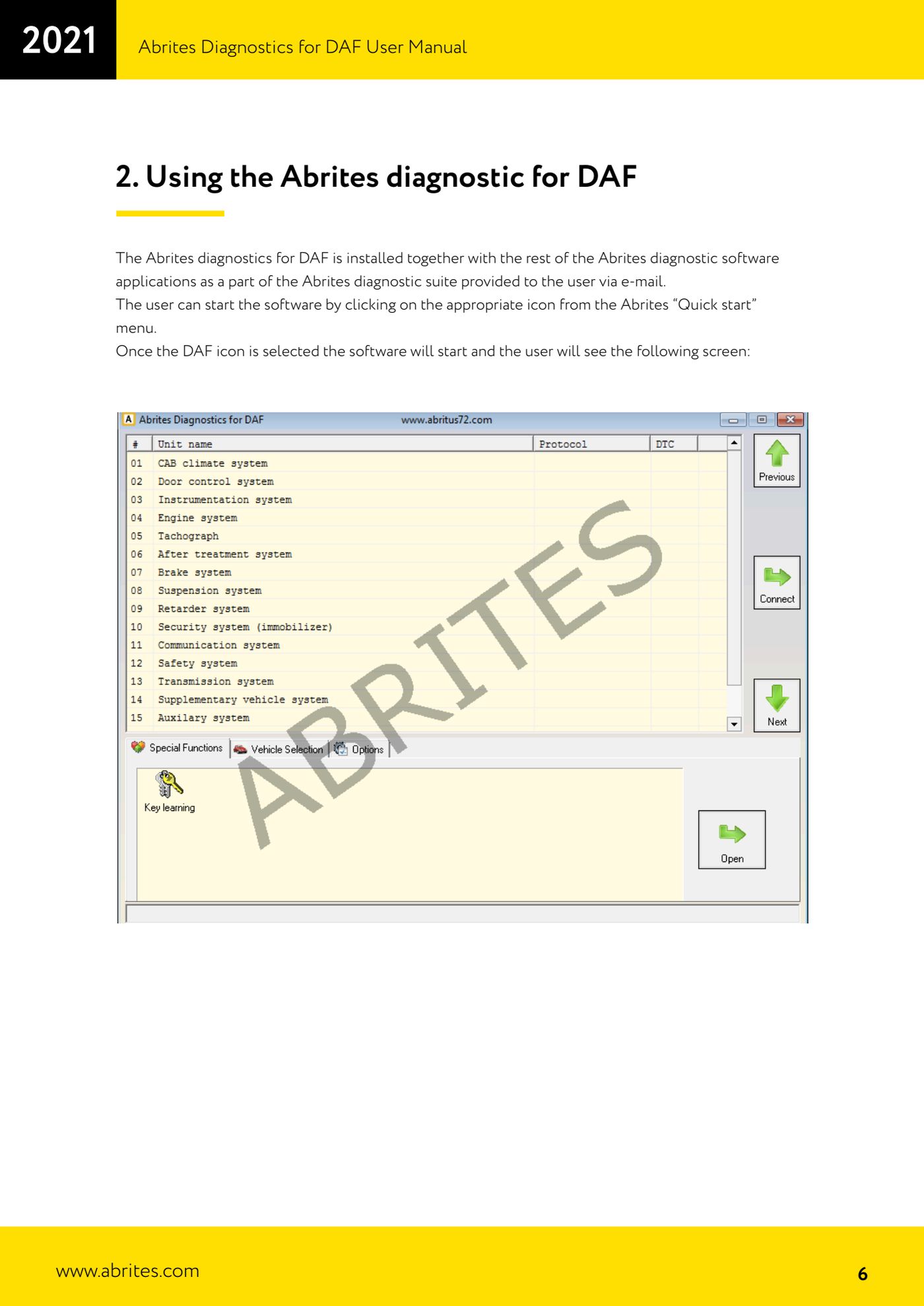
- On the PC open the Abrites "Quick start" menu and click the DAF icon: the software launches and shows the application's home screen.
- From this screen you reach the diagnostic functions available for DAF Motors group vehicles: diagnostic scan, key programming, module replacement, ECU programming, configuration and coding.
- If you run into technical difficulties while using it, contact Abrites support at support@abrites.com.
Reference screenshots
Source: Manuale DAF, cap. 1-2 (p.3, 5-7) · ⏱ estimated time 10 min
← All Abrites guides Hardware catalogue
More guides Camion / Bus
- DAF key programming over OBDII (2002-2008 models, no PIN required)
- Getting to the connection points behind the glovebox on Mercedes Actros (and 963 MP4 trucks)
- Connecting to the internal CAN for ECU and TCU work on Mercedes Actros with the ZN051 Distribution Box
- All Keys Lost connections on Mercedes Actros: fuse relay on fuse 17 or CB022 jumper cable
- Connecting to the fuse box on the Setra S515HD bus with the CB025 cable (fuse F61)
- Reading FBS information from the EIS/EZS, ECU and TCU on Mercedes Trucks (Info screens)
- Key programming on Mercedes Trucks FBS3 (Actros, Axor, Arocs, Setra) with TA69 and ZN003 PROTAG
- DAS module replacement on Mercedes Trucks: the VIRGIN - PERSONALIZE - ACTIVATE sequence (EIS/EZS, ECU, TCU)
- Reading and writing the coding and changing the VIN on Mercedes Trucks DAS modules