
Chip-Tools
Resetting and setting the Service Reminder (service light) on Mitsubishi
Mitsubishi
Interface Classic
Service
Basic
⏱ 10 min
7 steps
The "Other Functions" menu of the connected control unit gives access to the extra functions the module offers, among them the "Service Reminder" settings, i.e. the vehicle's maintenance reminder. Use it after a service to reset or reprogram the warning.
Required licences
- —
Hardware / cables
 AVDI
AVDI- cavo OBDII
Procedure
- Connect the AVDI to the OBDII socket and turn the ignition ON.
- Start "ABRITES diagnostics for MITSUBISHI" and connect to the control unit that handles the service reminder (double-click the module in the list or the "Connect" button).
- With the module connected press "Other Functions": the options available for that specific module appear, and they vary from model to model.
- Select "Service Reminder" from the list of available functions.
- Set the reminder values the screen asks for and confirm with the write button offered by the software.
- Cycle the ignition off and on, then check on the dashboard that the service warning has actually been updated or reset.
- Close the session by reading the faults with "Read DTCs" and clearing any codes that appeared during the job.
Reference screenshots
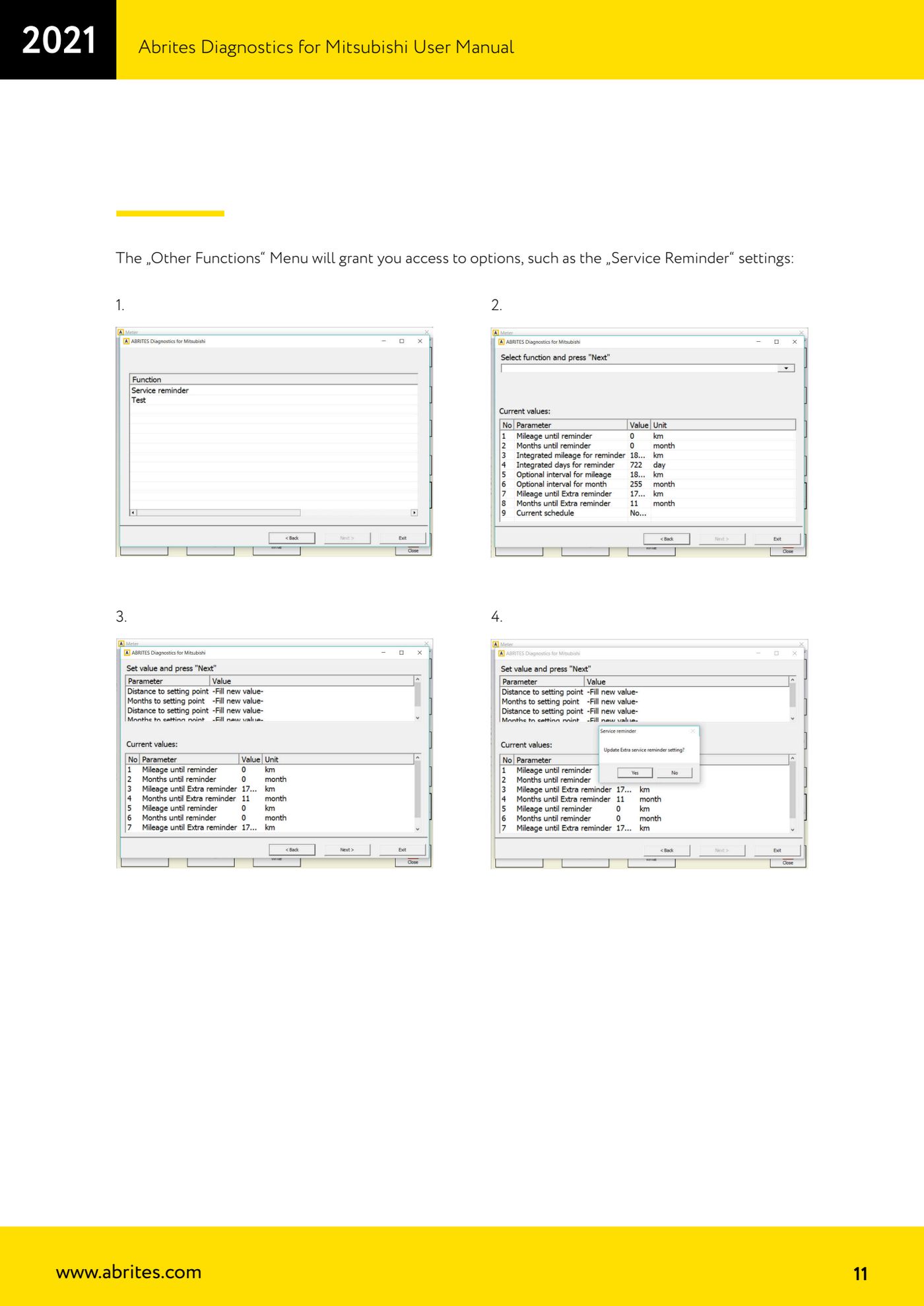
Source: Manuale Mitsubishi, cap. 2.1 - Other Functions / Service Reminder (p.11) · ⏱ estimated time 10 min
← All Abrites guides Hardware catalogue
More guides Mitsubishi
- Standard Mitsubishi diagnostics with the AVDI: control unit scan, DTCs, actual values and actuator tests
- Mitsubishi Coding: reading, saving and writing the coding and the chassis number (VIN)
- Mitsubishi key programming over CAN with the PIN code (Key Programming)
- Mitsubishi Simplified Key Registration: keys with no working key and no PIN (PROTAG/TagProg)
- Mitsubishi Smart Key (Fast System): key programming and KOS remote synchronization
- Mitsubishi Dump Tool: mileage calculation and PIN reading from an EEPROM dump ("Swap bytes" function)
- Mitsubishi SW Update: checking and updating module software from the Abrites servers