
Chip-Tools
Standard Mitsubishi diagnostics with the AVDI: control unit scan, DTCs, actual values and actuator tests
Mitsubishi
Interface Classic
Diagnostics
Basic
⏱ 15-30 min
10 steps
The "ABRITES diagnostics for MITSUBISHI" software covers full diagnostics of Mitsubishi group vehicles on CAN and K-Line through the OBDII socket, including many control units the manufacturer's testers cannot see. Use it to list the modules fitted to the car, read and clear fault codes, watch live parameters and drive the actuators.
Required licences
- —
Hardware / cables
 AVDI
AVDI- cavo OBDII
Procedure
- Connect the AVDI to the vehicle OBDII socket and turn the ignition ON. Mitsubishi diagnostics works exclusively through the OBDII connector, with K-Line and CAN-BUS interfaces.
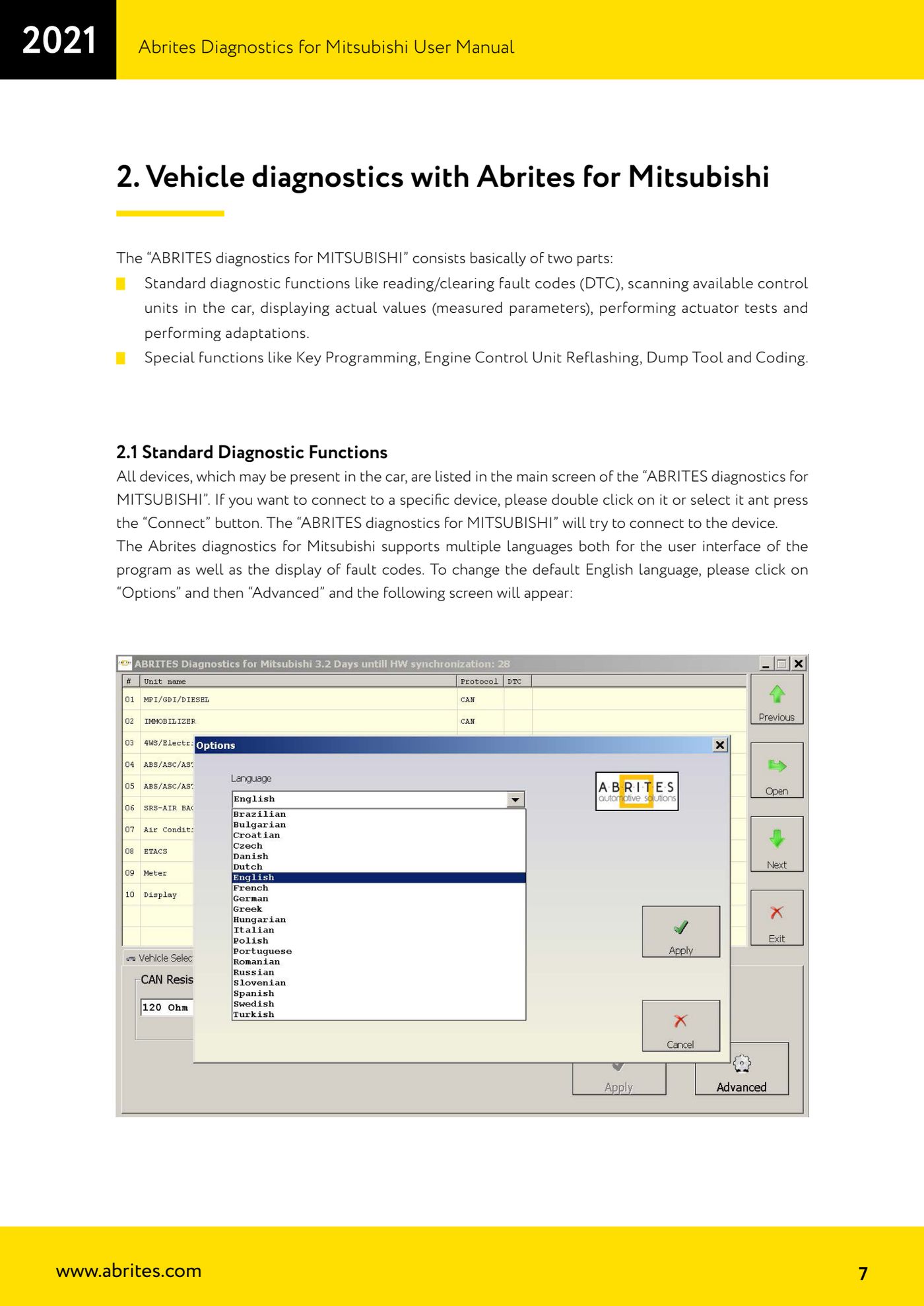
- Start "ABRITES diagnostics for MITSUBISHI": the main screen lists all the devices that may be fitted to the car.
- If you want to work in another language, first go into "Options" then "Advanced": from there you change the interface language and also the language the fault codes are displayed in (the program ships in English).
- To connect to a control unit, double-click the entry in the list or select it and press the "Connect" button. The software attempts communication with that module.
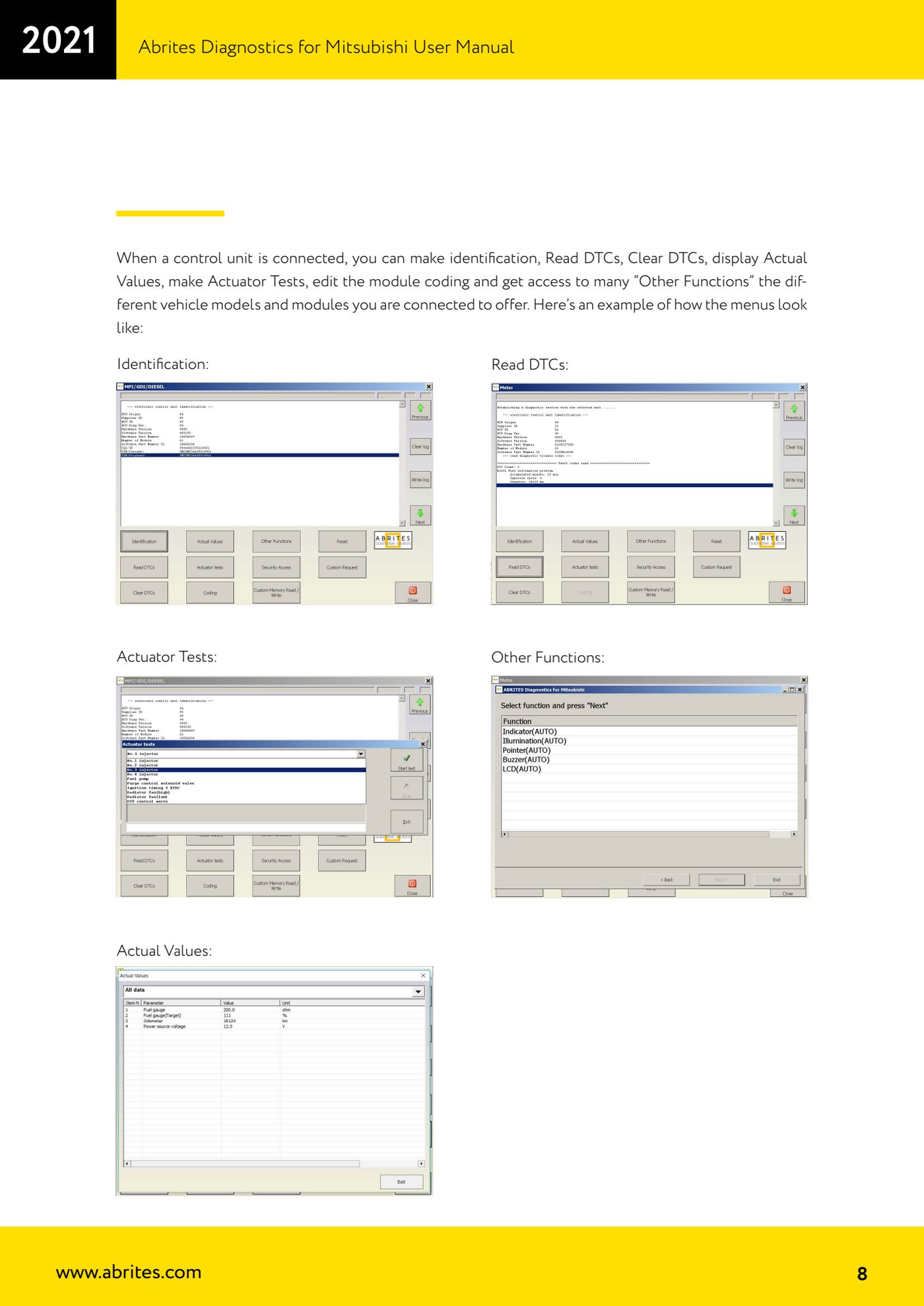
- With the control unit connected, open "Identification" to read the module ID data (useful to confirm you are on the right control unit before any work).
- Press "Read DTCs" to read the stored fault codes. Once the fault is fixed, use "Clear DTCs" to erase them and read back to confirm they do not return.
- Open "Actual Values" to see the connected control unit's live measured parameters: it is the quickest way to compare sensor readings against what the vehicle is actually doing.
- Use "Actuator Tests" to drive the module's actuators and physically confirm they work (always chock the vehicle wheels before running tests).
- The "Other Functions" button opens the extra functions, which vary from model to model and module to module: this is where you find the "Service Reminder" settings, for example.
- For jobs outside standard diagnostics (key programming, engine ECU reflash, Dump Tool, Coding) exit and move to the "Special Functions" tab.
Reference screenshots
Source: Manuale Mitsubishi, cap. 1 e 2.1 (p.6-8) · ⏱ estimated time 15-30 min
← All Abrites guides Hardware catalogue
More guides Mitsubishi
- Mitsubishi Coding: reading, saving and writing the coding and the chassis number (VIN)
- Resetting and setting the Service Reminder (service light) on Mitsubishi
- Mitsubishi key programming over CAN with the PIN code (Key Programming)
- Mitsubishi Simplified Key Registration: keys with no working key and no PIN (PROTAG/TagProg)
- Mitsubishi Smart Key (Fast System): key programming and KOS remote synchronization
- Mitsubishi Dump Tool: mileage calculation and PIN reading from an EEPROM dump ("Swap bytes" function)
- Mitsubishi SW Update: checking and updating module software from the Abrites servers